Context Engineering: How AI Coding Agents Find Their Way Through a Large Codebase
It found the right file. Why was the change still wrong?
Suppose you ask an AI Coding agent:
Let each merchant configure how long a customer can cancel an order. Keep 15 minutes as the default.
The agent searches for CANCEL_WINDOW_MINUTES, finds the constant in the order service, replaces it with a setting, adds a unit test, and says the task is done.
The patch looks clean. Then the problems arrive:
- the web app still hides the cancel button after 15 minutes;
- the public API still describes a fixed deadline;
- a background worker also contains
15, but it controls a different timeout and should not change; - the project architecture requires settings to go through
PolicyService; - the unit test passes, but the real user flow still fails.
The agent found a correct file, but it did not find the complete behavior.
This is the moment when many people reach for one of three solutions:
- select more files;
- switch to a model with a larger context window;
- install a codebase index, vector database, or RepoWiki.
Any of them may help. None of them automatically solves the problem.

To use these tools well, we first need a simple picture of how an agent “understands” a repository. It does not memorize the whole project. It repeatedly looks for clues, reads a small working set, acts, and learns from the result.
That repeated choice of what the agent should see next is context engineering.
1. An agent does not read a repository from page one
A developer joining a project rarely reads every file in alphabetical order. They start with the task, ask a few questions, follow a call path, and run the code.
An AI Coding agent works in a similar way, only faster and more mechanically:
understand the request
  → inspect project rules and structure
  → search for likely code
  → open a few files
  → follow callers and consumers
  → make a change
  → run tests and inspect the diff
  → search again if the evidence disagrees
At no point does the model need every repository file in the active prompt. It needs enough evidence for the next decision.
For our cancellation task, the useful questions are not “What files contain the word cancel?” alone. They are:
- Who owns the cancellation decision?
- Where does the default value come from?
- Who consumes the deadline?
- Which similar-looking timeout is actually unrelated?
- What test proves the user can cancel at minute 20?
The quality of these questions matters as much as the search technology.
2. Five ways an agent can look for code
Imagine a large repository as a library. The agent has five ways to find what it needs.
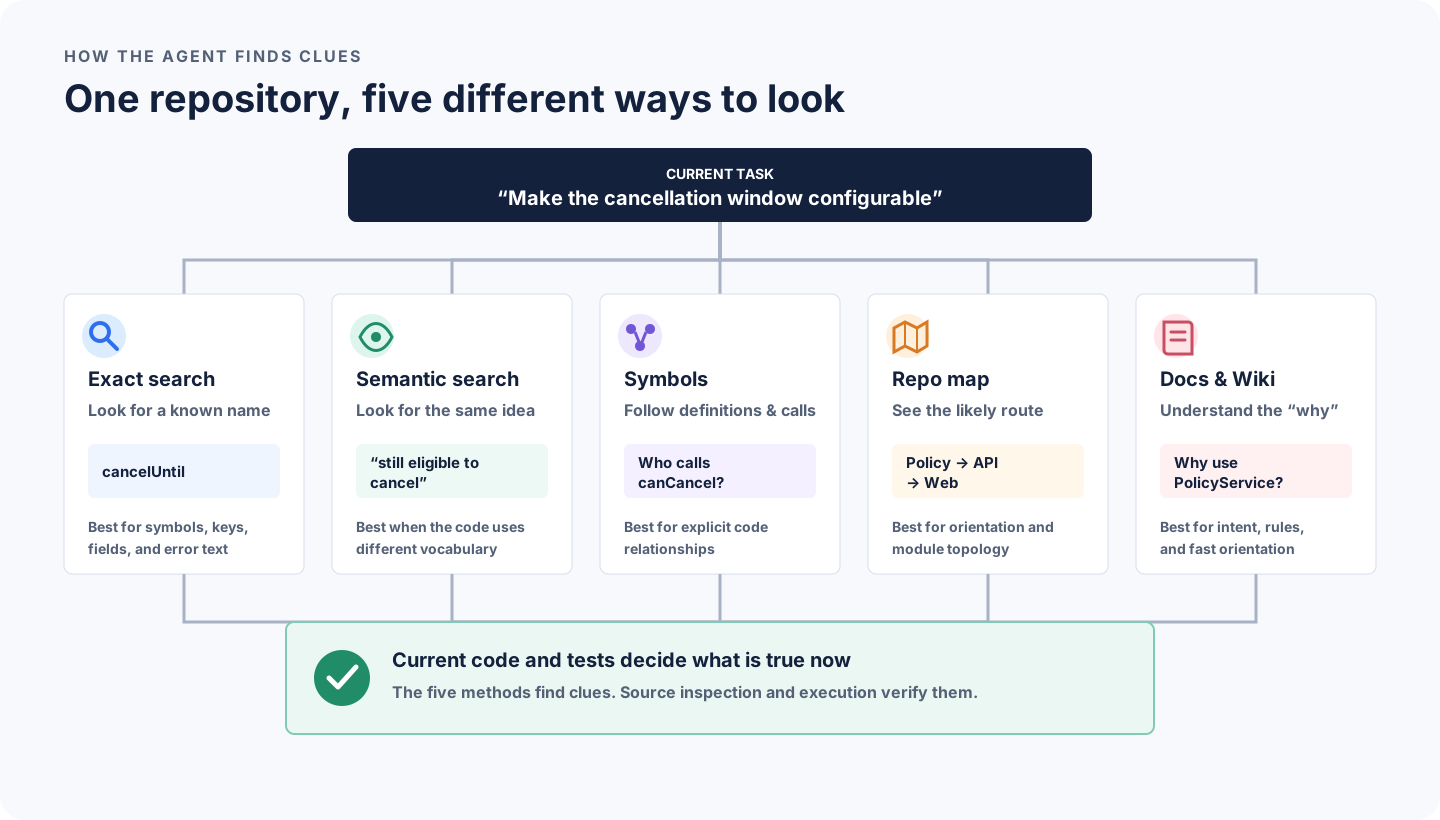
2.1 Walk the shelves: file tree and exact search
The simplest tools are often the best first move:
rg -n "CANCEL_WINDOW_MINUTES|cancelUntil|canCancel" .This is like looking up an exact book title. It is fast, easy to verify, and works on the files that exist on the current branch.
Exact search is especially good for:
- function and class names;
- configuration keys;
- API fields;
- error messages;
- database columns;
- copied constants.
Its weakness is vocabulary. If the code calls the concept revocationDeadline while the requirement says “cancel window,” exact search may miss it.
2.2 Ask by meaning: semantic search and embeddings
Semantic search tries to match ideas, not only identical words. You can ask “Where do we decide whether an order is still cancellable?” and retrieve code that talks about a deadline, eligibility, or policy.
The common mechanism is an embedding: code and the query are converted into numerical representations, and nearby representations are treated as semantically similar. A vector store makes it efficient to retrieve nearby chunks.
You do not need the mathematics to use it well. Remember one sentence:
Vector search is good at finding plausible neighborhoods; it is not good at proving who owns the behavior.
Semantic similarity can bring back a refund timeout, a subscription grace period, or a worker retry window. The agent still has to open the source and check the responsibility.
2.3 Follow the address book: symbols and references
Once the agent finds canCancel, the next question is usually not “What else sounds similar?” It is “Who calls this function, and which interface does it implement?”
That is the job of symbol navigation from an LSP or a precise code index. Sourcegraph, for example, documents SCIP-based precise code navigation for definitions and references.
Symbol navigation is stronger than text search for explicit code relationships. It can still miss framework wiring, reflection, generated code, event consumers, or shell scripts. Think of it as an accurate address book, not a complete city map.
2.4 Look at the city map: Repo Map and code graph
A Repo Map compresses important files, symbols, and relationships so the model can orient itself before opening everything. Aider’s repository map, for example, ranks important symbols and fits them into a token budget.
Code graphs go further by storing relationships such as imports, calls, inheritance, or module dependencies.
These maps answer:
“Which route is worth following?”
They do not answer:
“Is this route the intended architecture?”
A call edge can show that the web app reaches an API. It cannot tell you whether the web app should be making the business decision itself.
2.5 Read the tour guide: docs, memory, and RepoWiki
Architecture docs, ADRs, AGENTS.md, generated Wikis, and agent memory explain the repository in human language.
They are wonderful for orientation. A RepoWiki may tell a newcomer, “Order eligibility lives in the order domain and policy values come from the policy service.” That can save many searches.
But a tour guide can be out of date. Qoder’s Repo Wiki description explains how repository analysis can generate structured project knowledge and update it as code changes. Even with an update mechanism, a generated sentence is still derived from source. Before changing code, verify any named file, symbol, or call path on the current branch.
3. So what exactly is a Codebase Index?
“Codebase Index” sounds like one large piece of technology. In practice, it is usually a convenient name for one or more searchable catalogs:
exact-word catalog       → identifiers, paths, strings
meaning catalog          → embeddings for code and docs
symbol catalog           → definitions and references
relationship catalog     → imports, calls, modules
metadata                 → language, package, branch, revision
Some products combine several of these. Some agents rely more heavily on live search and language tools. The presence of a “Search codebase” button does not prove that the product uses a particular vector database.
When a semantic index is built, the rough process is easy to understand:
source files
  → ignore secrets, generated files, and excluded paths
  → split code into functions, classes, or useful sections
  → attach path, symbol, language, and revision
  → calculate embeddings
  → store them for retrieval
When you ask a question, the system retrieves several likely chunks, may combine them with exact matches, reranks them, and sends only the selected pieces to the model.
That last sentence is important: the index is outside the model’s active context. It helps choose what enters the context. The vector store is the warehouse catalog; the model still works with the few boxes brought to its desk.
Cursor’s security documentation is a useful concrete example because it describes an indexing boundary involving code chunks, embeddings, and obfuscated file-path metadata. Other tools may make different local-versus-hosted choices. Always check the actual product’s documentation before indexing a sensitive repository.
4. Mainstream agents mix these methods differently
There is no single “mainstream agent architecture.” The visible behavior usually falls into a few families.
Terminal-first agents such as Codex and Claude Code can inspect the live file tree, search with command-line tools, read files, inspect Git, and run tests. They can work without requiring you to build a project-specific vector database first. Durable files such as AGENTS.md or CLAUDE.md give them project guidance.
Editor-first products such as Cursor can combine the open files and cursor position with codebase retrieval and project rules. The editor already knows useful facts such as the active symbol, diagnostics, and recently viewed files.
Code-intelligence platforms such as Sourcegraph emphasize indexed search, symbols, and cross-repository navigation. They are valuable when “find all references” spans repositories or when the codebase is too large for ad hoc exploration alone.
Map and Wiki tools such as Aider Repo Map or RepoWiki products compress the repository before the model reads individual files. One emphasizes structural orientation; the other emphasizes human-readable explanation.
Most capable workflows combine them:
project rules tell the agent how to work
exact search finds known names
semantic search finds unfamiliar vocabulary
symbols and maps reveal relationships
docs explain intent
tests reveal what is actually true
The useful question is therefore not “Which tool understands the entire repository?” It is:
Which uncertainty do I need to reduce next?
5. Why a larger context window can still produce worse work
A larger desk is useful. Dumping the warehouse onto it is not.
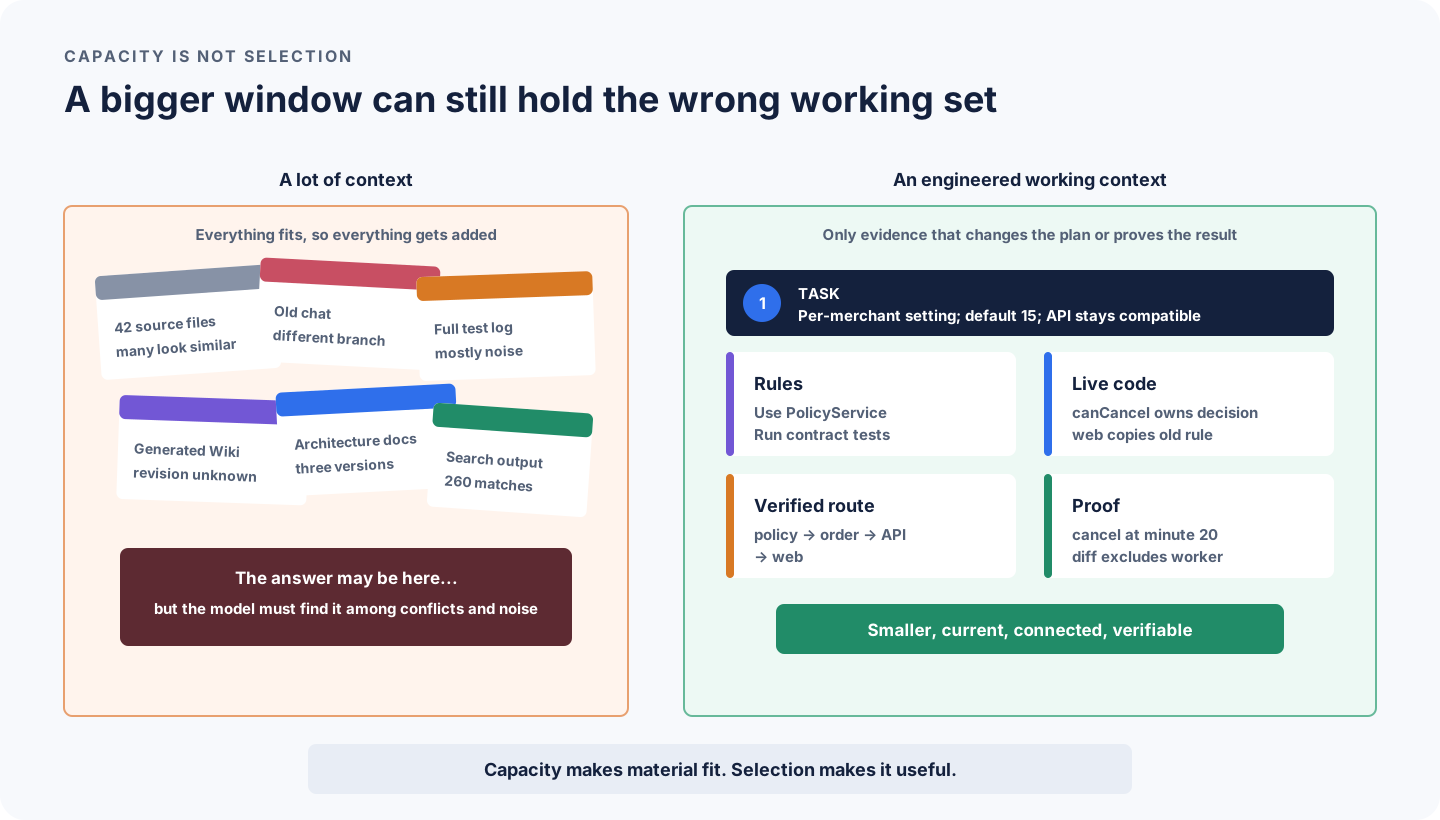
Suppose you attach 80 files, three architecture documents, a month of chat history, and a full test log. The correct answer may be present, but the model must now solve several extra problems:
- Which document describes the current branch?
- Which of four similar services owns the rule?
- Is the long log still relevant after the latest edit?
- Does an old conversation conflict with the source?
- Which acceptance condition matters most?
Research on how models use long context has shown that relevant information can be used less reliably when it is buried inside long inputs. Results vary by model and task, but the engineering lesson is durable: capacity and selection are different problems.
There is another problem in agent sessions: every tool call adds search output, file contents, test logs, and intermediate reasoning. Over time, the session can become a crowded workbench. Anthropic’s context engineering guidance recommends treating context as a limited resource that is continuously curated.
Good context is not simply “less.” It is:
- relevant to the current decision;
- fresh enough for the current branch;
- trustworthy enough for the claim being made;
- connected to a way of verifying the result.
6. Follow one task through the repository
Let us return to the cancellation window.
Before asking the agent to search, rewrite the request as a small task contract:
Behavior
- A merchant may configure the cancellation window in minutes.

Compatibility
- Unconfigured merchants keep the 15-minute default.
- Existing API clients remain compatible.

Out of scope
- Payment capture timing.
- Expiry of abandoned cancellation requests.

Proof
- Default and custom-value unit tests.
- API contract test.
- End-to-end: a merchant configured for 30 minutes can cancel at minute 20.
Now the agent has a reason for each search.
First, find the obvious name
rg -n "CANCEL_WINDOW_MINUTES|cancelUntil|canCancel" \
  services packages apps tests docs
This finds the current constant, public field, and obvious consumers.
Next, search for the responsibility
rg -n "CancellationPolicy|PolicyService|eligib|deadline" \
  services packages apps tests docs
If semantic search is available, ask “Where does the system decide whether an order is still cancellable?” This may uncover different vocabulary.
Then, expand one step around strong candidates
For canCancel, inspect:
- callers;
- the public response that exposes the result;
- UI code that consumes the deadline;
- policy and configuration readers;
- tests that observe the behavior;
- recent commits that moved the responsibility.
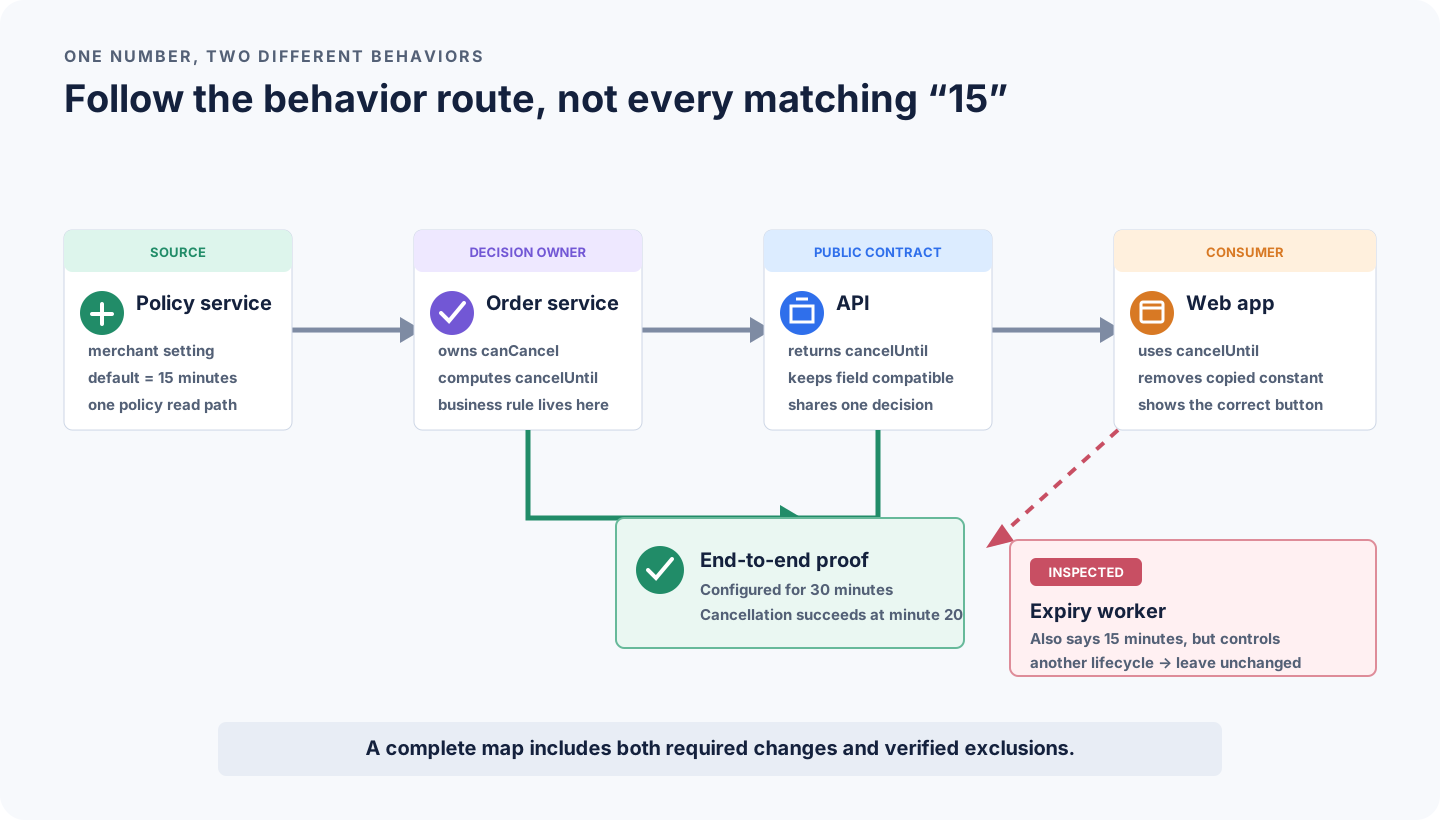
This one-step expansion is where the agent learns two crucial facts:
- the web app copied the 15-minute rule and must stop owning the decision;
- the worker’s 15-minute timeout is a different behavior and must be left alone.
Finding the correct exclusion is part of understanding the repository. A tool that returns more matches is not automatically more helpful.
7. Turn exploration into a small context packet
After the search, do not keep every opened file in the foreground. Ask the agent to summarize what it verified:
# Context packet: configurable cancellation window

## What must change
- Per-merchant minutes; default remains 15.
- Existing API clients remain compatible.

## What is true on this branch
- PolicyService already provides merchant policy values.
- Order service owns canCancel and calculates cancelUntil.
- Web app repeats the 15-minute comparison.
- Expiry worker uses 15 minutes for a different lifecycle.

## Planned edits
- Add cancellationWindowMinutes to the policy read model.
- Keep the order service as the only decision owner.
- Make the web app consume cancelUntil.

## Proof
- Unit: default 15 and configured 30.
- Contract: existing response remains valid.
- End-to-end: cancel at minute 20.
- Diff: no payment or expiry-worker change.

## Still unknown
- Whether the product defines a maximum value.
This packet is not extra ceremony for every tiny edit. Use it when a change crosses modules, public contracts, data models, permissions, or business rules.
It has one major benefit: facts, plans, and unknowns no longer blur together.
8. A four-step workflow you can use tomorrow
The full practice can be remembered as Frame → Map → Pack → Prove.
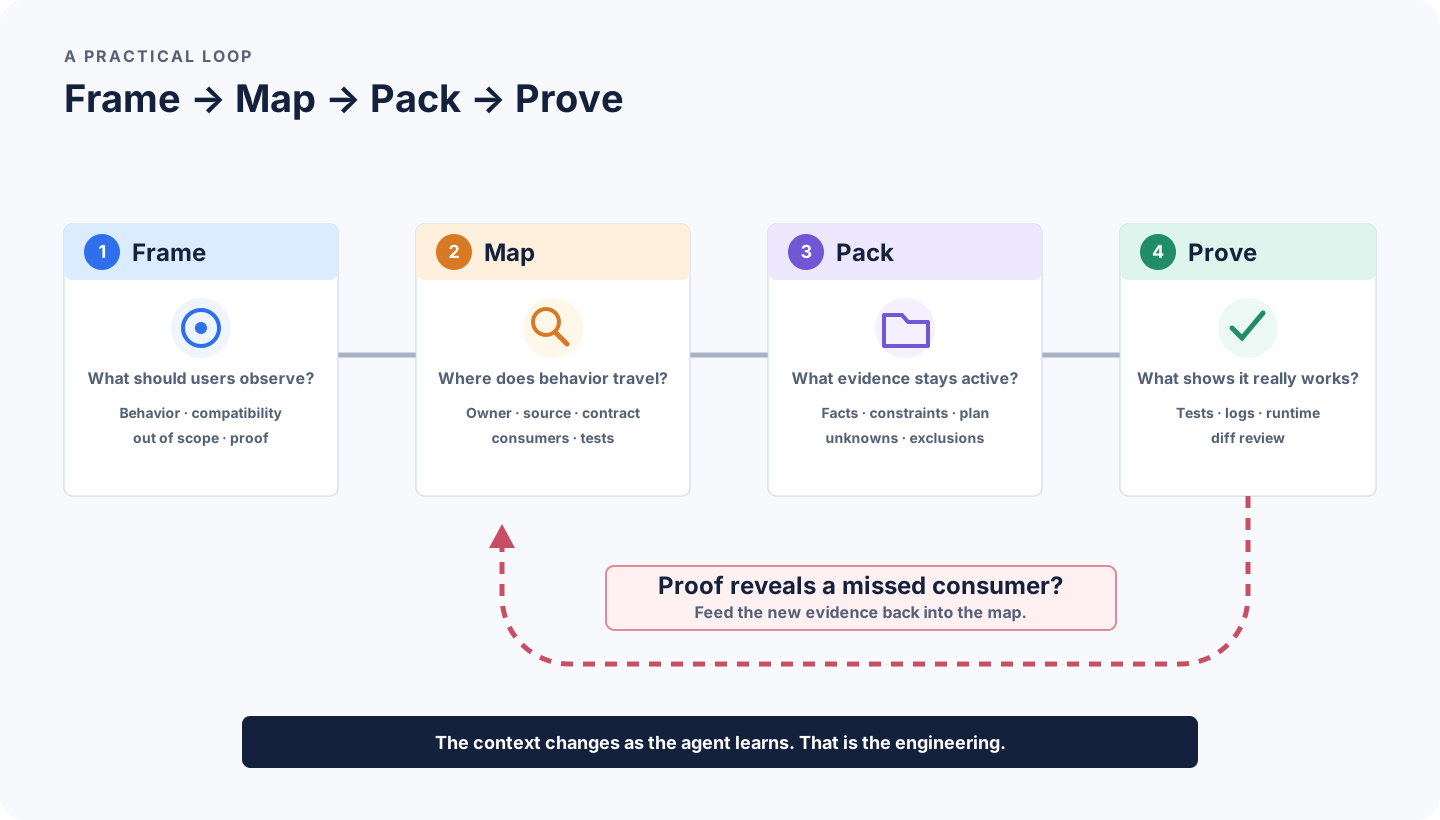
Step 1: Frame the behavior
Tell the agent what users should observe, what must remain compatible, what is out of scope, and what would prove success.
Weak:
Make cancellation configurable.Stronger:
Make the cancellation window configurable per merchant. Keep 15 minutes as the
default. Preserve the existing API shape. Do not change payment or abandoned-
request expiry. Prove the 30-minute case at minute 20.
Step 2: Map before editing
For a risky or unfamiliar area, say explicitly:
Do not edit yet. Find the decision owner, configuration source, public contract,
consumers, and tests. For each candidate file, explain why it matters. Mark
similar-looking paths that you inspected and excluded.
This prevents the first plausible search result from becoming the entire plan.
Step 3: Pack the verified evidence
Ask for a short summary of current facts, constraints, planned edits, proof, and unknowns. The packet should be smaller than the material used to build it.
If the summary says “probably” five times, exploration is not finished. If it contains 40 files, compression is not finished.
Step 4: Prove and refresh
Let execution update the map:
- a compiler error reveals another consumer;
- a contract test reveals a compatibility boundary;
- a runtime log reveals a cache or another process;
- the diff reveals an accidental unrelated change.
Do not treat these as obstacles to patch around. They are new repository evidence. Update the plan, then continue.
9. Match the technique to the symptom
You do not need every context tool on every task. Start from the failure you can see.
“The agent only changed the most obvious file”
Ask it to identify the owner, callers, consumers, public contract, configuration source, and tests before editing. Use symbol references or a one-hop expansion.
“The agent reads too many files and never settles on a plan”
Give it a task contract and a search budget. Ask for candidate files with reasons, then approve or let it continue only along the strongest routes.
“Semantic search keeps returning similar but wrong code”
Anchor the search with an exact symbol, package, API field, or domain boundary. Semantic retrieval improves recall; exact constraints improve precision.
“The RepoWiki sounds confident, but paths do not exist”
Check its source revision. Regenerate it or treat it only as a list of search leads. Current code and tests win on repository state.
“The session was good at first and became confused later”
Start a fresh task for a new outcome, or compact the session around the current packet. Keep old logs and abandoned plans out of the active working set.
“Every task must rediscover the same commands and conventions”
Put stable, repository-wide guidance in AGENTS.md or the product’s equivalent. The AGENTS.md specification supports nested guidance so a subproject can carry its own commands and boundaries. Keep one-off acceptance criteria in the task prompt, not in permanent rules.
10. When a local knowledge base is worth building
A local index, Repo Map, or Wiki is worth the maintenance when one or more of these are true:
- newcomers repeatedly spend hours finding the same subsystem boundaries;
- the monorepo spans many packages or languages;
- symbol navigation alone cannot explain architecture and business intent;
- the same cross-cutting tasks repeat across the team;
- repository data must remain inside a controlled environment.
Do not build one simply because “RAG sounds advanced.” For a small repository with clear naming, rg, LSP navigation, good tests, and a concise AGENTS.md may already be the better system.
Whatever you build, separate three layers:
source of truth   code, schemas, tests, accepted specs, ADRs
navigation        rules, search recipes, repo maps
cache             embeddings, generated Wiki, graph snapshots, memory
The cache may be fast and helpful. It should be rebuildable. If an architectural decision exists only in a generated Wiki, move that decision into a reviewed source-of-truth document.
Also check the security boundary:
- Which paths are excluded?
- Does source code leave the machine?
- Where are chunks, embeddings, and file metadata stored?
- Who can query the shared index?
- How are deleted or newly restricted files removed?
Context quality includes not retrieving material the agent should never see.
11. How do you know the context improved?
Do not judge by how polished the generated Wiki looks. Run several real cross-file tasks and observe:
- Did the first plan find the correct decision owner?
- Did review discover fewer missed consumers?
- Did the agent inspect fewer unrelated files?
- Did every acceptance condition receive a matching test?
- Did stale summaries mislead the implementation?
- Did the task finish with fewer “try another patch” loops?
For our cancellation case, the improved workflow succeeds only if it finds the policy source, order decision, API contract, web consumer, and end-to-end test and correctly excludes the worker timeout.
That is a better measure than “the prompt used 30% fewer tokens.” The goal is not minimum context. The goal is minimum context without missing the behavior.
A prompt you can reuse
Before editing, build a map for this task.

1. Restate the observable behavior, compatibility requirements, and exclusions.
2. Read the applicable repository instructions.
3. Find the decision owner, data/config source, public contract, consumers, and tests.
4. Use exact search for known names and semantic search for unfamiliar vocabulary.
5. Follow strong candidates one hop through definitions and references.
6. Separate verified facts, inferences, and open questions.
7. Return a compact context packet with the proposed edit set and proof.

Then implement. Treat compiler errors, failing tests, logs, and the diff as new
evidence. If they change the map, update the plan before making another patch.
Conclusion: do not give the agent the whole warehouse
A codebase index, vector store, symbol graph, Repo Map, and RepoWiki are not competing answers to the same problem. They are different ways to help an agent find the next useful clue.
The model still needs someone to decide:
- what behavior matters;
- which evidence is current;
- which relationship must be followed;
- which tempting path should be excluded;
- what result would prove the work complete.
That “someone” is partly the agent, partly its tools, and partly the context you design.
A large window gives the agent more desk space. Context engineering puts the right evidence on the desk.