Multica in Practice: Turning Multi-Agent AI Coding into a Managed Team Workflow
The wall you hit after the patterns start working
In the multi-Agent workflow article, you learned when to split a task, how to write handoffs, and why one file should have one editing owner. Suppose you now practice all of that — and a new kind of friction appears, one that has nothing to do with task decomposition.
Your reviewer agent lives in a terminal tab that forgets everything when the session ends. Your teammate asks “can I use your API-builder setup?” and the honest answer is a Slack message full of prompts to paste. The skills you carefully packaged sit in ~/.claude/skills/ on one laptop. When your manager asks what the agents actually did last week, the evidence is scattered across five terminal histories, three branches, and nobody’s memory. And every parallel run still starts with you re-explaining the same project context.
The bottleneck has moved. It is no longer how agents divide a task — it is how a team operates agents day after day: who can run which agent, where the runs happen, what they cost, what they produced, and how the good configurations get reused instead of re-typed.
Multica is an open-source, self-hostable workspace built for exactly this gap: you assign work to AI coding agents the way you would assign it to a teammate — they pick up the issue, report progress, raise blockers, and hand the result back for review. This article explains its operating model, shows how to migrate an existing AGENTS.md + rules/skills workflow onto it without breaking anything, and gives you a set of practices for single-project multi-agent work and team-level adoption — including when modifying Multica itself is justified and when it is not.
What Multica is — and what it deliberately is not
The first thing to understand is what Multica does not do: it does not ship a model, and it does not replace your AI coding tool. According to the project README, Multica drives the agent CLIs you already have installed and authenticated — Claude Code, Codex, Cursor, Copilot, Qoder, Kimi, and more, 23 CLIs at the time of writing — so switching providers is a dropdown, not a migration.
What it adds is a coordination layer with a clean boundary:
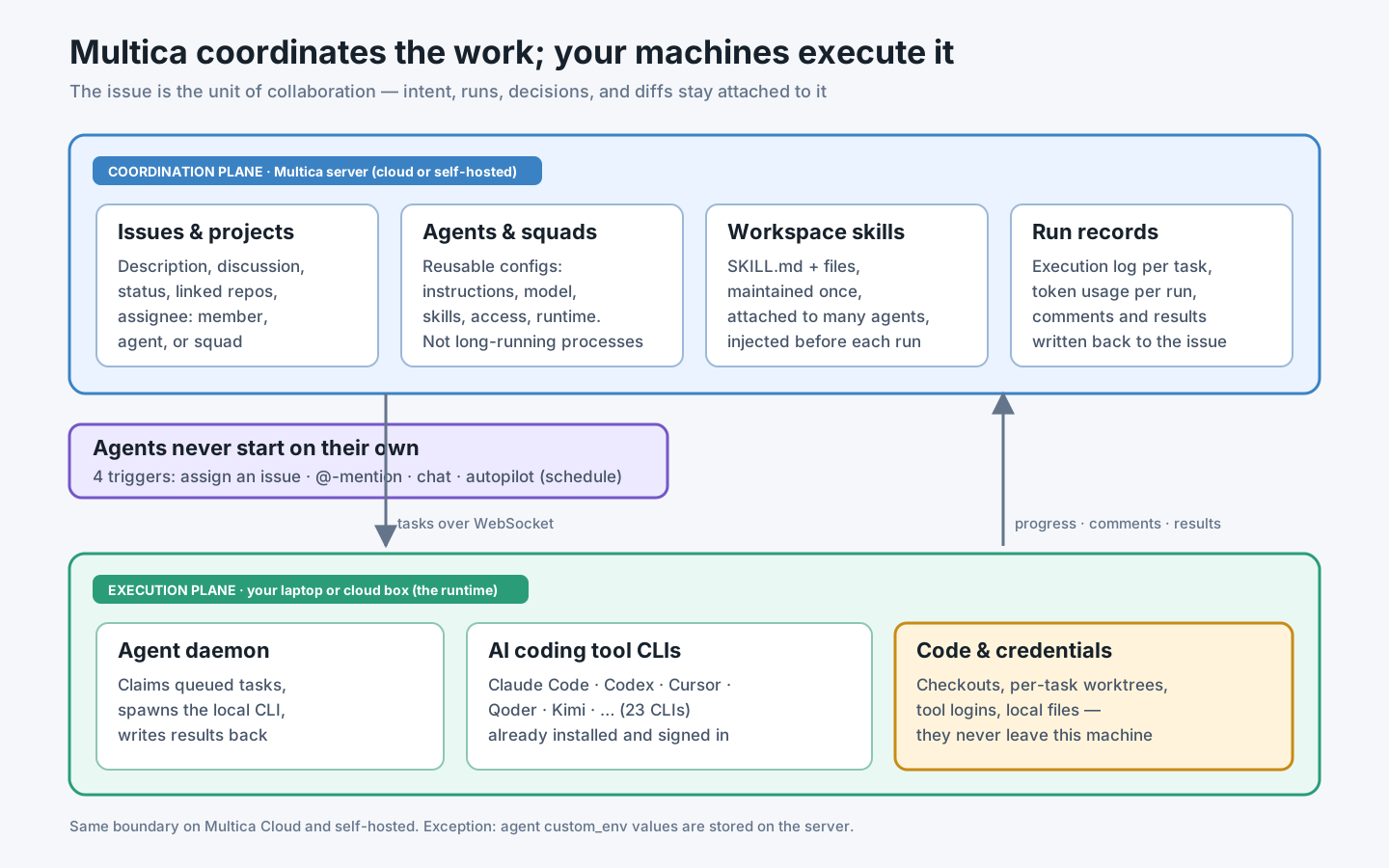
The official architecture description draws the line precisely. The server — Multica Cloud or your own deployment — stores workspaces, issues, comments, statuses, agent configurations, skills, and run records. The connected computer keeps the AI coding tools and their credentials, the code directories, and the actual file changes. When you assign an issue to an agent, the server creates a task; a daemon on one of your machines claims it, spawns the local CLI next to the code, and streams progress and results back to the issue. Code and tool credentials never leave the machine — with one documented exception: values you save into an agent’s custom_env are stored on the server, which is why the docs tell you not to put must-never-leave secrets there.
Four objects carry most of the model, as defined in the core concepts page:
- An issue is the unit of collaboration: description, discussion, status, and history. The assignee can be a human, an agent, or a squad.
- An agent is a reusable configuration — name, instructions, model, skills, access, runtime — not a long-running process. It executes only when triggered.
- A runtime is a computer you connected: the agent is the identity, the runtime is the desk it works at.
- A task is one concrete run. One issue can accumulate many tasks; a finished run does not mean a finished issue.
Two properties of this model matter more than any feature list. First, agents never start work on their own — every run is triggered by assigning an issue, an @-mention, a chat message, or a scheduled Autopilot. Second, everything an agent does lands on the issue: the delegation decision, each tool call in the execution log, the token cost per run, and the resulting branch. That is what makes multi-agent work reviewable by someone who was not watching the terminal.
If you have read our multi-Agent workflow article, you will recognize the philosophy: orchestrator, bounded workers, durable handoffs, verification gate. Multica is essentially that delivery system turned into a product, with the issue as the durable handoff.
Three pairs of concepts you must not confuse
Migration goes wrong when people map old concepts onto new ones carelessly. Three distinctions do most of the work.
Agent instructions vs. AGENTS.md. Instructions belong to one agent and are provided on every run: what it is responsible for, what it may modify, how it delivers, when it must stop and ask. AGENTS.md and rules files describe the project: build commands, conventions, boundaries — the single source of truth you built in the Rules and AGENTS.md article. Multica does not absorb your repo docs; because it drives the same CLIs, those tools keep reading AGENTS.md, CLAUDE.md, and rules directories from the checkout exactly as before. Role identity goes to the platform; project facts stay in Git.
Workspace skills vs. repository skills. A Multica workspace skill is a SKILL.md plus supporting files stored on the server, attached to any number of agents, and maintained in one place. Before each run, Multica injects the agent’s bound skills into the path the current tool discovers natively — .claude/skills/ for Claude Code, a per-task $CODEX_HOME/skills/ for Codex, .qoder/skills/ for Qoder CLI, and so on, per the tools comparison table. Skills that already live in your repository are never overwritten; on a name collision the injected copy gets a different directory name, and after the run Multica removes only the files it created. So repo-managed skills and workspace skills coexist — the former versioned with the code, the latter shared across agents and tools.
Squad vs. subagent. A subagent is an implementation detail inside one tool’s session. A squad is a routing structure in the workspace: one leader agent plus members (agents or humans). Assigning an issue to a squad wakes only the leader, which reads the context, posts one delegation comment @-mentioning the chosen members, records its reasoning on the issue timeline, and stops. The leader never implements. Squads answer “who should take this work” — they do not merge agents into a super-agent and do not increase concurrency by themselves.
Migrating an AGENTS.md + rules/skills workflow
The good news, and the single most important migration fact: nothing in your repository has to change. Migration is a re-homing of the assets that were never comfortable in Git or in personal dotfiles.
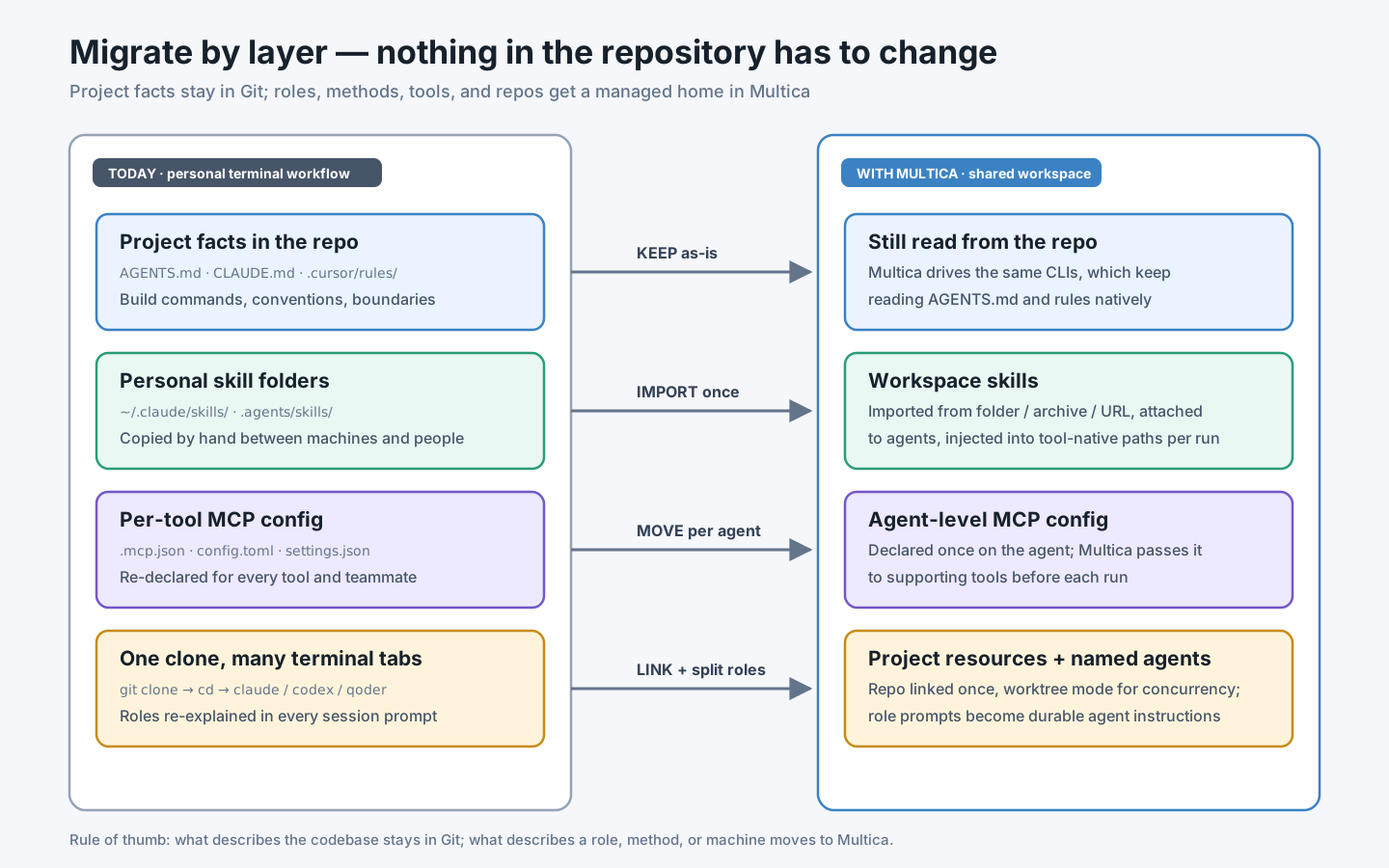
Work through it layer by layer:
Step 1 — inventory what you have. Most mature setups contain four kinds of assets: project docs in the repo (AGENTS.md, rules), skill folders (personal or repo-level), MCP server configurations scattered across per-tool files, and the informal layer — the role prompts you paste at the start of every session (“you are the reviewer; never edit code directly”).
Step 2 — leave project facts in the repository. Verify, don’t just trust: run one Multica task against the repo and check in the execution log that the tool loaded your AGENTS.md. The rule of thumb from the diagram is worth writing into your team docs: what describes the codebase stays in Git; what describes a role, method, or machine moves to Multica.
Step 3 — turn session role-prompts into agent instructions. Each recurring role you kept re-typing becomes a named agent. Connect a runtime, then:
multica agent create \
  --name "Frontend Reviewer" \
  --runtime-id <runtime-id> \
  --description "Reviews frontend pull requests" \
  --instructions "Read the diff and tests first. Check React/TS correctness,
accessibility, and component-pattern consistency. Never modify code directly;
post findings as issue comments ordered by severity."
The agent configuration docs recommend exactly the content you used to paste: responsibilities, what to check first, what it may modify, how to deliver, when to stop and ask a human.
Step 4 — import skills once, attach them to many agents. Workspace skills can be created manually, imported from a local folder or .skill/.zip archive, imported from a URL (GitHub, ClawHub, Skills.sh), or copied from a connected runtime — that last option scans skills already installed on your machine. From the CLI:
multica skill import --file ./review-helper.skill
multica skill refresh <skill-id>   # re-pull a URL-imported skill from its source
Two behaviors matter for teams: a copied-from-runtime skill is a snapshot (later local edits do not sync), and a URL-imported skill keeps its source reference so you can update it in place while agents keep their bindings.
Step 5 — move MCP configuration to the agent. For tools that support Multica-managed MCP, you declare servers once on the agent and Multica passes them to the tool before each run — instead of maintaining .mcp.json, config.toml, and settings.json variants per tool and per teammate. Do not embed credentials in custom arguments; custom_env values are access-controlled and audited but stored in plaintext on the server, so keep high-value long-lived credentials out entirely.
Step 6 — link the repository as a project resource. A project resource tells agents which code the work uses. A Git repository resource runs in worktree mode by default, so tasks on the same repo run concurrently without colliding. A local directory is the escape hatch for giant checkouts; in its default in_place mode tasks serialize and the agent edits your real working copy, so prefer worktree mode whenever the directory is a normal Git repo.
A useful bridge during migration: the Multica CLI skill lets Codex, Claude Code, or Cursor operate Multica itself, so your existing interactive sessions can file issues and check task states while the team transitions.
One issue end to end: the order-export feature again
Take the same feature we used in the multi-Agent workflow article — CSV export on the orders page, spanning an API, a UI, an audit event, and adversarial tests — and run it through Multica.
Setup, once: a project “Order Delivery” linked to the repo; three agents (api-builder, ui-builder, security-reviewer), each with role instructions and the team’s skills attached; a squad “Order Delivery” whose leader delivery-lead carries squad instructions like “API and persistence to api-builder; UI to ui-builder; every change gets a security-reviewer pass before in_review.”
Then the daily loop is short enough to show in full:
- File the issue.
MUL-231: Add CSV export to the orders page, with the contract from the previous article — route, permission, audit event, success rule — pasted into the description. Assign it to the squad. - The leader routes. Multica wakes only
delivery-lead, briefs it with a system-managed operating protocol, the member roster, and your squad instructions. It posts one delegation comment @-mentioningapi-builderandui-builder, records its evaluation on the timeline, and stops. The issue moves toin_progress. - Members build in isolation. Each mention creates a task; the daemon runs each in its own Git worktree, so neither touches your working copy or each other. Progress and blockers appear as comments on MUL-231. Each run’s result is a branch named
agent/<agent>/<task>— and Multica never merges it for you. - Review is a gate, not a hope. Pushed branches become PRs; the GitHub integration auto-links them to MUL-231 via the identifier in the branch name or a
Closes MUL-231close intent, and mirrors CI status and mergeability onto the issue — read-only, it never pushes or comments on GitHub.security-reviewerreads the combined diff and posts findings. A human reads the review, the execution logs, and the token cost per run, then merges. - Done is earned. Only when a merged linked PR carried a close intent and no other working PR is still open does the issue move to Done — agents themselves stop at
in_review.
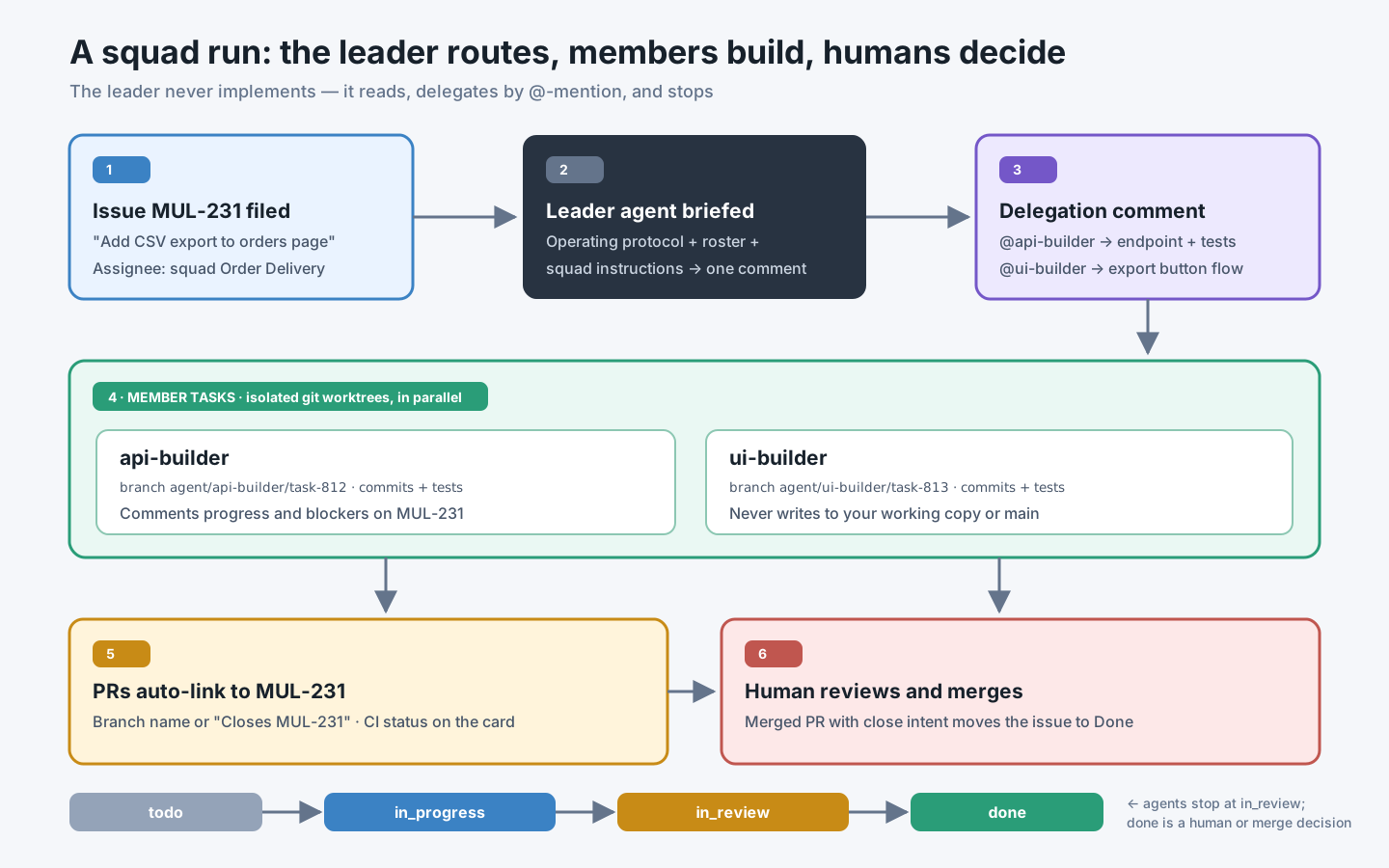
Compare this to the terminal version of the same feature: the division of labor is identical, but the contract, the delegation decision, every command each agent ran, the branches, the review findings, and the cost now live on one issue that your teammate — or your future self — can replay.
Practices for one project, many agents
The engineering judgment from the multi-Agent workflow article survives unchanged; the platform just gives each rule a place to live. These practices come from Multica’s documented behavior plus the failure they prevent:
Keep “one file, one owner” by role design, not by hope. Worktrees prevent filesystem collisions, not semantic ones — two agents can still redesign the same module in parallel branches. Encode ownership in instructions (“never modify code directly”, “own services/orders/ only”) and in squad routing rules, so the boundary is applied on every run instead of remembered on some.
Let the leader route; never let it implement. Multica hard-codes this — the leader’s dispatch turn ends after one delegation comment — and it matches the orchestrator pattern: a leader that also edits code competes with its own workers for ownership. Put routing knowledge in squad instructions (“DB work to Alice, frontend to Bob”), which only the leader sees.
Use direct assignment when the owner is obvious. The squads doc says it plainly: when the scope is clear, assign the matching agent directly. A squad earns its overhead only when the right owner genuinely depends on the issue’s content.
Size concurrency deliberately. Each agent defaults to 6 concurrent tasks and each daemon caps at 20; the effective limit is the smaller. A reviewer agent rarely needs more than 1–2; builders on a hot repo may want more. Concurrency you cannot review is not throughput — it is queued rework.
Treat the issue as the contract’s home. Frozen decisions (route, permission, event names, success rules) go in the issue description, which every triggered agent receives. Comments are for progress and discoveries, not for silently changing the contract — if the contract must change, a human edits the description and says so.
Make evidence a delivery requirement. Write it into every builder’s instructions: report the branch, the commands run, the test results, and the remaining risks as an issue comment. The execution log records what happened anyway; the comment is the human-readable handoff you will actually read in review.
Practices for team collaboration
Team adoption adds questions that single-player workflows never asked. The team adoption and governance article covers the general strategy; these are the Multica-specific control points.
Scope who can run what. Access is per-agent — only me, specific people, or entire workspace — and notably, only the agent’s owner can change it; workspace admins cannot grant themselves the right to run someone’s agent. Start new agents private, widen access after their behavior has been reviewed. Squads inherit this: a member who cannot run the leader cannot use the squad.
Govern skills like a shared library, not a wiki. Any member can create or import a skill, but only the creator, owners, and admins can modify one, and deletion detaches it from every agent at once. Prefer URL-imported skills with a hosted source for team-shared methods, so “Update from source” is an auditable action rather than a folder copy. And take the docs’ warning literally: imported skills are handed to agents as-is — Multica does not review, sign, or sandbox them — so treat a third-party skill import with the same suspicion as adding a dependency.
Place runtimes where the blast radius is acceptable. The security model is unusually candid: a task runs with the full permissions of the OS user running the daemon, and because agents run unattended, approval prompts are answered automatically — on the default path Codex runs with sandbox_mode = "danger-full-access" and Claude Code with --permission-mode bypassPermissions. Multica explicitly declines to pretend it is a sandbox. The documented recommendation, lightest to strongest: a dedicated multica OS user that owns only the repos and scoped credentials agents need; a container with only the needed mounts and secrets; a VM. For a team, the pattern that works is one or two shared runtime boxes provisioned this way, plus per-purpose deploy keys instead of anyone’s personal SSH key.
Decide cloud vs. self-hosted on data, not ideology. Code and tool credentials stay on your runtimes in both modes; what the server holds is issues, discussions, configurations, skills, and run records. If those must stay inside your network — or you need self-hosted GitLab/Gitea/Forgejo integration, which is a self-hosted-only feature — deploy it yourself with Docker Compose or Helm. Under the Multica License, internal use within a single organization requires no commercial license.
Meet the team where it already talks. Slack and Lark integrations are official; DingTalk, WeCom, and Telegram are community-maintained. Triggering an agent from the channel where the bug was reported removes the “I’ll file it later” gap — but keep review in the workspace, where the execution log and diff live.
Extending Multica for your team: configure, script, then fork
“Can we adapt it to our workflow by modifying the source?” is usually the wrong first question. Multica’s extension surfaces form a ladder, and each rung is cheaper to maintain than the one below it.
Rung 1 — configuration. Agents, instructions, skills, squads with routing rules, Autopilots on a schedule, and per-agent MCP servers cover most “our team works differently” cases without writing a line of code. An Autopilot that runs a standup summarizer every morning is configuration, not development.
Rung 2 — the CLI and API. Every surface is scriptable — agents drive Multica through the same CLI you do. A script that files issues from your ticket system, or a CI job that @-mentions a reviewer agent when a PR label appears, is a thin integration you own completely and Multica upgrades cannot break contractually.
Rung 3 — a fork. Justified when you need something structural: a custom trigger source, an internal approval flow in the middle of the task lifecycle, an in-house Git host the integration does not cover. Before committing, weigh three documented facts. First, the license: internal single-organization use is fine without a commercial license, but offering your fork as a hosted service to third parties — even free of charge — requires one, and the UI’s branding and attribution must stay unless you obtain a written waiver; a backend-only integration must still credit Multica in user-facing docs. Second, velocity: the project states it releases most weekdays and main moves quickly — a deep fork starts drifting the day you cut it. Third, structure: the codebase is a Go backend, Next.js frontend, and a daemon, so the sustainable fork pattern is the same as for any fast-moving upstream — keep your changes as a thin, well-isolated layer (new handlers, new integration modules) rather than edits scattered through core logic, and rebase on a cadence.
A practical interpretation for most teams: exhaust rungs 1 and 2 first; fork only for a named structural gap, with a named owner for tracking upstream.
Failure modes and boundaries
The platform is not the isolation boundary. This is the failure with teeth. An unattended agent with danger-full-access on your personal laptop can read your SSH keys and your browser profile. The boundary is the OS user, container, or VM you put the daemon in — set it up before the first real task, not after the first incident.
A green run is not a done issue. The docs make the distinction explicit: Completed in the execution log means one run ended. Teams that wire “agent finished” to “ticket closed” ship unreviewed work. Keep the gate: agents stop at in_review; merge-with-close-intent or a human moves it to Done.
Skills drift in three copies. The same checklist can exist in the repo, in the workspace, and on a runtime. Pick one authority per skill and record it in the skill’s own description — repo for code-coupled procedures, workspace for cross-project methods — or two agents will follow two versions of “the” process.
The leader becomes a bottleneck by design abuse. If every trivial issue goes through a squad, you pay one extra leader run per issue and get delegation comments that restate the obvious. Squads are for genuinely ambiguous routing; everything else is a direct assignment.
And sometimes you should not use Multica at all. A solo developer with one repo and one tool gets little from a coordination plane; the terminal plus worktrees from the previous article is simpler. Tight, exploratory pair-programming with sub-second feedback belongs in the IDE. Multica pays off when work must survive handoffs — between people, between agents, or between today and next week. Adopting it does not create governance either: it gives you the audit trail, access scopes, and review gates, but someone still has to look at the diffs. A board full of green agent runs that nobody reviews is risk with better typography.
A pilot you can verify in one week
Run a bounded pilot before any team-wide announcement, and collect evidence rather than impressions:
- A runtime is connected under a dedicated OS user or container, with only scoped repo credentials — verify by listing what that user can actually read.
- One real task ran against your repo, and the execution log shows the tool loaded
AGENTS.mdunchanged from Git. - Two agents worked the same repository concurrently in worktree mode, and
git branchshows twoagent/...branches with no writes to anyone’s working copy. - A squad-assigned issue shows the leader’s delegation comment and evaluation on the timeline — and no code authored by the leader.
- A PR auto-linked to its issue by branch name, showed CI status on the issue, and the issue reached Done only through a human merge with a close intent.
- One skill was imported once, attached to two agents using different CLIs, and both runs show it injected under each tool’s native skills path.
- Token usage per run is visible on the issues, so the pilot’s cost can be stated in numbers.
- At least one teammate other than the agent’s owner ran an agent — through granted access, not shared credentials.
If any box will not check, you have found the real migration work — usually runtime placement or ownership boundaries, not the tooling.
What actually changes in how you work
The multi-Agent patterns you already knew — bounded workers, shared contracts, evidence-bearing handoffs, a human verification gate — do not change. What changes is where they live. Contracts move from ad hoc Markdown into issue descriptions every run receives. Role prompts become named, access-controlled agents. Skills stop being folders you copy and become versioned assets you attach. “What did the agents do” stops being an archaeology project and becomes a timeline with logs, branches, and costs.
The deeper shift is organizational: multi-agent AI Coding stops being a personal productivity trick that lives and dies with one engineer’s terminal, and becomes a team capability — inspectable, transferable, and governable. That is the actual promise behind “agents as teammates”: not that the agents got smarter, but that their work finally shows up on the same board as everyone else’s.
Authoritative references
- Multica GitHub repository
- Multica docs: How Multica works
- Multica docs: Core concepts
- Multica docs: Skills
- Multica docs: AI coding tools comparison
- Multica docs: Squads
- Multica docs: Security model
- Multica docs: Project resources
- Multica docs: GitHub integration
- Multica docs: Create and configure an agent
- Multica License
- AGENTS.md — an open format for guiding coding agents
- Git worktree documentation