From Prompt to Agent Skill: Package Expert Knowledge as a Reusable Capability
Every team has a few prompts that “work exceptionally well.”
One may live in an expert’s chat history and span two pages: which files to inspect, what order to follow, when to stop, which table to return, and which commands to run at the end.
The first copy works. The second person adds a special rule. The third removes a boundary that looks unnecessary. Two months later, five versions exist and nobody knows which is authoritative.
The problem is not that the prompt is too short. It is still merely text inside one conversation:
- people must remember when to use it;
- missing inputs surface halfway through execution;
- all background material occupies task context every time;
- critical scripts are rewritten repeatedly;
- quality has no stable test;
- an expert fixes one copy while old copies continue to circulate.
An Agent Skill addresses this exact failure. It is not a longer prompt; it is a workflow package an agent can discover, load on demand, execute, and verify.
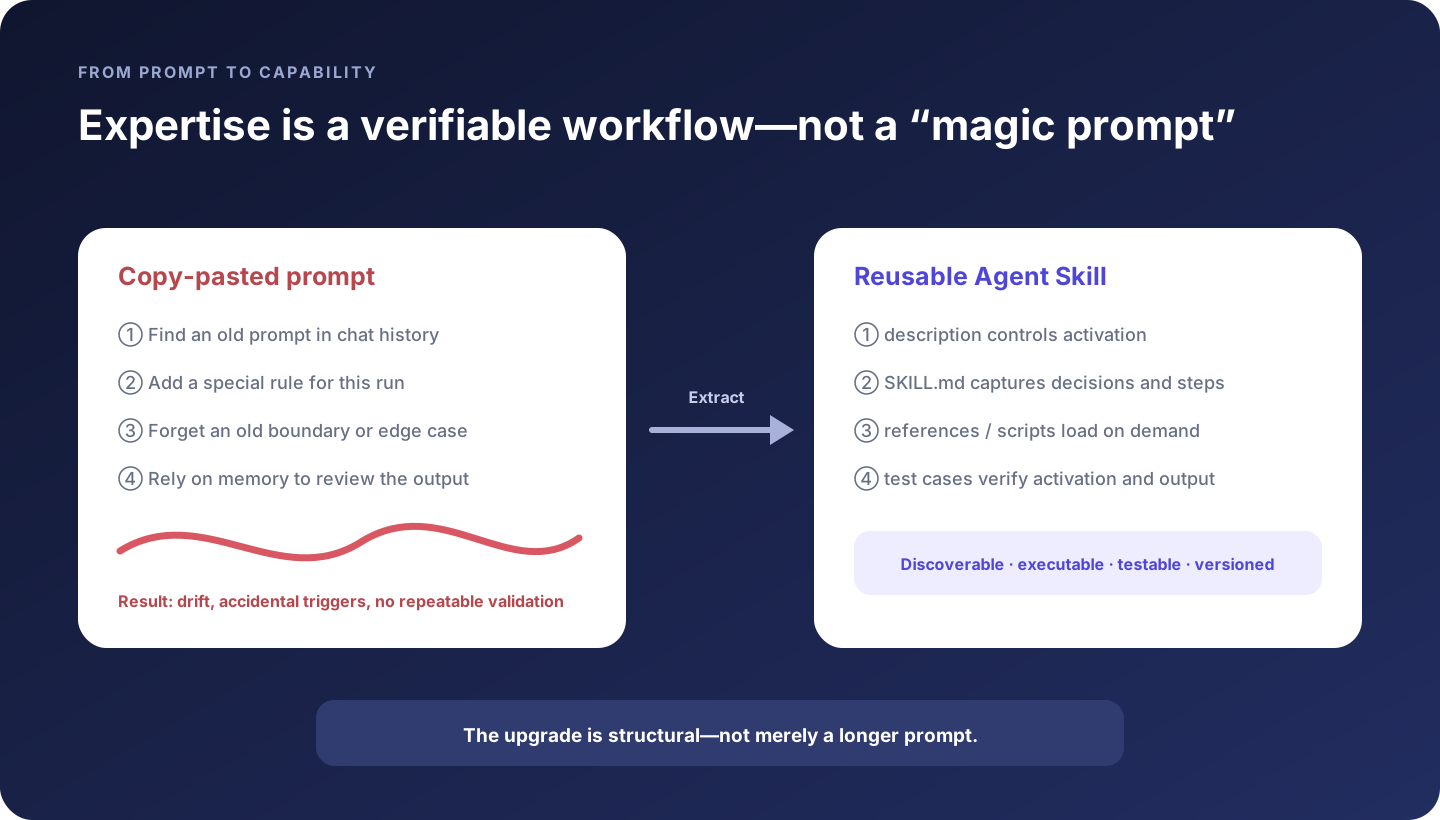
We will use one practical example throughout: upgrade a team’s recurring “write release notes” prompt into a write-release-notes skill.
By the end, you will be able to:
- decide whether knowledge belongs in a prompt,
AGENTS.md, or a skill; - write a
descriptionthat activates correctly without over-triggering; - layer workflow instructions, references, templates, and deterministic scripts;
- test positive, negative, incomplete, and edge-case requests;
- maintain a skill as versioned code rather than forgotten prose.
1. What exactly is a skill?
OpenAI describes a skill as a reusable, task-specific capability that packages instructions, resources, and optional scripts so ChatGPT or Codex can follow a workflow reliably. Agent Skills are also an open format. The minimum structure is a directory with SKILL.md:
write-release-notes/
├── SKILL.md                 # Required: routing metadata + core workflow
├── agents/
│   └── openai.yaml          # Recommended: UI metadata and dependencies
├── references/              # Optional: policies, domain knowledge, examples
├── scripts/                 # Optional: deterministic executable code
└── assets/                  # Optional: output templates and starter files
Most importantly, the complete directory is not injected into every conversation.
An agent first sees each skill’s name and description. When the user’s goal matches, it loads the full SKILL.md. While executing a relevant branch, it can then read a reference, run a script, or use an asset. This is progressive disclosure.
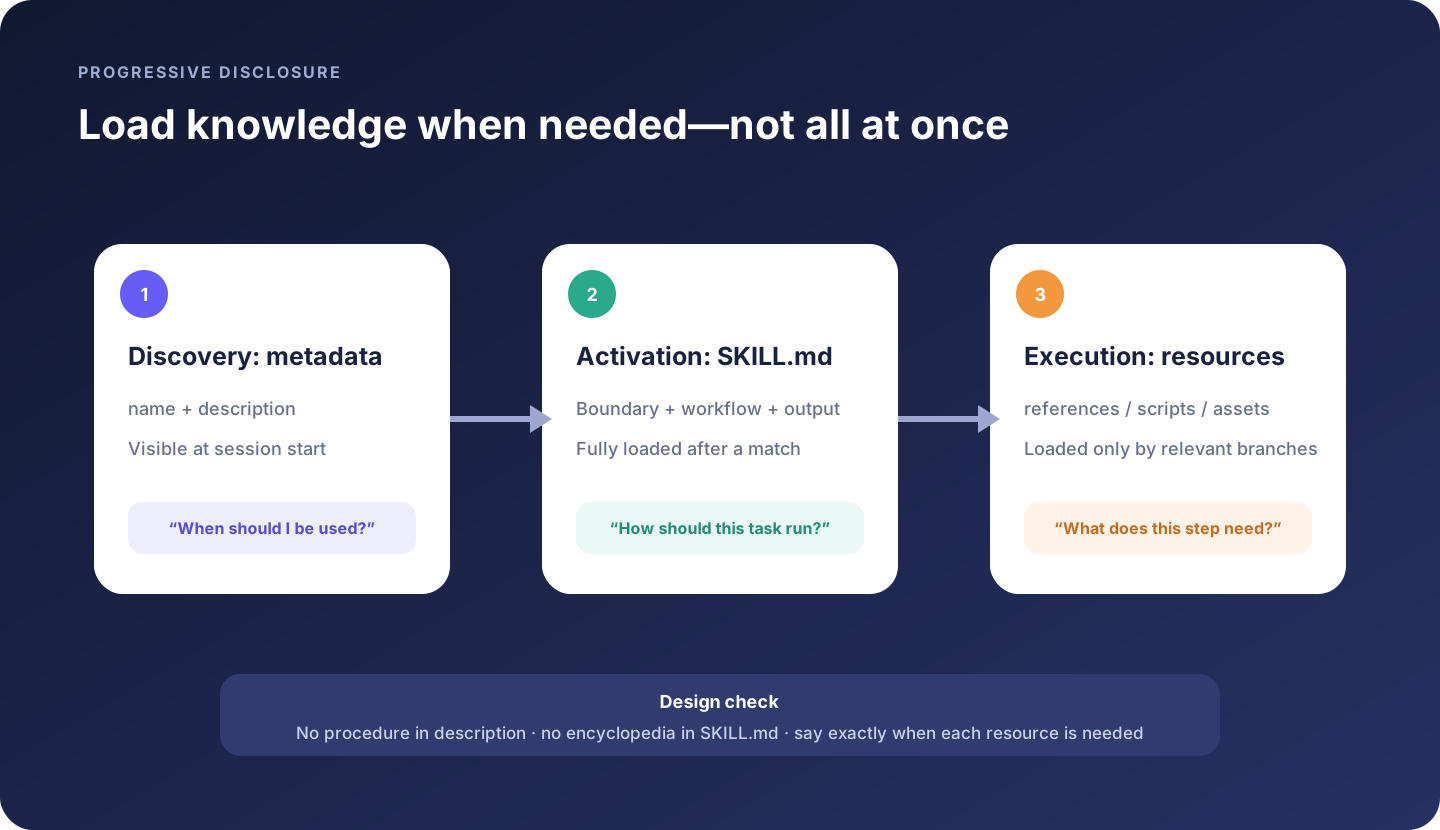
This has two direct benefits:
- many skills can remain available without paying their full context cost on every task;
- specialized knowledge loads by branch, so the agent does not search through unrelated documentation.
2. Put expertise on the right surface
Not every good prompt should become a skill.
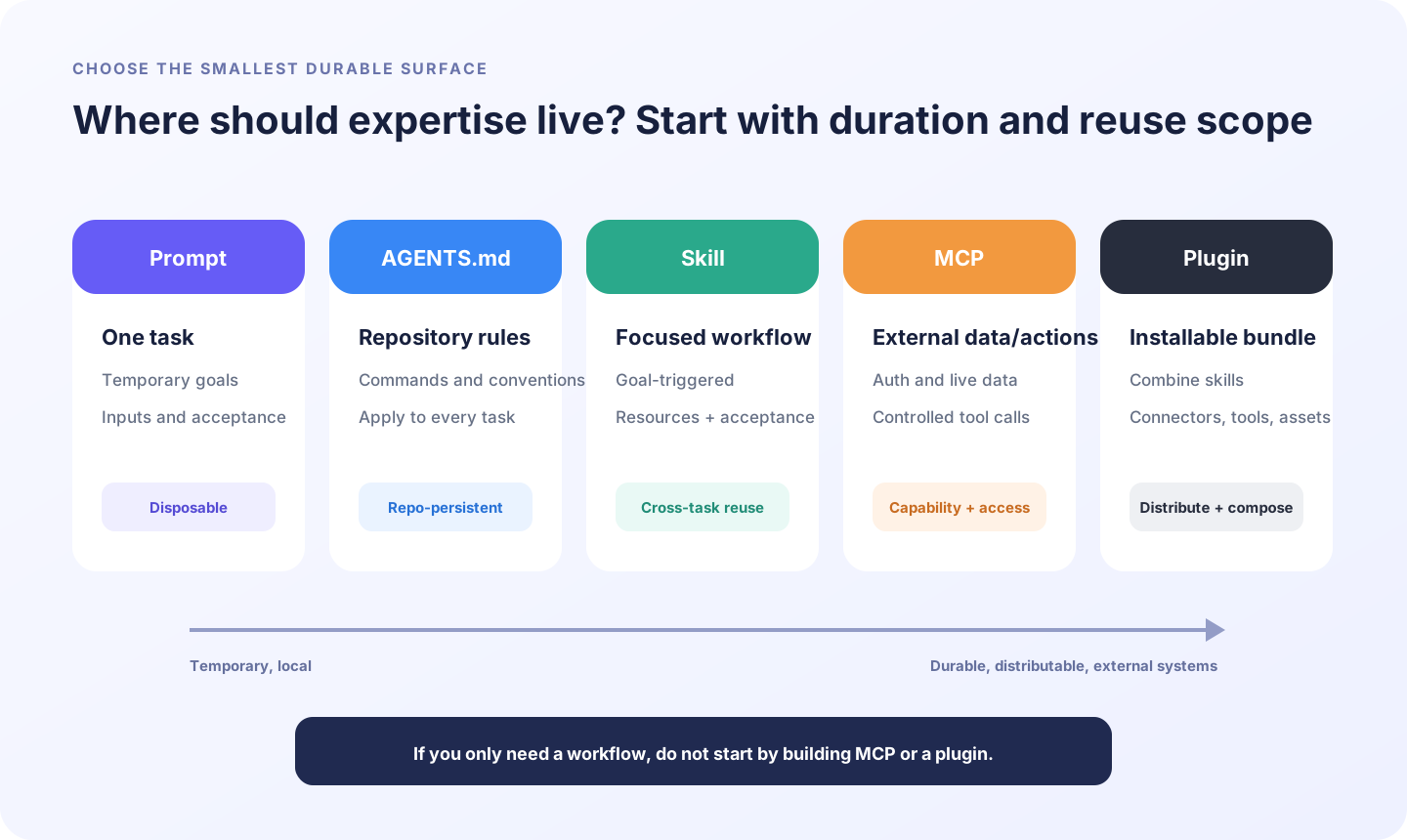
| Surface | Best for | Example | Poor fit |
|---|---|---|---|
| Prompt | Goals, inputs, scope, and acceptance for one task | “Fix the order-page crash; frontend only” | A complete weekly workflow |
AGENTS.md | Rules every task in a repository should follow | Build commands, directory conventions, review policy | Steps used only for release notes |
| Skill | A reusable workflow around one recognizable user goal | Release notes, migration review, PDF redlining | Rules that apply to every repository task |
| MCP / connector | Live external data, authentication, and controlled actions | Read GitHub PRs, query CRM, create a ticket | Writing procedure and judgment rules alone |
| Plugin | An installable bundle of skills, connectors, tools, and assets | A GitHub collaboration bundle | The first draft of one internal workflow |
A useful summary is:
A prompt says what this run needs;
AGENTS.mdsays how this repository always works; a skill teaches how to perform a class of tasks; MCP provides live capability; a plugin packages and distributes capabilities.
Split mixed requirements. For example:
- “always use pnpm” belongs in
AGENTS.md; - “the range is
v2.4.0..v2.5.0” belongs in this run’s prompt; - “collect, classify, identify breaking changes, and render release notes” belongs in a skill;
- “read current GitHub Releases and pull requests” belongs in a GitHub connector or MCP server.
3. Which expertise deserves packaging? Ask five questions
The more conditions a workflow meets, the stronger the case for a skill.
Is it repeated?
The task occurs every week, release, or project—not once during an unusual incident.
Does quality depend on tacit judgment?
An expert decides which changes are user-visible, what counts as breaking, and when execution must stop for clarification.
Are inputs and outputs explicit?
If nobody can explain what is required to start or what completion looks like, map the process before packaging it.
Can it be accepted independently?
Structure, fields, commands, examples, or a human rubric can evaluate the result. “Feels professional” is not enough.
Is failure costly enough to justify guardrails?
Repeated omissions, unsafe disclosure, inconsistent output, or incorrect releases create clear value for a stable workflow.
Three poor candidates are:
- a one-time task with highly unique context;
- a vague desire such as “make writing better” with no stable input or output;
- a simple operation the model already performs reliably without organization-specific knowledge.
4. Case study: the release-notes prompt that kept growing
The team began with:
Write release notes from recent commits. Group them into Added, Improved, and
Fixed. Use plain language, omit internal refactors, mark breaking changes, and
finish with upgrade guidance.
Rules accumulated:
Also read PRs. Do not treat an issue title as evidence. Do not guess customer
impact. Do not classify the same change twice. Do not expose exploit details
for unreleased security fixes. Include the version range and comparison link.
Highlight database migrations. Use the team terminology guide. Verify every
claim against a commit or PR.
This is no longer a writing instruction. It is a workflow:
confirm range
  → collect commit and PR evidence
  → remove internal noise
  → evaluate user impact and risk
  → classify and deduplicate
  → render the template
  → verify traceability and safe disclosure
That is the signal to create a skill.
5. Step 1: build a use-case inventory before SKILL.md
Activation and evaluation both come from realistic examples. Prepare at least four groups.
Should activate
Generate customer-facing release notes for v2.4.0 through v2.5.0.
Turn this week's merged PRs into Release Notes.
Indirect wording that should still activate
We ship tomorrow. Turn this batch of customer-visible changes into an announcement.Missing input that should trigger a question
Write release notes for me.The range, evidence source, or audience is missing. The skill should ask, not silently choose the ten most recent commits.
Should not activate
Review this pull request.
Translate the README installation section.
A skill with only positive examples will often over-trigger.
6. Step 2: naming and description control discovery
Use lowercase letters, digits, and hyphens, with the folder matching name. Prefer short, verb-led names:
write-release-notes     ✅
release-notes-helper    less goal-oriented
ReleaseNotesExpert      ❌ uppercase and not a user goal
general-dev-tool        ❌ too broad
description is the primary activation surface. Before activation, the agent sees the name and description, so “when to use” information belongs here—not in a body section the agent has not loaded yet.
Weak:
description: Helps create high-quality release notes.Stronger:
description: >-
  Generate customer-facing release notes from a Git commit range, merged pull
  requests, or a release diff. Use when the user asks for release notes,
  changelogs, launch announcements, or a summary of user-visible changes.
  Do not use for code review, commit-message writing, or internal sprint reports.
A practical description states:
- what the skill does;
- which inputs it accepts;
- how users may phrase the goal;
- when it must not run.
Do not put the full procedure in metadata. Metadata routes; the body executes.
7. Step 3: initialize with Skill Creator
Invoke the built-in creator in Codex:
$skill-creator

Create a write-release-notes skill that turns a Git range or merged PRs into
customer-facing release notes. It must identify user-visible changes, breaking
changes, migrations, and disclosure boundaries; ask when the range is missing;
and never activate for code review.
For manual creation, place a repository skill under:
.agents/skills/write-release-notes/For personal reuse across repositories:
$HOME/.agents/skills/write-release-notes/Repository skills can be committed, reviewed, and versioned alongside the code. Personal skills are useful while the workflow is still exploratory.
A minimal file is:
---
name: write-release-notes
description: Generate customer-facing release notes from a Git range or merged PRs. Use for release notes, changelogs, and launch announcements. Do not use for code review or sprint reports.
---

# Write release notes

1. Confirm the range and audience.
2. Collect traceable evidence.
3. Keep user-visible changes only.
4. Classify, deduplicate, and identify upgrade risks.
5. Render the required template.
6. Verify every claim against a commit or PR.
This is a valid skill, but it still needs the expert decisions.
8. Step 4: express expertise as input, decision, action, and output
Avoid slogans such as “analyze carefully” or “ensure high quality.” Map knowledge into four operational categories:
| Category | Question | Release-notes example |
|---|---|---|
| Input contract | What must exist before work begins? | From/to versions, audience, commit or PR evidence |
| Decision rules | How should branches be chosen? | Only observable user changes enter the body |
| Actions | In which order should work occur? | Collect, classify, write, then verify |
| Output contract | What must the result contain? | Summary, groups, breaking changes, migration, evidence |
A more complete core looks like this:
---
name: write-release-notes
description: >-
  Generate customer-facing release notes from a Git commit range, merged pull
  requests, or a release diff. Use for release notes, changelogs, launch
  announcements, and summaries of user-visible changes. Do not use for code
  review, commit-message writing, or internal sprint reports.
---

# Write release notes

## Inputs

Require a Git range, release diff, or explicit PR list; the target audience;
and output language. If the range is ambiguous, ask before collecting data.
Never silently choose a time window.

## Workflow

1. Read repository guidance and inspect the working tree without modifying it.
2. Collect commits and merged-PR evidence for the confirmed range.
3. Exclude purely internal work unless it changes performance, compatibility,
   security, or operator behavior.
4. Classify remaining items as Added, Improved, Fixed, Deprecated, Security,
   or Breaking.
5. Merge duplicates describing the same user-visible outcome.
6. For Breaking items, identify affected users, migration, and first
   incompatible version. Mark unsupported details Unknown.
7. Render `assets/release-notes-template.md`.
8. Map every factual claim to at least one commit or PR.

## Safety and evidence

- Never infer customer impact from a ticket title alone.
- Never expose exploit details for an embargoed security fix.
- Never invent migration steps; request review when evidence is missing.
- Do not modify tags, releases, branches, or repository files.

## Resources

- Read `references/product-language.md` for customer-facing product names.
- Read `references/security-disclosure.md` for security-related changes.
- Run `scripts/collect-changes.sh <from> <to>` for a local Git range.
- Use `assets/release-notes-template.md` for final structure.

## Output

Return a title and summary, grouped changes, a Breaking Changes section even
when empty, evidence links or hashes, and an Unknown / Needs review list.
It does not prescribe every sentence. It constrains the parts that must not be improvised.
9. Step 5: set freedom according to risk
Skills should not all be maximally rigid.
High freedom
Use principles and examples when many answers are valid: tone, summary angle, and explanation style.
Medium freedom
Use decision tables, pseudocode, or parameterized templates when a preferred pattern exists: classification, output structure, and framework selection.
Low freedom
Use tested scripts with few parameters when mistakes are costly: version calculations, file conversion, aggregation, or release commands.
Do not make the agent reinvent how to list commits between tags on every run:
#!/usr/bin/env bash
set -euo pipefail

from_ref=${1:?"missing from ref"}
to_ref=${2:?"missing to ref"}

git rev-parse --verify "$from_ref^{commit}" >/dev/null
git rev-parse --verify "$to_ref^{commit}" >/dev/null
git log --no-merges --format='%H%x09%s' "$from_ref..$to_ref"
The script lists changes accurately; the model interprets and communicates them. Every script added to a skill must be executed in testing. A broken reusable script reproduces failure more consistently than a bad one-off prompt.
10. Step 6: use progressive disclosure to control context
Putting all material in SKILL.md merely renames a mega-prompt.
write-release-notes/
├── SKILL.md
├── references/
│   ├── product-language.md
│   └── security-disclosure.md
├── scripts/
│   └── collect-changes.sh
└── assets/
    └── release-notes-template.md
Use these boundaries:
SKILL.md: the core workflow required on every execution;references/: policies, terminology, schemas, and rare branches;scripts/: deterministic programs that would otherwise be rewritten;assets/: templates and starter artifacts copied or transformed for output.
Merely storing files is insufficient. State when to read or run each one:
Read references/security-disclosure.md when a change is security-related.This is stronger than “See references for more information,” which provides no routing condition.
The Agent Skills specification recommends keeping SKILL.md under roughly 500 lines and 5,000 tokens and avoiding deep reference chains. The goal is not a mechanical number; every paragraph loaded after activation should support the core workflow.
11. Step 7: test both activation and execution
A skill has two distinct quality dimensions.
Activation quality
- Does it load when it should?
- Does it stay inactive for negative cases?
- Does it recognize indirect wording?
- Are essential trigger terms front-loaded if descriptions are shortened?
Execution quality
- Does it ask for missing inputs?
- Does it follow steps and prohibitions?
- Does it load the correct reference?
- Does it pass correct parameters to scripts?
- Is the output traceable and independently reviewable?
Build a minimum test matrix:
| Type | Request | Expected behavior |
|---|---|---|
| Direct positive | “Write Release Notes for v2.4.0..v2.5.0” | Activate and run the full workflow |
| Indirect positive | “We ship tomorrow; summarize customer changes” | Activate and confirm range |
| Missing input | “Write release notes” | Ask for range and audience |
| Negative | “Review this PR” | Do not activate |
| Edge | Only internal refactors | Report no user-visible changes; do not invent highlights |
| Security | Embargoed fix exists | Load disclosure policy; omit exploit detail |
Save raw prompts, outputs, loaded resources, script calls, and failure reasons. For complex skills, forward-test in a fresh task or independent agent so the evaluator does not inherit the author’s intended answer.
If routing is wrong, refine description. If routing is correct but execution drifts, refine the body or resources. Do not solve a routing defect by adding more procedural text.
12. Step 8: install, invoke, and validate
Codex supports explicit and implicit activation:
- explicit: type
$write-release-notesor choose it through/skillsin Codex CLI or the IDE; - implicit: Codex selects it when a request matches
description.
Test explicitly first to isolate execution quality. Then remove $ and test implicit routing.
Codex scans .agents/skills/ from the current working directory toward the repository root. Skill changes are normally detected automatically; restart Codex if an update does not appear.
Use Skill Creator’s validator for basic structure and frontmatter checks:
python /path/to/skill-creator/scripts/quick_validate.py \
  .agents/skills/write-release-notes
The open ecosystem also provides skills-ref validate. Syntax validation cannot replace realistic activation and output tests.
13. Seven common failure modes
1. The skill becomes an encyclopedia
All background knowledge, tools, and examples live in the body. Activation immediately floods context. Keep the core workflow and move conditional detail into references.
2. The description sounds impressive but cannot route
“Empower high-quality delivery” lacks a user goal, input language, and boundaries. Use words real users say and state what, when, and when not.
3. One skill owns the entire development lifecycle
Requirements, coding, tests, deployment, and retrospective have different triggers, inputs, and success criteria. Split them.
4. Common knowledge is verbose; critical boundaries are vague
Assume the agent is capable. Store organization-specific sequence, constraints, and prohibited actions—not a tutorial on Git.
5. Natural language performs deterministic calculation
Move stable calculations and conversions into tested scripts. Let the model select parameters and explain results.
6. Only the happy path is tested
Cover direct, indirect, missing-input, negative, and risk cases.
7. Nobody owns maintenance
Assign an owner, review workflow, version history, staleness signal, and retirement condition just as you would for code.
14. Skills need engineering maintenance
A team skill should record:
- Owner: responsible for domain correctness;
- Scope: repositories, teams, and tasks covered;
- Dependencies: scripts, MCP, tools, commands, and permissions;
- Test set: positive, negative, and edge cases;
- History: use Git and pull requests rather than extra process documents;
- Staleness signals: which workflow, policy, or tool changes require updates;
- Retirement: when a new skill, plugin, or product feature replaces it.
Start with four metric groups:
| Metric | Example |
|---|---|
| Activation accuracy | Recall on positives and false activation rate on negatives |
| Workflow adherence | Required steps, stop conditions, and resource loads completed |
| Output acceptance | Template fields, evidence, and human-rubric pass rate |
| Efficiency | Rework count, context use, and completion time |
Usage alone is not success. A frequently mis-triggered skill that still requires extensive rework is not a healthy asset.
15. From a personal skill to a team plugin
A skill is the workflow layer. Upgrade to a plugin when you need broader distribution or external capabilities:
one stable skill
  → several related skills
  → GitHub / CRM connector or MCP
  → UI metadata and dependencies
  → installable plugin
Keep the boundary explicit:
- a skill tells the agent when, in what order, how to decide, and what to output;
- MCP provides live data, authentication, authorization, and controlled actions;
- a plugin packages skills, connectors, MCP configuration, and assets for installation.
Do not add servers, authentication, and distribution machinery to the first skill draft merely because it may become a plugin later. Prove the workflow’s value first.
16. A reusable skill design card
Fill this before implementation:
Skill name:
One-sentence user goal:

Three real requests that should activate:
1.
2.
3.

Three requests that should not activate:
1.
2.
3.

Required inputs:
When inputs are missing: ask / default / stop

Core decisions:
1.
2.
3.

Deterministic actions (consider scripts):
On-demand knowledge (consider references):
Output template (consider assets):

Facts or actions that are prohibited:
Acceptance criteria:
Test-set location:
Owner:
If you cannot complete the card, the expertise is still mostly intuition. Observe more real executions and make the decisions explicit before creating a skill.
Conclusion: turn “I know how” into “the team and agent can do it reliably”
Prompts are excellent for rapid exploration. Do not engineer every idea on day one.
When a prompt is repeatedly copied, accumulates boundaries, relies on stable references or scripts, and has clear acceptance criteria, it crosses a line—from a one-off conversation into a maintainable capability.
A strong skill does not replace the agent’s intelligence. It captures only what must not be guessed:
When to activate, what is required, which order to follow, where to stop, what not to invent, and how completion is verified.
Expertise is successfully packaged when another teammate, repository, and session can produce an acceptable result without the original author standing nearby—not when SKILL.md reaches a certain length.