From Rules and Skills to Plugins: Engineering Composable Agent Capabilities
Your team’s AI Coding setup is usually not designed. It accumulates.
One engineer keeps a 120-line prompt for release reviews. The repository has an AGENTS.md or CLAUDE.md, but half its rules apply only during releases. A second engineer adds a Skill. A third configures a GitHub MCP server. Someone else writes a script that checks generated files after every edit. The pieces work on their machines, yet onboarding still begins with a checklist of files to copy, commands to run, permissions to grant, and caveats to remember.
Then the release process changes.
The Skill is updated, but an old hook still runs. The MCP server asks for broader permissions than the workflow needs. A rule says “never publish automatically,” while a command bundled elsewhere still calls npm publish. Nobody can answer one basic question:
What is the capability, where are its boundaries, and which version is the team actually running?
That is the problem a Plugin should solve. A Plugin is not merely a bigger prompt or a folder with many files. It is an installable capability product: a named, versioned package that combines the instructions, workflows, tools, lifecycle controls, metadata, and distribution path required for one coherent scenario.
This article uses one case throughout: build a release-guard Plugin that reviews release evidence, reads live pull-request data when available, blocks an Agent from publishing directly, and produces a verifiable release decision.
By the end, you will be able to:
- place a requirement in Prompt, Rules, Skill, MCP, Hook, or Plugin for a reason;
- compare the current Plugin approaches in Cursor, Claude Code, and Codex without treating them as one standard;
- explain where Hooks sit inside an agentic loop and which failures they can and cannot prevent;
- design a portable Skill core with host-specific manifests and Hook adapters;
- test installation, activation, enforcement, permissions, upgrades, and rollback as separate concerns.
1. The mental model: Plugin is the package, not another layer of intelligence
An Agent still performs the reasoning. The other surfaces shape what it knows, what it can do, and what must happen around its actions.
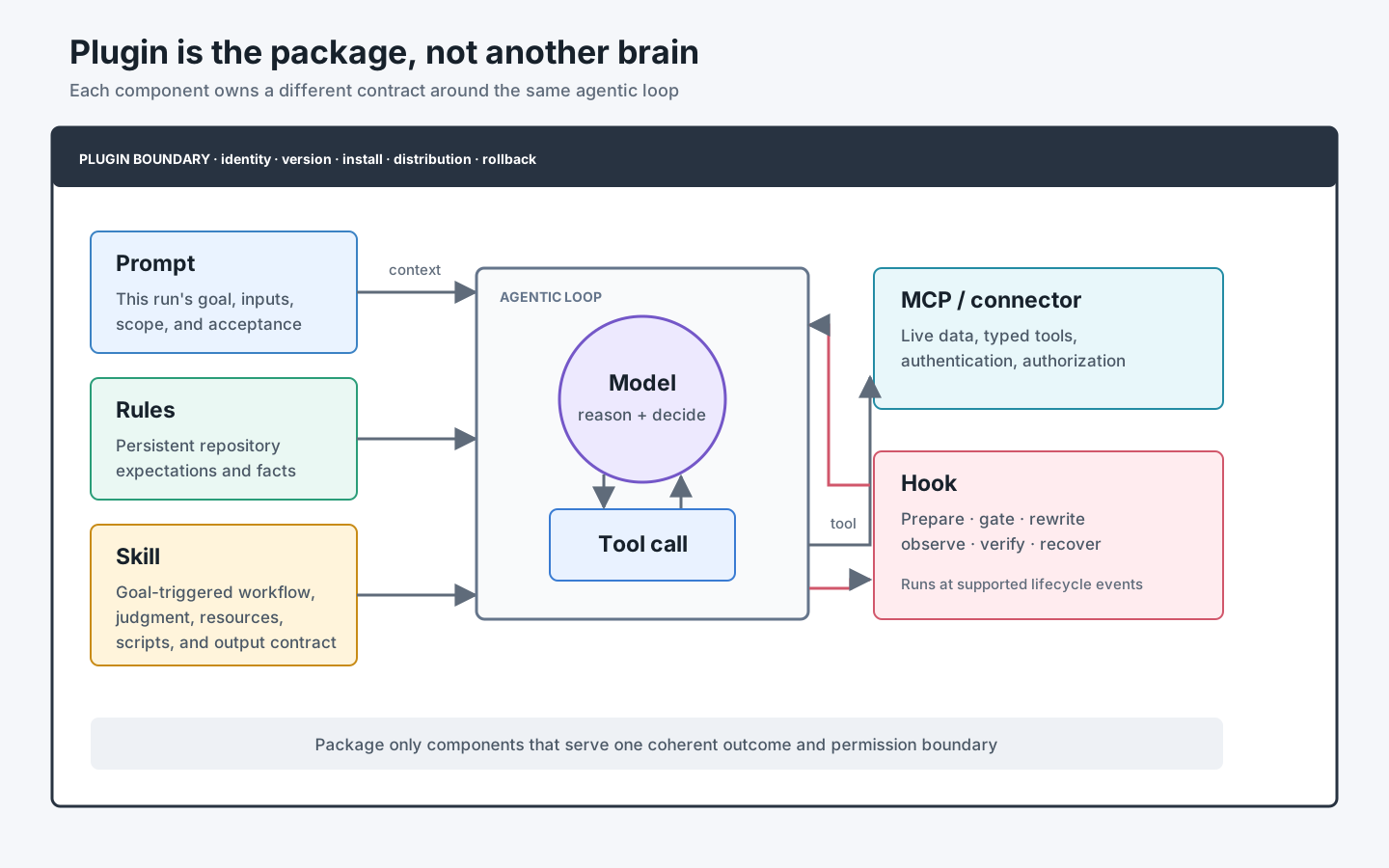
Think in six responsibilities:
| Surface | Question it answers | Typical content | Runtime character |
|---|---|---|---|
| Prompt | What does this run need? | Goal, input, scope, acceptance criteria | One task |
| Rules | How should work in this scope normally behave? | Repository commands, architecture constraints, coding conventions | Persistent context |
| Skill | How is this recognizable class of task performed? | Trigger description, decisions, workflow, references, scripts, output contract | Loaded on demand |
| MCP / connector | Which live data or external action is available? | Typed tools, authentication, authorization, structured results | Server-backed capability |
| Hook | What must run at a lifecycle boundary? | Inspect, block, rewrite, validate, audit, or add context | Event-driven control |
| Plugin | How are related capabilities installed, versioned, and distributed together? | Manifest, Skills, tools, Hooks, assets, metadata | Capability package |
The boundaries matter more than the names.
Rules guide; they do not enforce
AGENTS.md, CLAUDE.md, and Cursor Rules enter model context. They are excellent for “use pnpm,” “read this architecture note,” or “tests for this package live here.” They are still natural-language guidance interpreted by a model.
Claude Code’s official memory documentation states this directly: CLAUDE.md is context, not enforced configuration; a PreToolUse Hook is the appropriate surface when an action must be blocked regardless of the model’s decision. The same engineering distinction applies across products.
Skills teach a workflow; they do not create authority
A Skill can explain how to review a release, which evidence to collect, and when to stop. It may call tools the host already provides. Installing the Skill does not authenticate GitHub, grant write access, or guarantee that a command is safe.
MCP exposes capability; it should not own the whole workflow
An MCP server is the right boundary for live PR data, issue metadata, release state, or a controlled create_draft_release action. Tool schemas and server-side authorization are stronger boundaries than telling the model “be careful” in prose. The Skill should decide when and why to use the tool; the server should decide whether the caller may perform the action.
Hooks intercept events; they are not background magic
A Hook runs because a lifecycle event occurred: a session started, a prompt was submitted, a tool is about to execute, a file was edited, the context was compacted, or the Agent wants to stop. Hooks can add deterministic behavior around the model, but every Hook has a supported event set, input schema, output schema, timeout, and failure policy.
Plugin makes the capability operable
The Plugin answers the questions individual files cannot:
- Which components belong together?
- Which version is installed?
- Which host and features are supported?
- What needs authentication or trust review?
- How does a teammate discover, install, update, disable, and remove it?
- Who owns failures and compatibility?
This is why “put the files in a shared Wiki” is not equivalent to a Plugin.
2. Why Plugins become necessary
Do not start with a Plugin. Start with a repeated problem, prove a Skill or tool, and package it when coordination cost becomes the larger problem.
A Plugin becomes justified when at least three of these conditions are true:
- Several components must stay compatible. A Skill expects a Hook output or MCP tool schema.
- More than one person or repository needs the capability. Manual copying creates version drift.
- Installation has dependencies or permissions. Users need a visible setup and trust boundary.
- The capability needs an upgrade and rollback path. A changed workflow must not leave stale scripts behind.
- Discoverability matters. Users should ask for an outcome, not memorize five setup steps.
- The team needs ownership and policy. Someone must review changes, vulnerabilities, and deprecations.
The benefits are concrete.
| Without a Plugin | With a well-designed Plugin |
|---|---|
| Copy Rules, Skills, scripts, and config separately | Install one named bundle |
| Components drift independently | Release compatible components together |
| Setup knowledge lives in chat or a Wiki | Manifest and marketplace expose dependencies and metadata |
| Every user invents an update path | Version, source, and upgrade path are explicit |
| Permissions are discovered during failure | Required connections and trust reviews are visible during setup |
| Hard to know what to remove | Uninstall boundary is defined by the package |
There is also a cost. A Plugin creates a release surface, compatibility commitments, security review, documentation, and support work. If one focused Skill solves the problem, keep it a Skill.
3. There is no universal AI Coding Plugin format
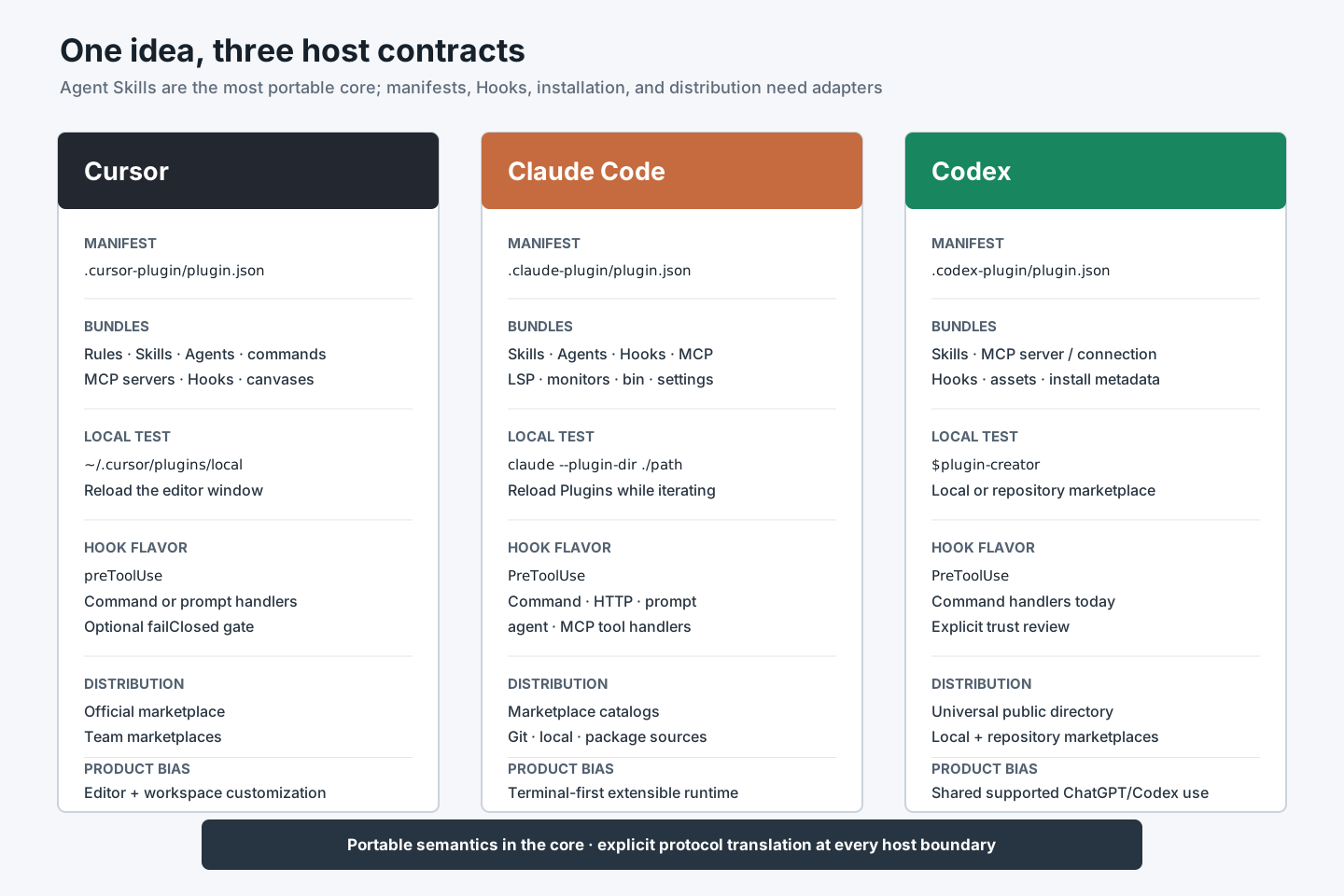
As of August 6, 2026, Cursor, Claude Code, and Codex all use the word “Plugin” for a distributable capability bundle. Their concepts are converging, but their manifests, component sets, installation paths, invocation syntax, marketplaces, and Hook protocols are not interchangeable.
The most portable unit is the Agent Skills open format: a directory centered on SKILL.md. Even there, hosts may add frontmatter extensions and discovery rules. MCP is also an open protocol, but a Plugin’s MCP configuration and authentication flow remain host-specific.
Cursor: an editor-wide customization bundle
Cursor’s official Plugins documentation defines a Plugin as a bundle of Rules, Skills, custom Agents, commands, MCP servers, and Hooks. A Plugin uses .cursor-plugin/plugin.json; components can be discovered in conventional directories. Local development can use ~/.cursor/plugins/local, while official and team marketplaces provide distribution.
This shape reflects Cursor’s product boundary: the Plugin can customize the editor Agent, specialized Agents, inline workflows, MCP connectivity, and workspace lifecycle.
release-guard-cursor/
├── .cursor-plugin/
│   └── plugin.json
├── rules/
│   └── release-policy.mdc
├── skills/
│   └── release-readiness/
│       └── SKILL.md
├── hooks/
│   └── hooks.json
└── mcp.json
Cursor’s manifest requires only name for a minimal Plugin, and default component directories can be auto-discovered. That convenience does not remove the need to declare versions and ownership for team distribution.
Claude Code: a terminal-first extension package with broad runtime components
Claude Code’s Create plugins guide describes Plugins containing Skills, custom Agents, Hooks, and MCP servers. Its Plugin root may also contain LSP server configuration, background monitors, executables added to PATH, and default settings. The manifest is .claude-plugin/plugin.json.
For local development, claude --plugin-dir ./release-guard-claude loads a directory directly. For distribution, a .claude-plugin/marketplace.json catalog can point to local paths, Git repositories, Git subdirectories, or packages; installed Plugin Skills are namespaced, such as /release-guard:release-readiness.
release-guard-claude/
├── .claude-plugin/
│   └── plugin.json
├── skills/
│   └── release-readiness/
│       └── SKILL.md
├── agents/
├── hooks/
│   └── hooks.json
└── .mcp.json
Claude Code explicitly recommends starting with standalone .claude/ configuration for project-specific experiments, then converting to a Plugin for cross-project reuse, releases, and marketplace distribution.
Codex: a package shared across supported ChatGPT and Codex surfaces
OpenAI’s Plugin architecture documentation defines a Plugin around Skills, an optional MCP server, or both. Codex-specific packaging can also include lifecycle Hooks and assets. Every package has .codex-plugin/plugin.json; .mcp.json can describe a bundled MCP server, while .app.json can map a registered server connection.
Public Plugins use a universal directory shared by supported ChatGPT and Codex surfaces. Local and repository marketplaces support authoring, testing, and private distribution. OpenAI recommends $plugin-creator in Codex or @plugin-creator in ChatGPT Work for scaffolding, while manual packages remain ordinary directories.
release-guard-codex/
├── .codex-plugin/
│   └── plugin.json
├── skills/
│   └── release-readiness/
│       └── SKILL.md
├── hooks/
│   └── hooks.json
├── .mcp.json
└── assets/
Installed Plugin availability varies by surface. The current OpenAI Plugins guide documents Plugin browsing in ChatGPT Work, the desktop app, and Codex CLI, while the Codex IDE extension supports standalone Skills but not the Plugin browser. Treat “supported by the ecosystem” and “available in this host” as separate compatibility dimensions.
A practical comparison
| Dimension | Cursor | Claude Code | Codex |
|---|---|---|---|
| Manifest | .cursor-plugin/plugin.json | .claude-plugin/plugin.json | .codex-plugin/plugin.json |
| Typical components | Rules, Skills, Agents, commands, MCP, Hooks | Skills, Agents, Hooks, MCP, LSP, monitors, bin, settings | Skills, MCP connections/servers, Hooks, assets and install metadata |
| Local test | ~/.cursor/plugins/local + reload | claude --plugin-dir ./path | Local/repo marketplace; scaffold with $plugin-creator |
| Skill invocation | /skill-name | /plugin-name:skill-name | $skill-name or host Skill picker |
| Distribution | Official and team marketplaces | Marketplace catalogs from Git/local/package sources | Universal directory plus local/repo marketplaces |
| Primary product bias | Editor and workspace customization | Terminal/IDE agent runtime extensibility | Shared capability packaging across supported ChatGPT/Codex surfaces |
Do not choose a host from this table alone. Choose from the team’s actual execution surface, required component types, security model, and distribution boundary.
4. Hooks: deterministic code around a probabilistic loop
An AI Coding Agent alternates between model reasoning and tool execution:
user request
  → model decides next action
  → tool is requested
  → tool runs
  → result returns to model
  → model continues or stops
Hooks add programmable checkpoints around this loop.
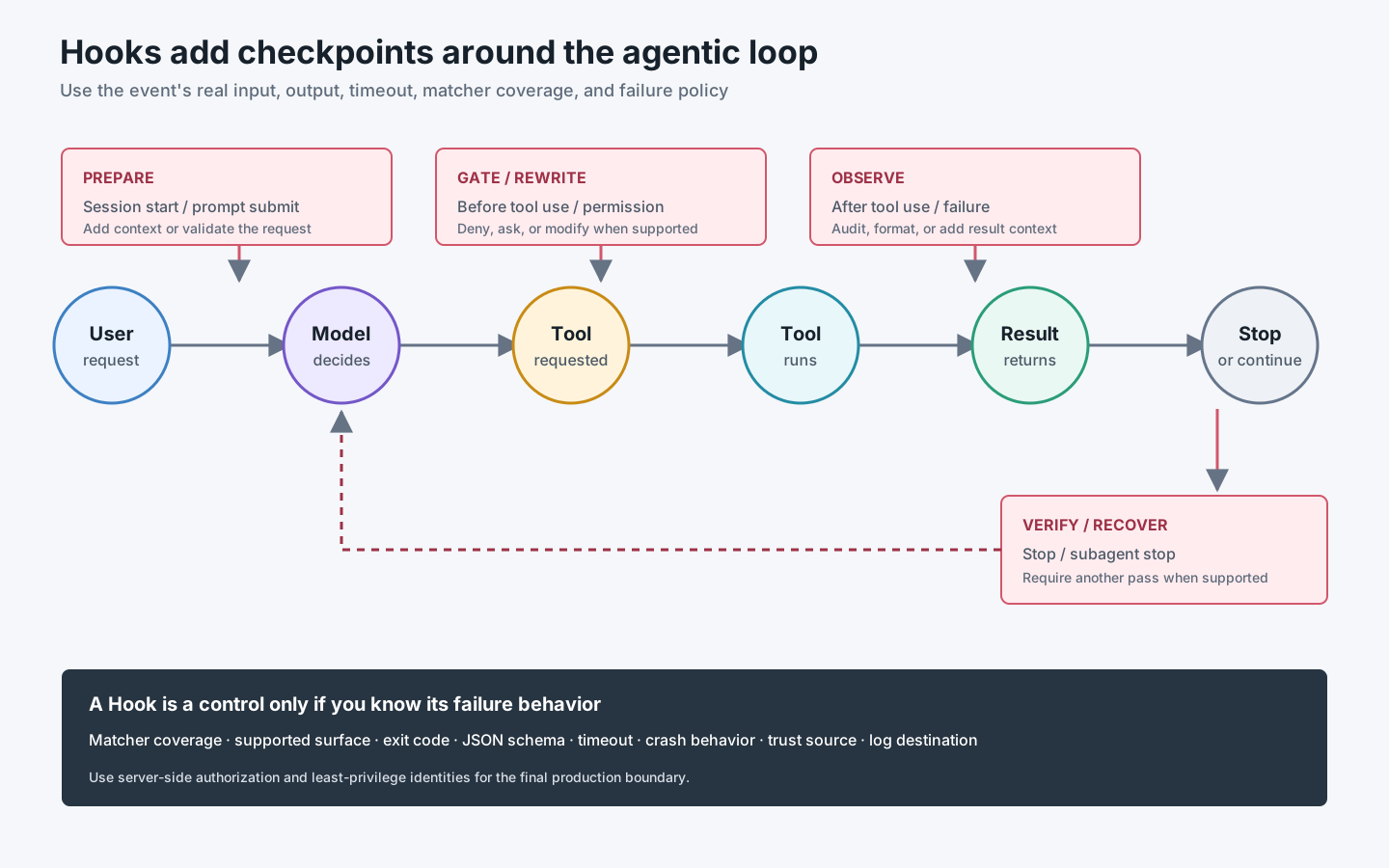
Five jobs cover most useful Hooks:
| Job | Typical event | Example | Can it affect the current action? |
|---|---|---|---|
| Prepare | Session start / prompt submit | Load environment facts or validate prompt shape | Adds context or blocks, host permitting |
| Gate | Before tool use / permission request | Deny publishing, secret access, or an unsafe MCP call | Yes |
| Normalize | Before or after an edit/tool | Rewrite a supported input or run a formatter | Depends on host and event |
| Observe | After tool use / session end | Audit duration, command, result, or failure | Usually no retroactive prevention |
| Verify / recover | Stop / subagent stop | Require one more test pass or produce evidence | Can continue the loop, host permitting |
Hook is stronger than a Rule, but narrower than server-side authorization
Suppose the policy is “the Agent may prepare a release but must never publish it.”
- A Rule explains the policy and helps the Agent choose correctly.
- A
PreToolUseHook can block a localnpm publishorgh release createcall. - An MCP server can omit the publish tool entirely or require a server-side approval token.
- Repository or registry permissions can ensure the identity itself lacks production write access.
The robust design uses several layers. A Hook on a developer laptop is not a substitute for registry permissions or protected environments.
Event names look similar; contracts differ
All three hosts provide lifecycle events around tool calls, sessions, and completion, but the wire protocols differ.
- Cursor’s Hooks documentation uses events such as
preToolUse,beforeShellExecution,afterFileEdit,subagentStop, andworkspaceOpen. Command Hooks exchange JSON through standard input/output; prompt-based Hooks are also supported. For important gates, Cursor exposesfailClosed: true; failures otherwise proceed by default. - Claude Code’s Hooks reference includes session, prompt, tool, permission, subagent, task, compaction, worktree, file, and MCP-related events. Handler types include commands and other documented handlers such as HTTP, prompt, agent, and MCP tool Hooks.
- Codex’s Hooks documentation includes events such as
PreToolUse,PermissionRequest,PostToolUse,SessionStart,SubagentStop, andStop. Matching command Hooks run concurrently, and non-managed command Hooks require review and trust. Plugin Hooks can usePLUGIN_ROOTandPLUGIN_DATA.
Even capitalization is part of the host contract: Cursor uses preToolUse, while Claude Code and Codex document PreToolUse. Never copy a Hook config between products merely because the event sounds familiar.
Understand fail-open and fail-closed before calling a Hook a control
A security gate has at least four failure cases:
- the matcher does not run;
- the Hook crashes;
- the Hook times out;
- the Hook returns invalid output.
If any of those cases lets the action proceed, the Hook is fail-open. That may be appropriate for telemetry or formatting, where availability matters more than enforcement. It is usually wrong for a secret boundary or production write gate.
Ask these questions for every Hook:
Which event fires?
Which tools does the matcher actually cover?
What exact JSON arrives?
What output blocks or rewrites?
What happens on timeout, crash, or malformed output?
Does the Hook run in local, IDE, cloud, subagent, and headless modes?
Who can change or trust the Hook?
Where do its logs and secrets go?
Hooks execute code from configuration: installation is a trust event
Plugin Hooks and scripts are executable supply-chain content. Review them as code, not prose.
Minimum controls include:
- pin or review the Plugin source and version;
- keep scripts inside the package and resolve paths from the Plugin root;
- avoid placing secrets in Hook output, transcripts, or command lines;
- use least-privilege identities for MCP and shell actions;
- cap time and output size;
- make network destinations explicit;
- record decisions without logging sensitive payloads;
- test denial, timeout, malformed input, and missing dependency cases;
- provide a way to disable or roll back the Plugin.
Codex’s trust review for changed non-managed command Hooks is a useful reminder: upgrading executable configuration is equivalent to reviewing new code.
5. Choose the smallest correct surface
Use this decision sequence before creating a package:
Does it apply only to this request?
  yes → Prompt
  no
Does every task in this repository need it?
  yes → Rule / AGENTS.md / CLAUDE.md
  no
Is it a repeatable workflow with a recognizable goal?
  yes → Skill
  no
Does it need live external data or a controlled external action?
  yes → MCP / connector (possibly used by the Skill)
Does code have to run at a lifecycle boundary regardless of model choice?
  yes → Hook
Do several of these need one install, version, and distribution path?
  yes → Plugin
Mixed requirements should split across surfaces. For release-guard:
| Requirement | Surface | Reason |
|---|---|---|
“This release is v3.2.0 for enterprise customers” | Prompt | Varies per run |
| “This repository uses Changesets and pnpm” | Rule | Stable repository fact |
| “Collect evidence, classify risk, and render a decision” | Skill | Reusable workflow |
| “Read current PR checks and approvals” | GitHub MCP / connector | Live authenticated data |
| “Do not let the Agent publish or create a release” | Pre-tool Hook plus real permissions | Mechanical enforcement |
| “Install and update all of the above together” | Plugin | Distribution and lifecycle |
6. Design the capability contract before the directory
Our Plugin’s purpose is deliberately narrow:
Prepare and verify a release decision. Never perform the production release.
Define the contract before writing manifests.
Inputs
- release range or target version;
- repository and target environment;
- change evidence from Git and, when connected, GitHub;
- repository release policy;
- optional human approval evidence.
Outputs
- decision:
READY,NOT_READY, orNEEDS_REVIEW; - failed and passed checks with evidence;
- migration, compatibility, and rollback notes;
- unresolved questions;
- no production mutation.
Prohibited actions
- create or push tags;
- create a GitHub Release;
- publish packages;
- deploy to production;
- weaken branch, registry, or environment protection.
Dependencies
gitis required;- a GitHub MCP/connector is optional and must remain read-only for this workflow;
- Hook runtime requires Python 3 in this tutorial implementation;
- each host adapter declares its supported surfaces.
This contract is more important than the directory tree. It prevents the Plugin from becoming “all release automation.”
7. Build a portable core and thin host adapters
Do not force one native package to run unchanged everywhere. Maintain one semantic core and small adapters.
release-guard/
├── core/
│   ├── skills/
│   │   └── release-readiness/
│   │       ├── SKILL.md
│   │       ├── references/
│   │       │   └── decision-policy.md
│   │       └── scripts/
│   │           └── collect-local-evidence.sh
│   └── hooks/
│       └── guard_core.py
├── hosts/
│   ├── cursor/
│   │   ├── .cursor-plugin/plugin.json
│   │   └── hooks/hooks.json
│   ├── claude/
│   │   ├── .claude-plugin/plugin.json
│   │   └── hooks/hooks.json
│   └── codex/
│       ├── .codex-plugin/plugin.json
│       └── hooks/hooks.json
├── tests/
│   ├── skill-cases.yaml
│   └── hook-cases.json
└── README.md
The source repository can use this layout, but published artifacts should be assembled so each host sees its expected files at the Plugin root. A build script can copy the shared skills/ and core Hook code into three output directories.
Step 1: write the shared Skill
core/skills/release-readiness/SKILL.md:
---
name: release-readiness
description: >-
  Assess whether a software release is ready from a version range, local Git
  evidence, pull requests, and required checks. Use for release review, go/no-go
  decisions, or release risk summaries. Do not use to publish or deploy.
---

# Assess release readiness

## Inputs

Require a release range or target version and the target environment. Ask when
either is missing. Read repository instructions before collecting evidence.

## Workflow

1. Collect local commits and changed paths without modifying the repository.
2. If an authorized GitHub read tool exists, collect linked PR checks, reviews,
   and unresolved conversations. Otherwise label that evidence unavailable.
3. Read `references/decision-policy.md` and classify each required check.
4. Return `READY` only when every mandatory check has passing evidence.
5. Return `NOT_READY` for a failed mandatory check and `NEEDS_REVIEW` when
   required evidence is unavailable or ambiguous.
6. Include evidence identifiers and recommended next actions.

## Safety

Do not create tags, releases, deployments, or package publications. Do not ask
for write credentials. Never convert missing evidence into a pass.
The Skill captures judgment. It does not contain installation commands for three hosts and does not pretend an optional GitHub connection always exists.
Step 2: keep the Hook policy independent of protocol
core/hooks/guard_core.py contains a pure decision function:
import re

PUBLISH_PATTERNS = (
    r"\bnpm\s+publish\b",
    r"\bpnpm\s+publish\b",
    r"\bgh\s+release\s+create\b",
    r"\bgit\s+push\b[^\n]*\s--tags\b",
)


def denial_reason(command: str) -> str | None:
    if any(re.search(pattern, command) for pattern in PUBLISH_PATTERNS):
        return (
            "release-guard prepares release evidence but does not publish. "
            "Run the release-readiness Skill and use the approved human release path."
        )
    return None
This is intentionally not a complete shell parser. The test suite must include quoting, command chaining, wrappers, and false positives. For a high-assurance boundary, remove production credentials from the Agent identity and enforce approval on the server or deployment platform.
Each host adapter performs only three tasks:
- read the host’s Hook JSON;
- extract the command;
- translate
denial_reasoninto the host’s documented response schema.
That separation lets policy tests remain stable when a host changes its Hook wire format.
Step 3: package for Cursor
Minimal hosts/cursor/.cursor-plugin/plugin.json:
{
  "name": "release-guard",
  "version": "1.0.0",
  "description": "Review release readiness and block direct publication",
  "author": { "name": "Platform Engineering" }
}
Cursor discovers conventional component directories. Its preToolUse adapter returns the documented flat permission shape:
{
  "permission": "deny",
  "user_message": "Direct publication is outside release-guard's boundary.",
  "agent_message": "Prepare evidence and use the approved human release path."
}
Configure failClosed: true for this gate after verifying that the Hook runtime and dependencies exist on every supported environment. A fail-closed Hook with a missing Python executable can block all matched commands; that is safer than an unintended publish, but still an operational outage.
Local test:
ln -s /absolute/path/to/dist/cursor-release-guard \
  ~/.cursor/plugins/local/release-guard
Reload Cursor, verify the Rule and Skill appear in Customize, then run both allowed and denied command cases.
Step 4: package for Claude Code
hosts/claude/.claude-plugin/plugin.json:
{
  "name": "release-guard",
  "version": "1.0.0",
  "description": "Review release readiness and block direct publication",
  "author": { "name": "Platform Engineering" }
}
Claude Code loads Skills from the Plugin’s skills/ directory and Hooks from hooks/hooks.json. The Hook adapter can return a PreToolUse denial using the host’s documented hookSpecificOutput format. Test the assembled package directly:
claude --plugin-dir ./dist/claude-release-guardThen invoke:
/release-guard:release-readiness v3.1.0..v3.2.0 for productionUse /reload-plugins after iterative changes. Add a marketplace only after the direct-directory test passes.
Step 5: package for Codex
hosts/codex/.codex-plugin/plugin.json explicitly points to bundled components:
{
  "name": "release-guard",
  "version": "1.0.0",
  "description": "Review release readiness and block direct publication",
  "skills": "./skills/",
  "hooks": "./hooks/hooks.json"
}
Codex Plugin Hooks receive PLUGIN_ROOT for read-only package files and PLUGIN_DATA for writable state. Do not write caches back into the installed Plugin directory. The PreToolUse adapter returns the documented hookSpecificOutput.permissionDecision: "deny" response.
The fastest scaffold is:
$plugin-creator

Create a release-guard plugin with the release-readiness skill and a PreToolUse
hook. Add it to a personal marketplace for local testing. The hook must block
direct package publication, tag pushes, and GitHub Release creation.
For a manual repository marketplace, place the catalog at .agents/plugins/marketplace.json, point its local source.path to the assembled Plugin, restart the desktop app, install it, review the Hook trust prompt, and test in a new task. Codex CLI can add and inspect marketplace sources with codex plugin marketplace add and codex plugin marketplace list.
8. Treat installation, authorization, activation, and success as four states
“The Plugin is installed” proves very little.
installed
  → enabled in this host
  → dependencies available
  → Hook reviewed/trusted
  → connector authenticated
  → identity authorized for required scope
  → Skill activated for the right request
  → workflow produced acceptable evidence
Diagnose each state separately.
| Symptom | Likely layer | Evidence to inspect |
|---|---|---|
| Plugin absent from UI | Marketplace/source/manifest | Catalog source, manifest path, host support |
| Plugin visible but Skill absent | Component discovery | Assembled directory, skills path, new session/reload |
| Skill runs but GitHub data is missing | Connection/auth | Connector state, MCP server health, OAuth scopes |
| Hook never fires | Event/matcher/surface | Event name, tool name, local vs cloud support |
| Hook fires but action proceeds | Output/failure policy | Exit code, JSON schema, fail-open behavior |
| Upgrade changes nothing | Cache/version/session | Manifest version, marketplace refresh, installed cache, restart |
| Workflow completes but result is unreliable | Skill/evaluation | Trigger cases, evidence coverage, acceptance rubric |
This separation prevents an especially common mistake: broadening permissions because a Skill failed to activate.
9. Test the package as a product
Unit tests for scripts are necessary, but a Plugin has more contracts.
Skill routing tests
| Case | Request | Expected |
|---|---|---|
| Direct | “Assess release readiness for v3.1.0..v3.2.0” | Skill activates |
| Indirect | “Can we ship this build?” | Skill activates and asks for range/environment |
| Negative | “Write release notes” | Does not activate; another Skill may apply |
| Boundary | “Publish v3.2.0 now” | Refuses publication and explains approved path |
Hook contract tests
Test each host adapter with captured fixtures:
allowed:     git log v3.1.0..v3.2.0
denied:      npm publish
denied:      gh release create v3.2.0
denied:      git push origin --tags
ambiguous:   bash ./scripts/release.sh
malformed:   missing tool_input
timeout:     adapter exceeds host limit
dependency:  python3 unavailable
The ambiguous wrapper case should drive a design decision. Either parse the script and accept residual risk, block known release wrappers, or move the real boundary to server-side authorization. Do not quietly label it “covered.”
Cross-host compatibility matrix
Record evidence for every supported surface:
| Host | Install | Skill route | Allowed tool | Denied tool | Missing dependency | Upgrade | Uninstall |
|---|---|---|---|---|---|---|---|
| Cursor desktop/CLI | ☐ | ☐ | ☐ | ☐ | ☐ | ☐ | ☐ |
| Claude Code terminal/IDE | ☐ | ☐ | ☐ | ☐ | ☐ | ☐ | ☐ |
| Codex app/CLI | ☐ | ☐ | ☐ | ☐ | ☐ | ☐ | ☐ |
Do not mark a product family as supported because one surface passed. Cloud Agents, IDE extensions, desktop apps, and CLIs can load different components.
End-to-end acceptance
A successful test should leave observable evidence:
- a fresh host discovers and installs the intended version;
- the Skill activates for positive requests and stays inactive for negative requests;
- unavailable GitHub evidence becomes
NEEDS_REVIEW, not an invented pass; - an allowed read-only command succeeds;
- each direct publish command is denied with a useful reason;
- the same test passes after an upgrade and after rollback;
- uninstall removes the package behavior without leaving an active Hook or connection assumption.
10. Version and operate the capability
A team Plugin needs the same lifecycle discipline as an internal library.
Version the contract, not only the manifest
Use semantic-version intent:
- Patch: wording, examples, or implementation fixes that preserve triggers and outputs;
- Minor: backward-compatible Skill, Hook, or tool additions;
- Major: changed trigger scope, removed components, new required permissions, Hook behavior changes, or incompatible MCP schemas.
A Hook that begins denying a command it previously allowed is behaviorally significant even if the code change is three lines.
Publish a compatibility record
For every release, record:
- supported hosts and minimum versions;
- bundled component versions;
- required local runtimes;
- MCP endpoints and OAuth scopes;
- Hook events and failure policy;
- data read, transmitted, and stored;
- migration and rollback steps;
- owner and support route.
Measure outcomes, not installs
Useful Plugin health measures include:
| Measure | What it reveals |
|---|---|
| Skill false-positive and false-negative rate | Routing quality |
| Mandatory evidence coverage | Workflow reliability |
| Hook deny count by reason | Policy pressure and false positives |
| Hook failure/timeout rate | Control availability |
| Manual rework after decision | Output usefulness |
| Version adoption and rollback rate | Distribution health |
Do not collect full prompts or tool payloads by default. Telemetry itself needs a data-minimization and retention policy.
11. Common anti-patterns
1. “Plugin” means a zip of unrelated utilities
If components do not share one user goal, permission boundary, or lifecycle, split them. Installation convenience is not architectural cohesion.
2. Rules duplicate Hook logic
Keep the human-readable reason in Rules or Skill safety guidance, but implement the mechanical decision once in testable Hook policy. Contradictory copies drift.
3. One Hook becomes a second Agent
A lifecycle Hook should inspect, decide, transform, or record with a tight time budget. Long exploratory reasoning belongs in a Skill or subagent workflow, not every tool call.
4. The package requests maximum permissions “for future features”
Permissions are part of the product contract. Add them with the feature that needs them, explain the data flow, and require a new review.
5. Host differences leak into the core policy
If guard_core.py knows three manifest paths and five response schemas, the adapter boundary has failed. Keep shared semantics pure and translations thin.
6. Only installation is tested
A Plugin can install perfectly while its Skill never triggers, its Hook fails open, or its MCP identity lacks the needed scope. Test the full state chain.
7. Updates have no rollback
Keep prior known-good artifacts or immutable refs, especially when Hooks can block work. “Fix forward” is not a plan when the Plugin prevents the command needed to fix it.
12. A Plugin engineering card
Complete this before implementation:
Plugin name:
Single user outcome:
Non-goals:

Stable repository guidance (Rules):
Reusable workflows (Skills):
Live data/actions (MCP/connectors):
Lifecycle controls (Hooks):
Assets or UI:

Supported hosts and surfaces:
Portable core:
Host adapters:

Required permissions:
Data sent outside the machine:
Hook failure mode:
Trust/review flow:

Positive routing cases:
Negative routing cases:
Denied action cases:
Upgrade test:
Rollback test:

Owner:
Version policy:
Deprecation signal:
Success measures:
If the “single user outcome” needs a paragraph, the package probably contains several Plugins.
Conclusion: engineer the boundary, then package the capability
Rules, Skills, MCP, Hooks, and Plugins are not stages where each newer item replaces the previous one.
They solve different coordination problems:
- Rules make stable expectations visible to the model.
- Skills turn expert judgment into an on-demand workflow.
- MCP connects live systems through typed, authorized capabilities.
- Hooks run deterministic controls at lifecycle boundaries.
- Plugins make a coherent set discoverable, installable, versioned, and operable.
The best Plugin is not the one with the most components. It is the smallest package that lets another person install a capability, understand its permissions, obtain the intended result, observe failures, upgrade it, and remove it without the original author standing nearby.
For cross-agent work, design around a portable semantic core and accept that host contracts differ. Port the Skill where the open format fits. Adapt manifests, Hook schemas, invocation, and distribution explicitly. That small amount of honest duplication is cheaper than pretending three different runtimes are one platform.
Authoritative references
Product behavior and availability in this article were checked on August 6, 2026.
- Cursor Docs: Plugins
- Cursor Docs: Rules
- Cursor Docs: Agent Skills
- Cursor Docs: Hooks
- Claude Code Docs: Create plugins
- Claude Code Docs: Plugins reference
- Claude Code Docs: Create and distribute a plugin marketplace
- Claude Code Docs: Hooks reference
- Claude Code Docs: How Claude remembers your project
- OpenAI Developers: Plugin architecture
- OpenAI Developers: Package your plugin
- OpenAI: Build plugins
- OpenAI: Hooks
- OpenAI: Plugins
- Agent Skills open specification
- Model Context Protocol specification