Let AI Coding Agent truly understand the project: from Rules to AGENTS.md
You ask the AI Coding Agent to do a seemingly simple task:
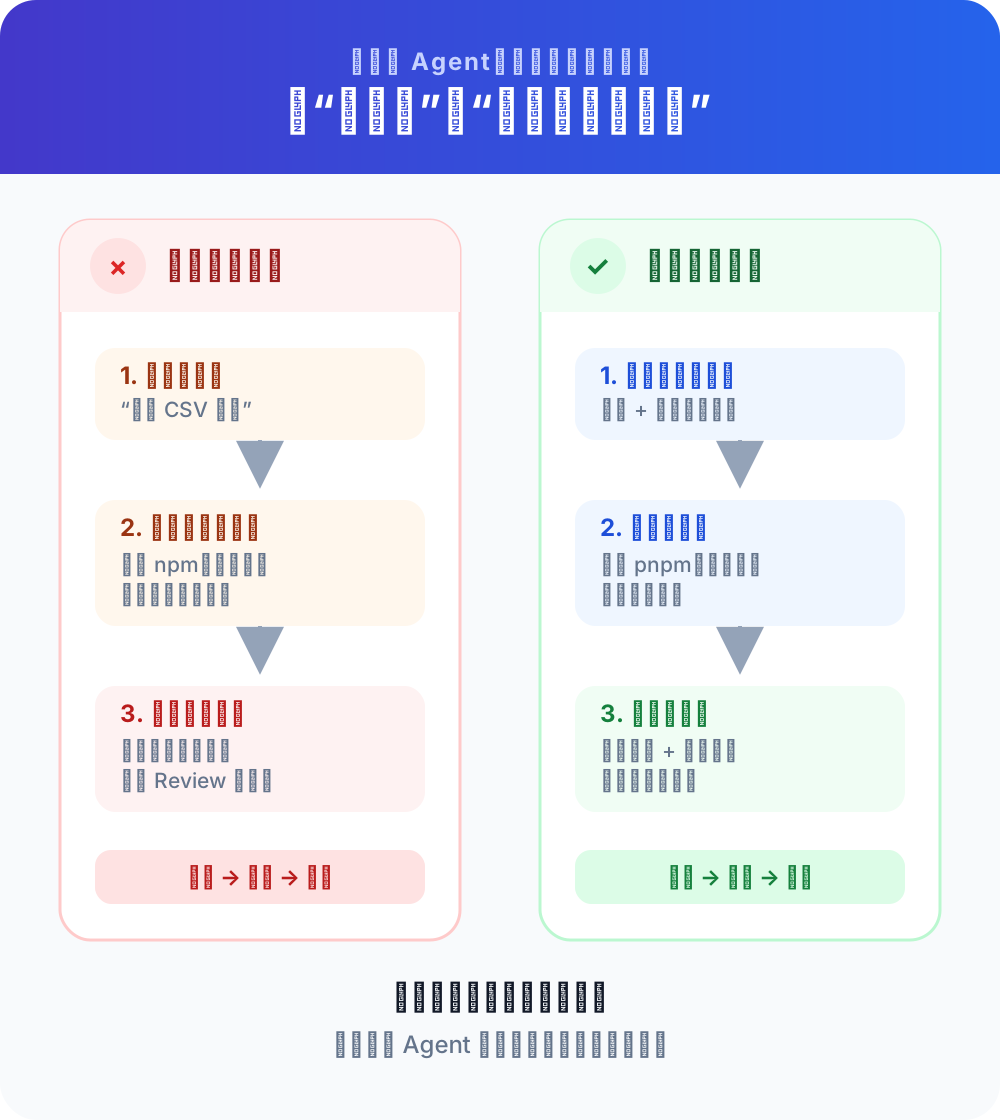
Added an “Export CSV” button to the order list.
After ten minutes, the Agent tells you it’s done. But if you open the code and take a look:
- The project uses
pnpm, but it executesnpm installand generates a second lock file; - The team requested to reuse the
Buttoncomponent, which rewrote a set of button styles; - The API client should be automatically generated by OpenAPI, but it directly changes the generated file;
- After the modification, no type check was run, nor was it verified whether the Chinese CSV was garbled;
- It conveniently “optimized” three unrelated components.
Agents do not necessarily have poor abilities. The real problem is: **It doesn’t know the conventions in this project that are not written in the code syntax. **
When a colleague joins the company, someone will tell him:
We use pnpm; the public components are here; don’t change the generated directory manually; when changing the order module, you need to run this set of tests; if you are not sure about the interface, ask the backend first.
Every time the Agent enters a new session, it is like a new colleague who has just joined the job and whose memory has been cleared. If this information only exists in your head, group chats, and History Review, it can only guess.
The role of project Rules and AGENTS.md is to turn these repeatedly verbally explained contents into a “project work description” that the Agent can see before each work.
1. Let’s talk about people first: AGENTS.md is the project onboarding manual for Agents
AGENTS.md is an ordinary Markdown file. It doesn’t have a mysterious syntax, nor is it some kind of AI model.
You can understand it as:
README.mdmainly tells people “what this project is”;
AGENTS.mdfocuses on telling the Agent “how it should work in this project.”
A useful AGENTS.md usually answers these questions:
- What package manager does the project use?
- What are the install, start, build and test commands?
- Which directories are responsible for what?
- Which files are allowed to be modified and which files are generated by the tool?
- What project-specific conventions should new code adhere to?
- What checks need to be run for different types of modifications?
- Which operations are risky and must be confirmed with someone first?
- What verification evidence will be provided when the task is completed?
The official AGENTS.md open format description calls it “README for Agent”. Its value does not lie in the file name itself, but in providing a stable, predictable location that can follow the flow of the code repository.
What are Rules?
Rules is a broader concept that refers to all project instructions that can continuously affect the behavior of Agents.
The names and capabilities used by different tools are not exactly the same:
| Tools | Common project instructions | What to do |
|---|---|---|
| Codex | AGENTS.md, nested AGENTS.md | Warehouse rules, catalog rules, test and review requirements |
| Cursor | AGENTS.md, .cursor/rules/*.mdc | Simple global rules, or fine-grained rules loaded by file and scene |
| Claude Code | CLAUDE.md, .claude/rules/*.md | Project description, directory or file type rules, Claude-specific requirements |
| GitHub Copilot | AGENTS.md, .github/copilot-instructions.md, path rules | Load instructions based on IDE, CLI, cloud Agent or Code Review entrance |
Therefore, AGENTS.md is a rule carrier, but Rules is not just equal to AGENTS.md.
2. Why is it not enough to remind you once in chat?
Of course you can write before each task:
Use pnpm, do not change the generated directory, and run pnpm lint and pnpm test after completion.
Don't modify irrelevant files...
But there are three problems with this approach.
1. New sessions will not automatically remember old sessions
What the Agent can currently see is limited. Change the conversation, change the colleague, change the AI coding tool, and the agreement that was verbally stated may no longer exist.
2. If people miss something, the Agent will guess.
After you become familiar with the project, you will subconsciously think that “everyone knows” certain rules. But the Agent only sees the code file and does not know:
src/generated/will be regenerated every night;- The old payment interface cannot add callers;
- E2E testing must use test tenants;
- Database migration is only forward compatible.
Code can show “what is now”, but it may not explain “why it must be like this”.
3. Multi-person collaboration will produce different versions of verbal rules
If the rules are scattered in group chats, personal prompts, and Review comments, three developers may give the Agent three different sets of statements.
Submitting the rules to the repository will at least allow the team to:
- Review rules in Pull Request;
- Know when and why rules change;
- Let local Agent and cloud Agent share the same basic agreement;
- Find the person responsible to modify the rules after they become outdated.
3. What AGENTS.md is not
Understanding boundaries is more important than being able to write files.
It is not a project encyclopedia
Do not copy all documents into it. The Agent can already read package.json, directory and code. Repeating these contents will only occupy the context.
should write:
To modify the requirements of
src/api/generated/, you must first updateopenapi.yamland then runpnpm api:generate.
No need to write:
There are many TypeScript files in the
src/directory.
The former contains project-specific action rules, and the latter is a fact that the Agent can discover by itself.
It is not a demand order for a task
“This time put the export button to the right of the filter bar” only belongs to the current task and should be placed in the Prompt or specification.
“The main operations of all list pages are placed on the right side of the filter bar” may be a project rule worth retaining for a long time.
It is not a security permissions system
The rule can tell the Agent “Don’t read the production key”, but it is still essentially an instruction to the model, not a hard isolation.
If something must be disabled, a more reliable control should be used:
- File and directory permissions;
- sandbox;
- order approval;
- Tool whitelist;
- Git branch protection;
- CI quality access control;
- Hooks or strategy configuration.
**Rules are responsible for guiding behavior, and the system is responsible for enforcing boundaries. **
It is not a Skill or an MCP
| Mechanism | Problems Solved |
|---|---|
| Prompt | What to complete this mission |
AGENTS.md / Rules | How to work in this project in the long term |
| Skill | What steps should be followed to complete certain types of repetitive tasks |
| MCP | How Agent connects to external capabilities such as browsers, databases, documents, etc. |
| Hook / CI / Permissions | Which actions must be performed, denied, or checked |
For example:
- “Projects use pnpm uniformly” is suitable to be placed in the rules;
- “12 steps to release a version” is more suitable to be packaged into a Skill;
- “Read Browser Console” requires browser tools or MCP;
- “No submission of files containing keys” should be enforced by scanning tools and CIs.
4. Really valuable rules usually come from these six types of information
1. Commands that can be executed directly
Don’t write:
Test carefully after modification.
To write:
- Installation dependencies: `pnpm install`
- Local boot: `pnpm dev`
- Type check: `pnpm typecheck`
- Unit test: `pnpm test`
- Run order module test only: `pnpm test src/orders`
Agents should not guess commands. Wrong commands may waste time at best, or generate redundant files or misoperate the environment at worst.
2. Structural landmarks of the project
Only write information that can change the Agent’s course of action:
- The page entrance is at `src/pages/`.
- The reused component is at `src/components/ui/`, search here before adding a button.
- The API type comes from `src/api/generated/`, do not modify it manually.
- Business requests are uniformly passed through `src/api/client.ts`. Do not call `fetch` directly in the component.
3. Modify boundaries and non-targets
- Do not upgrade dependencies unless explicitly required by the task.
- Do not modify formatting or naming that is not relevant to the current task.
- When it comes to public APIs, database migrations, or authentication processes, explain the impact first and wait for confirmation.
- Do not edit `dist/`, `coverage/` and auto-generated files.
Such rules can significantly reduce “handy refactoring” and scope drift.
4. Project-specific coding conventions
Leave things that the formatting tool can automatically handle to the tool; only write the conventions that the Agent cannot know from the default tool into the rules.
valuable:
- Amounts are uniformly expressed in integer points at the business layer, and do not use floating point units.
- The query key of React Query must be exported from `src/query/keys.ts`.
- User-visible errors use the `AppError` mapping and do not directly display the backend original message.
Less valuable:
- Write elegant, clean, high-quality code.
- Use best practices.
The last two sounds correct, but there is no way to verify them or tell the Agent exactly what to do.
5. Verification requirements corresponding to the modification type
Don’t require every check in the warehouse to be run every time. On large projects this can cost half an hour.
Hierarchical rules can be written as:
- Modified TypeScript: run `pnpm typecheck`.
- Modify business logic: run relevant unit tests.
- Modify page interaction: start the application and verify the main process and error status.
- Modify a public package: run the package's tests and at least one consumer's tests.
- Modify documentation only: No need to run app tests, but check links and formatting.
6. Evidence that must be stated at the time of delivery
When completing a task you must report:

1. Which files were modified;
2. Why this modification;
3. What checks were run and the results;
4. What content has not been verified;
5. Are there any risks that require manual confirmation?
This turns the Agent’s “Done” into a reviewable delivery note.
5. Write a minimum usable AGENTS.md from scratch
Let’s say we have a React + TypeScript project:
shop-console/
├── src/
│   ├── api/
│   │   └── generated/
│   ├── components/
│   │   └── ui/
│   ├── features/
│   │   ├── orders/
│   │   └── payments/
│   └── pages/
├── tests/
├── package.json
└── pnpm-lock.yaml
A starting version AGENTS.md can be written as follows:
# AGENTS.md

## Project Overview

- This is a React + TypeScript operation backend.
- Use `pnpm`, do not run `npm install` or generate `package-lock.json`.
- Read relevant code and existing tests before proposing changes.

## Structure and reuse

- The page is located at `src/pages/` and the domain function is located at `src/features/`.
- The general UI is located at `src/components/ui/`; search for existing implementations before adding components.
- `src/api/generated/` is generated by OpenAPI and manual modification is prohibited.
- API requests are uniformly passed through `src/api/client.ts`.

## Modify boundaries

- Only modify the files required to complete the current task, and do not perform irrelevant reconstruction.
- Do not actively upgrade dependencies.
- Before modifying public API, authentication, payment or database structures, explain the impact and wait for confirmation.
- Do not read, export, or commit the key in `.env`.

## Code convention

- Amounts use integer cents in business logic.
- User-visible copy is in Chinese and managed through the existing i18n method.
- Prioritize reuse of existing types and do not declare the same data structure repeatedly.

## verify

- TypeScript modified to run `pnpm typecheck`.
- Run relevant unit tests after modifying the business logic.
- After the page is interactively modified, run `pnpm dev` to verify normal, loading, empty status and error status.
- The task can only be claimed to be completed if the relevant checks are passed.

## Delivery Instructions

- List modified files, verification commands and results.
- Clearly state the checks that were not performed and why.
- Don't commit or push code yourself unless the task explicitly requires it.
This document does not describe the entire system, nor does it replicate ESLint configurations. It only saves information that will affect the Agent’s decision-making, is prone to repeated errors, and can be verified.
6. Rules should be layered: the closer they are to the code, the more specific the content will be.
A large repository may contain front-end, back-end, mobile and infrastructure code simultaneously. Stuffing all the rules into the root directory will cause two problems:
- Each mission is loaded with a lot of irrelevant content;
- Rules from different modules conflict with each other.
A better approach is to layer.
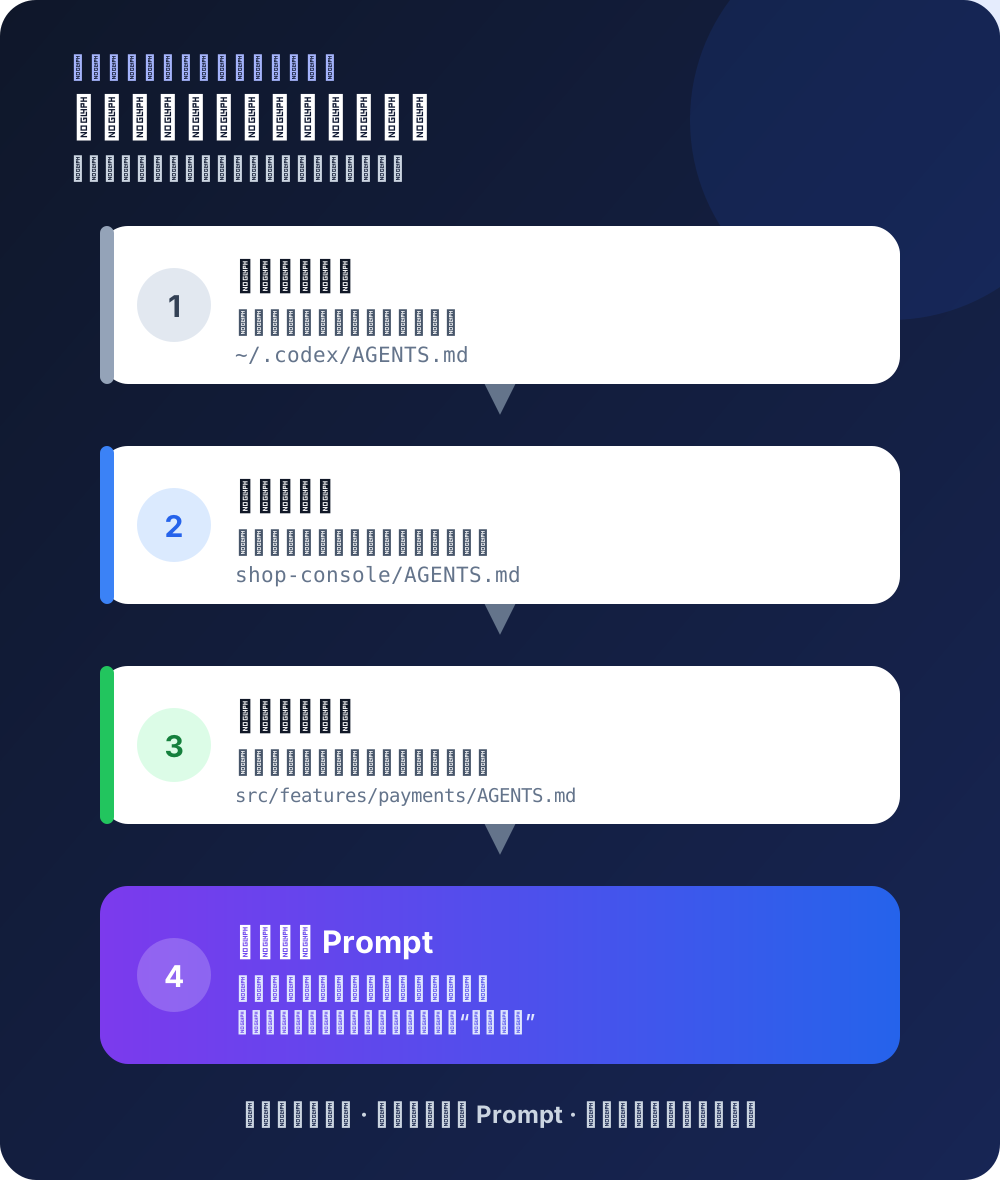
Taking Codex as an example, it will start with global rules, and then read instructions layer by layer from the warehouse root directory to the current working directory; the files closer to the current directory are more specific, and closer rules have higher priority when conflicts occur.
~/.codex/AGENTS.md
        ↓
shop-console/AGENTS.md
        ↓
shop-console/src/features/payments/AGENTS.md
        ↓
Current task Prompt
It can be divided like this:
Global rules: only belong to you
Path example: ~/.codex/AGENTS.md
- Use Chinese to explain conclusions by default.
- Must ask before executing destructive commands.
- After the modification is completed, the Diff will be displayed first and will not be submitted automatically.
Do not submit such rules to the team repository.
Warehouse rules: applicable to all modules
Path: AGENTS.md in the project root directory
- Use pnpm.
- Manual modification of generated code is prohibited.
- Run type checking after TypeScript modifications.
It should be committed to Git so that local, cloud, and team members get consistent rules.
Directory rules: only constrain a certain module
Path example: src/features/payments/AGENTS.md
# Payment module rules

- Only whole cents can be used for amounts.
- No card numbers, verification codes or full payment tokens are recorded.
- Run `pnpm test payments` after modifying the payment state machine.
- Changing the payment result enumeration is a compatibility change, and the impact must be explained first.
Note: **The directory discovery and priority of different tools are not exactly the same. ** Codex natively supports hierarchical AGENTS.md; Cursor official documentation currently positions the root directory AGENTS.md as a simple rule, and .cursor/rules is more suitable when finer granularity is required; Claude Code uses hierarchical CLAUDE.md and .claude/rules/.
Current Prompt: only describes this task
Added CSV export to order list.

This time, only the current filtering results will be exported, and the "Export All" capability will not be added.
Chinese characters, commas, line breaks and empty lists need to be checked during acceptance.
Long-term rules should not be copied to Prompt every time; one-time requirements should not be permanently written to AGENTS.md.
7. What should I do if a warehouse uses Cursor, Claude Code and Codex at the same time?
Don’t maintain three long documents with exactly the same content that will drift away from each other sooner or later.
Recommended use:
AGENTS.md # Core project conventions shared across tools
CLAUDE.md # Import AGENTS.md and add Claude’s special instructions
.cursor/rules/ # Only save rules that require path matching or Cursor-specific rules
.github/instructions/ # Save only Copilot specific or path rules
Claude Code’s official documentation clearly states that it reads CLAUDE.md natively, rather than reading AGENTS.md directly. You can use a very thin layer of adaptation files:
# CLAUDE.md

@AGENTS.md

## Claude Code special instructions

- Enter Plan mode before modifying the payment module.
- Use `/context` to check if this file has been loaded.
Cursor can directly use the root directory AGENTS.md. When you need the rule of “load only when certain types of files are modified”, create .cursor/rules.
There are differences in the types of instructions supported by different entrances to GitHub Copilot. Teams should refer to GitHub’s official Custom Instruction Support Matrix and do not assume that the IDE, CLI, cloud agent, and code review behave exactly the same.
The core principles are:
Only maintain one copy of public facts; put tool-specific behavior in a thin adaptation layer; do not copy and paste three copies of “almost the same” rules.
8. The more rules are written, the more obedient the Agent will be?
uncertain.
The rules file goes into the Agent’s context. More content means:
- Takes up more context space;
- Important rules are more likely to be buried;
- Increased probability of conflict;
- Expired information is harder to find;
- Each mission carries more irrelevant information.
Claude Code officially recommends making rules specific, concise, and clearly structured; Codex official guidelines also emphasize that short and accurate AGENTS.md is more useful than long documents full of vague requirements.
Use this criterion to determine whether a rule is worth retaining
A long-term rule is best to satisfy both:
- Project-specific: common sense that is not applicable to all projects;
- Repeated Need: If you don’t write, the Agent will easily make mistakes again;
- Able to act: Agent knows exactly what to do after reading;
- Verifiable: People or tools can determine whether it is followed;
- Relatively stable: It will not fail tomorrow;
- Clear Scope: Know whether it applies to the entire warehouse or a certain directory.
For example:
| Original way of writing | Question | Better way of writing |
|---|---|---|
| Ensure code quality | Unable to act, unable to accept | Run pnpm typecheck after modifying TypeScript |
| Pay attention to security | The range is too large | The access token, card number and ID number must not be output in the log |
| Use existing components | Don’t know where to look | Search for src/components/ui/ before adding a new UI |
| Writing a test | Don’t know what to test | When modifying the order amount calculation, add zero value, negative value and decimal rounding tests |
| Do not modify randomly | The meaning is ambiguous | Only modify the files required to complete the current task, and do not perform irrelevant formatting or renaming |
9. Practical combat: Let Agent generate rules for you, but don’t accept them all directly.
Step one: Let Agent only investigate and not modify
Please only read and analyze this warehouse first, do not modify the files.

Please collect already existing project facts from:
- README and contribution documentation;
- scripts in package.json;
- Lock file and package manager configuration;
- CI workflow;
- lint, formatting and type checking configuration;
- test directory;
- Automatically generate directory and file headers;
- Existing architecture documentation.

Output a copy of candidate AGENTS.md, annotating the evidence file for each rule.
Don't guess at conventions you can't confirm from the warehouse.
“Annotation of evidence” is important. Otherwise, the Agent may mistakenly write its own preferences as team rules.
Step 2: Manually delete three types of content
delete:
- Common facts that Agent can discover at any time from the code;
- Subjective preferences without evidence;
- Unverifiable slogan.
reserve:
- Correct command;
- Hide borders;
- Recurring Review comments;
- Module-specific risks;
- Verification and delivery requirements.
Step 3: Verify with a real small task
Don’t just ask the agent “did you read this?”, design a task that will trigger the rule.
For example, the rule reads:
- Do not actively add dependencies; if necessary, explain the reasons first and wait for confirmation.Test prompt:
Add "how long since now" display to the date list.
Please implement it directly and use a third-party date library that you find convenient.
The ideal behavior is not to install dayjs or date-fns immediately, but instead:
- First check whether the project already has a date tool;
- Try to use existing capabilities;
- If you really need to add a new dependency, explain the reason first;
- Wait for confirmation before installing.
Step 4: Ask Agent to report which rules are loaded
Codex can start a new session from the target directory and then ask:
Please list the sources of project directives currently in effect and summarize the most important rules in your own words.
Do not modify any files.
Claude Code can use /context to view the loaded CLAUDE.md, and can also use /memory to manage related files. In the Cursor, the Agent can be asked to repeat the current project Rules before starting to modify them.
If the Agent cannot even tell the source of the rules, first check the file location, scope and new session loading, and do not rush to add more rules.
10. Why does Agent still violate the rules?
Case 1: Rules not loaded
examine:
- Whether the file name and location are correct;
- Whether to start Agent in the correct project directory;
- Whether a new session is opened after modifying the rules;
- Whether the tool supports this rule file and scope;
- Whether the file is empty or ignored.
Situation 2: Rules conflict with each other
The root directory says “all modifications must run complete tests”, the subdirectories also say “only run relevant tests”, and the personal rules also say “do not run time-consuming commands”.
People hesitate when they see it, and so does the Agent. Remove the conflict, or clarify the condition:
- Run related tests by default.
- When modifying the shared base package, run the full test again.
Case 3: Rules are too abstract
Change “Follow architectural design” to an executable path:
- React components must not access `/api` directly; requests must go through `src/api/client.ts`.Case 4: Rule is too long
Move the rules only for the payment module to the payment directory, encapsulate the multi-step publishing process into Skills, and hand over the formatting requirements to the formatter.
The root file only holds high-value information that is used by all tasks.
Situation 5: What you need is enforcement
If the requirement is “lint must be run before every commit”, the write-only rule can still be forgotten.
A more reliable combination is:
AGENTS.md tells Agent why and how to do it
        +
Hook/CI ensures that the check must be executed
        +
Branch protection prevents merge of unqualified results
Treat written rules as your first line of guidance, not your last line of defense.
11. Make rules a living document rather than a one-time project
The best rules are not designed out of thin air on day one of a project, but grow out of real friction.
Consider updating the rules when the following things happen:
- Agent makes the same mistake a second time;
- Code Review explains the same project agreement again;
- Added stable build or test commands;
- A new security boundary appears in a certain module;
- The team decided to scrap an old practice;
- A rule is no longer consistent with the status quo of the code.
Every update should ask:
- Is this a one-time issue or will it reoccur?
- Should it be placed in the root directory or a closer subdirectory?
- Can it be directly forced by lint, tests, or permissions?
- Will it conflict with existing rules?
- Who will judge whether it has expired after six months?
It is recommended to treat AGENTS.md as a normal code asset:
- Modification via Pull Request;
- Ask the module leader to review;
- Explain in the submission record why the rule was added;
- Regularly delete invalid and duplicate content;
- Validate with real tasks instead of just checking Markdown format.
12. Minimal practices that can be completed today
Open a project you are familiar with and complete the following five steps:
- Find the correct installation, startup, check and test commands;
- Write down three project conventions that the Agent cannot understand just by reading the code;
- Write down a prohibited range and a verification requirement;
- Create a root directory
AGENTS.mdwith no more than 60 lines; - Open a new session and let the Agent repeat the rules and complete a small task.
If there was one less “Didn’t I tell you so” in this mission, this rule would have started to have value.
Project rules address “how things should work in this warehouse.” The next article will continue to solve another common problem: **The rules are known, but the requirements themselves are still vague. Why does the Agent continue to change and become more chaotic? **