Why Does AI Coding Ask for Your API Key? A Plain-Language Guide to BYOK
Every AI coding product sits on top of model calls
Claude Code, Codex, and Cursor look like different kinds of products. One lives in the terminal, another is integrated into an editor, and another may behave more like an agent that can carry a task forward. The category also includes IDE extensions, code-review bots, cloud development environments, and internal coding assistants.
The product layer can take many forms, but the core loop is less mysterious: the tool repeatedly assembles requirements, code, and execution results; asks an underlying model what to do next; performs an action; and sends the new evidence back until it reaches a result that can be reviewed.
Understand the request and read the code
  → assemble context and call a model
  → receive analysis, code, or a proposed tool action
  → execute, test, and collect evidence
  → call the model again to correct the result
  → produce something a human can accept
The model supplies language understanding and reasoning. The AI coding product places that capability inside a software-engineering loop: it decides which files to read, how to trim context, whether the model may use a terminal, how edits are applied, when another turn is needed, and how changes and verification results are presented. What users experience as product capability comes from both the underlying model and the way the product orchestrates this loop.
Every product must therefore solve the same foundational problem: how does it obtain access to a model service? Architecturally, that usually means sending inference requests through some API or service interface. It may be a public API from a model provider, or it may be hidden behind the product backend, an enterprise cloud platform, or an internal gateway. The ordinary user may never see that interface, but the call path still exists.
There are two common ways to manage it:
- The product subscription manages it. You sign in and buy a plan. The product arranges upstream credentials, endpoints, model selection, and allowance accounting, hiding that machinery behind the product experience.
- BYOK. You obtain a model-service API key and connect it through a configuration path supported by the tool. You or your organization then control more of the credential, API usage, and associated bill.
The two routes may reach the same underlying model, but they assign access, usage accounting, payment, and credential revocation to different parties. That relationship is what BYOK changes. It is not merely an advanced-looking settings panel.
With that model in place, a familiar question has useful context. You subscribe to an AI coding product, install another editor or CLI, and then see three empty fields:
API Key
Base URL
Model
The interface assumes you already understand the product layer and the model layer. Most people do not when they first encounter these fields.
You may reasonably ask:
- Is the API key the same thing as my product subscription?
- Will entering it charge me twice?
- Does the key contain a model or a token allowance?
- If I bring my own key, does my source code go directly to the model provider?
- Why would I choose this extra complexity at all?
These questions are the real beginning of BYOK. In AI tooling, BYOK usually means Bring Your Own API Key: instead of letting the coding product choose and pay for all model access on your behalf, you connect some of its model calls to an API account whose credentials and bill you control.
The word “own” is important. BYOK gives you more choice and visibility, but it also transfers responsibility. You now have to understand where the request goes, which account pays, what the key can access, and how to revoke it safely.
1. A subscription and an API account are two different purchasing paths
The simplest way to get confused is to treat every payment to the same company as one balance.
A product subscription usually buys access to a finished experience: an editor, coding agent, web app, usage window, or seat. You sign in, and the product handles model credentials and most routing decisions behind the scenes.
An API account buys programmable model access. Software sends a request to an endpoint, authenticates with a credential, names a model, and the associated project or organization records the usage. The provider may charge per token, per tool call, per runtime resource, or through another API pricing rule.
The two paths may share a brand and login email without sharing billing. A paid chat or coding subscription does not automatically turn into general-purpose API credit. Conversely, adding money to an API account does not automatically upgrade the consumer product.
This difference is visible in current products:
- Codex can authenticate through ChatGPT OAuth or through an API key supplied to
codex login; the official Codex command reference lists both paths. - Claude Code supports Claude subscriptions, Claude Console API access, and enterprise cloud providers. Its authentication documentation also defines which credential wins when several are present.
- Cursor lets users configure supported provider keys for some models, while specialized features can continue using Cursor’s built-in models. Its API key documentation describes those limits.
So the first question is not “where do I paste the key?” It is:
Which purchasing path should pay for this request—the product plan or my API account?
2. The five pieces hidden behind three settings fields
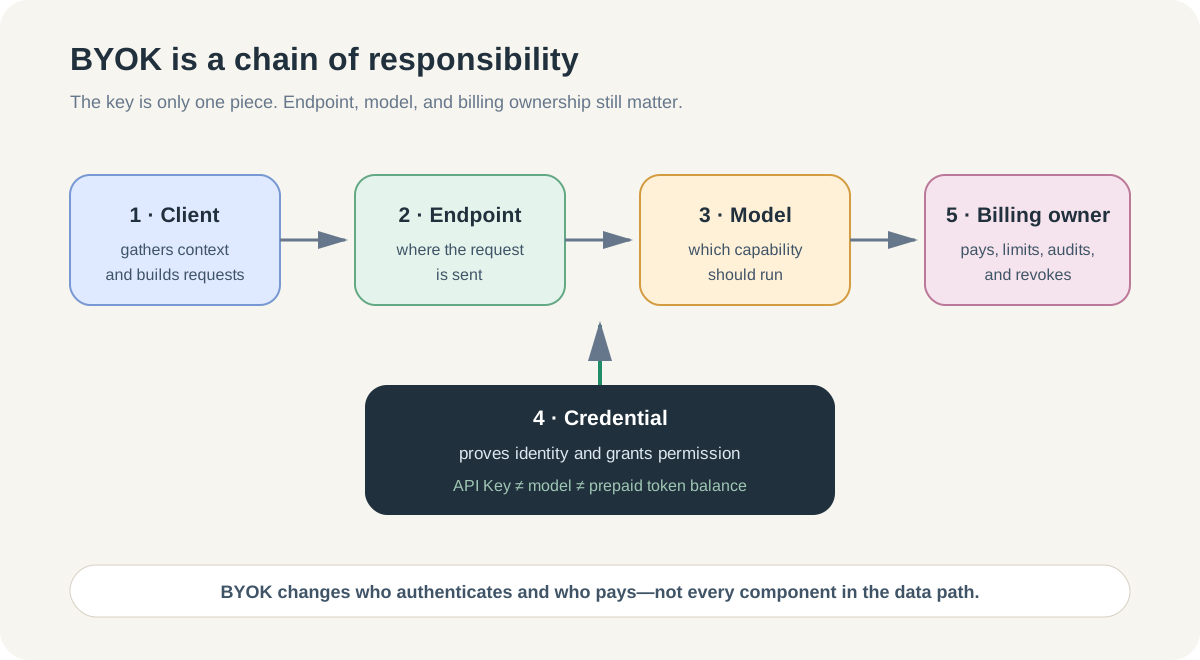
BYOK becomes much easier when you separate five moving parts.
1. The AI coding client
This is the tool you interact with: an editor, terminal agent, extension, or local application. It gathers context, builds prompts, calls tools, and presents the result.
The client is not necessarily the model provider. Cursor can call models from several providers. Claude Code can use Anthropic, enterprise cloud platforms, or a gateway. A compatible client can also point at an alternative endpoint.
2. The API endpoint
The endpoint, often configured as a Base URL, is the network destination to which model requests are sent. It answers “where does the client connect?”
Changing the endpoint can move requests from an official provider API to a cloud platform, company gateway, or third-party relay. This is a routing decision, not a cosmetic setting.
3. The credential
The API key or access token answers “what identity and permissions does this request use?” It is a bearer secret in many APIs: whoever possesses it may be able to spend money or access the project within its permissions.
The OpenAI API authentication reference explicitly treats API keys as secrets, recommends loading them from environment variables or a key-management service, and attributes requests to the associated organization and project.
An API key does not contain prepaid tokens like a gift card. It points to an account or project where permissions, limits, and billing rules live.
4. The model identifier
The model field answers “which capability should the endpoint run?” A valid key can still fail if the project cannot access the requested model, the endpoint uses a different model name, or the client expects an incompatible API shape.
This is why “the key verified successfully” does not prove that every model and agent feature will work.
5. The billing and policy owner
Someone owns the account behind the credential. That owner receives the bill, sets project limits, sees usage, accepts the provider’s data terms, and revokes access after an incident.
For personal experimentation, that person may be you. In a company, a personal key quietly makes one developer the payer and security owner for team work. That is usually the wrong operating model.
Put together, a model call looks like this:
AI coding client
  → sends context to an endpoint
  → authenticates as a project or account
  → requests a model
  → records usage under the billing owner
BYOK changes the credential and billing path. It does not remove the other pieces.
3. What BYOK gives you—and what it does not
What it can give you
Independent usage and billing. API activity appears under the provider, cloud project, or gateway account you control. That can make token and cost analysis more direct than a bundled product allowance.
More explicit model choice. A client may let you select models available to your provider account rather than only the product’s bundled catalog.
A separate limit from the product subscription. When a product allowance is exhausted, an API-funded route may remain available because it is a different account and billing path.
Portable configuration concepts. Endpoint, credential, model, and project are reusable ideas across many coding clients, even when their exact configuration formats differ.
A path toward organizational controls. Project-scoped credentials, cloud IAM, spend alerts, gateways, and audit logs can become part of a managed model-access design.
What it does not guarantee
It does not guarantee lower cost. API list-price billing can be cheaper or more expensive than a subscription depending on task volume, model choice, caching, and included allowances.
It does not guarantee every product feature. Cursor documents that custom keys apply to supported standard chat models while specialized features can continue using built-in models. Other products have their own compatibility boundaries.
It does not guarantee a direct data path. A tool can use your provider key while still sending requests through its own backend for prompt assembly or routing. Cursor’s documentation, for example, notes that requests using a custom key pass through Cursor’s backend for final prompt construction. Always verify the actual data path for the product and feature you use.
It does not make one key universal. OpenAI, Anthropic, Google, Azure, and AWS use different credentials, APIs, permissions, and model names. An “OpenAI-compatible” endpoint may reproduce only part of the protocol.
It does not remove trust. You still trust the coding client, endpoint operator, model provider, local secret storage, and any intermediaries on the path.
4. Four ways an AI coding tool can reach a model
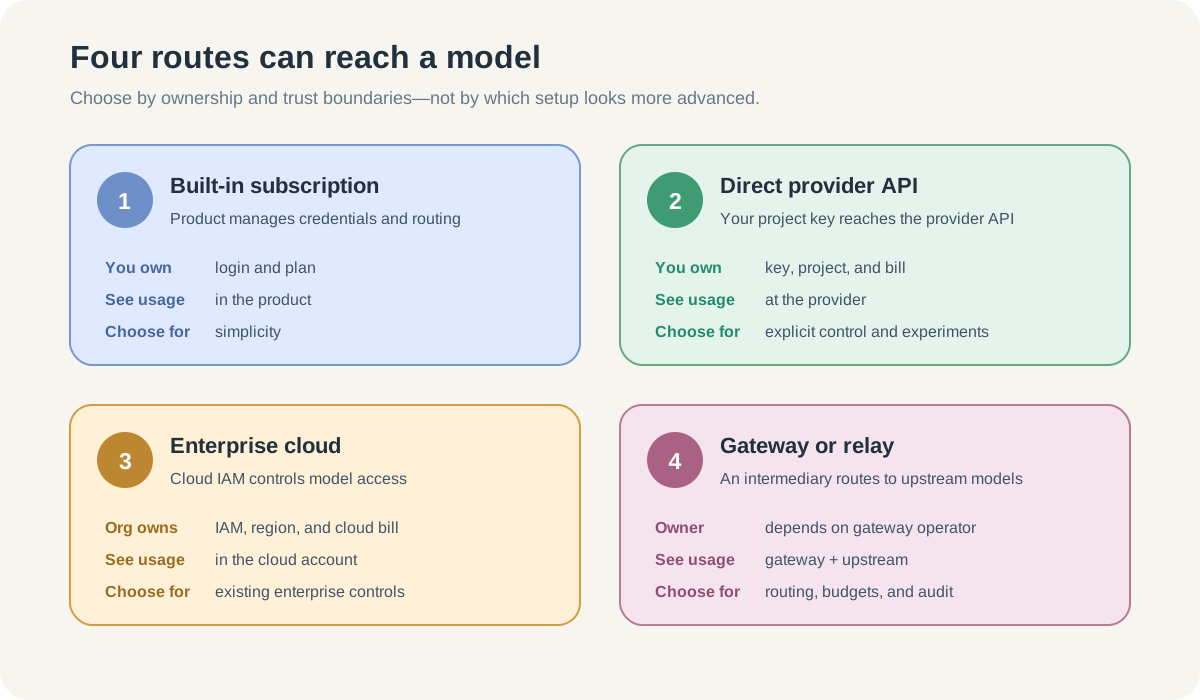
| Route | Who supplies credentials? | Where usage is usually visible | Best fit |
|---|---|---|---|
| Built-in subscription | Product handles it | Product usage or plan page | Lowest setup burden |
| Direct provider API | You or your organization | Provider project and billing dashboard | Explicit model access and pay-as-you-go control |
| Enterprise cloud platform | Cloud IAM or cloud credentials | AWS, Azure, or Google Cloud account | Existing enterprise identity, region, and procurement controls |
| Gateway or relay | Gateway credential; upstream key may be hidden | Gateway plus upstream provider | Central routing, budgets, logging, or protocol adaptation |
These are not maturity levels. A subscription can be the correct answer for an individual who values simplicity. A direct API key can be appropriate for a developer who needs transparent experiments. A cloud platform or gateway can be appropriate when a company already has identity, procurement, and audit requirements.
Official provider, cloud platform, and third-party relay are not interchangeable
With a direct official API, the model vendor is normally both the endpoint operator and billing party.
With a cloud platform, identity and billing may belong to AWS, Azure, or Google Cloud while the model originates elsewhere. Claude Code officially supports several such authentication paths, as documented in its setup and authentication guide.
With a gateway, the client talks to an intermediary. The gateway may map model names, inject upstream credentials, enforce budgets, log requests, or retry across providers. A well-designed organizational gateway can keep provider secrets outside the agent boundary; Anthropic’s secure agent deployment guidance describes this credential-injection pattern.
A public “relay” or “model transfer station” adds another operator to the trust chain. Before using one, establish who runs it, whether it can read prompts and code, what it logs, how model names map to real upstream models, how billing disputes work, and what happens if it disappears. A lower advertised price is not an answer to those questions.
5. A safe first BYOK experiment
Suppose Lin uses a coding subscription for daily work but wants to compare one API model on a small, non-sensitive repository. The goal is not to migrate everything. It is to verify one complete responsibility chain.
Step 1: create a separate API project
Lin creates a project dedicated to this experiment instead of reusing a broad personal or production credential. The project name makes later usage recognizable.
Where the provider supports it, Lin configures a small budget, spend alert, and only the model permissions needed for the test. Project separation limits the blast radius and makes the bill easier to interpret.
Step 2: create a replaceable credential
The key belongs to the experimental project, not to a root or administrator account. Lin stores it in the client’s protected credential flow, operating-system keychain, a secret manager, or the documented environment mechanism.
Lin does not place it in:
- a Prompt or chat message;
AGENTS.md,CLAUDE.md, or a Rule file;- a committed
.envfile; - a screenshot, issue, shell transcript, or shared log;
- browser-side code.
Step 3: record the whole connection profile
The key alone is not enough. Lin writes a non-secret note:
profile: byok-learning
client: chosen coding tool
endpoint_owner: official provider
credential_ref: keychain entry name, not the secret
billing_project: byok-learning
model: selected model identifier
data_path: client → provider API
spend_boundary: small experimental limit
This profile is the beginning of configuration management. It captures why the settings belong together.
Step 4: run one bounded task and verify both ends
Lin asks the tool to explain one small file or make a trivial tested change. Then Lin checks:
- the client reports the expected authentication mode and model;
- the request succeeds without silently falling back to a bundled model;
- the provider usage dashboard records the correct project and model;
- the amount is plausible for the observed request;
- no secret appears in the repository or logs.
For OpenAI API accounts, the Usage API and dashboard can group activity by project, model, user, or API key ID; the official usage reference recommends the Costs view when reconciling financial totals.
Step 5: revoke the key on purpose
At the end of the experiment, Lin revokes the credential and confirms that the route stops working or switches back only through an explicit action. This proves the key was actually controlling the path and practices the response needed after a leak.
The outcome is not “BYOK is installed.” The outcome is evidence that Lin knows who authenticated, where data went, which account paid, and how access ended.
6. How to decide whether BYOK is worth it
Use BYOK when at least one concrete benefit justifies the new responsibility.
| Your situation | Sensible starting point |
|---|---|
| You want the simplest daily experience | Stay with the built-in subscription |
| You need a specific supported model or independent API quota | Try a project-scoped direct API key |
| You need to compare model cost on controlled tasks | Use a small API project with clear labels and limits |
| Your company already governs AI through AWS, Azure, or Google Cloud | Prefer the approved cloud identity path |
| Several tools need shared routing, budgets, or audit rules | Evaluate an organizational gateway |
| You cannot explain the data path or relay operator | Do not enter a production key |
BYOK is a poor fit when the only motivation is “someone online says it is cheaper,” when the repository is sensitive but the data path is unknown, or when a team is about to share one person’s unrestricted key.
The decision should be reversible. Start with one tool, one project, one model, one small limit, and one test task.
7. Common failures and the layer to inspect
| Symptom | Likely layer | First check |
|---|---|---|
401 or “invalid key” | Credential | Typo, revocation, wrong credential type, stale environment variable |
403 or model unavailable | Permission/model | Project role, model access, region, provider policy |
404 or unknown model | Endpoint/model mapping | Base URL, API compatibility, exact model identifier |
429 or quota exceeded | Rate/billing | Project limit, provider quota, exhausted credits |
| Request works but usage appears in the wrong account | Credential precedence | Which key or login actually won |
| Cost appears in both product and provider | Mixed routes | Which features used BYOK and which retained built-in models |
| Code crossed an unexpected service | Data path | Client backend, gateway, logging, and retention documentation |
Credential precedence deserves special attention. Claude Code, for example, documents that an approved ANTHROPIC_API_KEY can take precedence over subscription OAuth. An old environment variable can therefore make a user believe the subscription is broken while the tool is actually trying a stale API organization.
Debug from identity outward: active credential, endpoint, model, limit, then product feature. Randomly replacing all three settings at once destroys the evidence.
8. Security rules that matter from day one
Treat a key as revocable authority, not as a password you keep forever
Create narrow, project-specific credentials. Rotate or revoke them when a device, repository, employee, vendor, or purpose changes. Do not use an organization admin key for model inference.
Do not give the secret to the agent
If the model can see the key in a Prompt, terminal output, or file, assume it can be copied into logs or generated content. Prefer a credential store or an external helper that supplies the secret to the network client without placing it in model context.
Separate configuration from secrets
Endpoint, model name, project label, and routing policy can often be versioned. The credential value should not be. Store a reference to the secret, not the secret itself.
Set an economic blast radius
Use project budgets, spend alerts, rate limits, and restricted permissions where available. A key leak should produce a bounded incident, not an unlimited bill.
Verify the full data path
BYOK controls authentication and billing. It does not automatically answer where prompts are processed or retained. Read the coding client’s policy, the endpoint operator’s policy, and the upstream provider’s policy.
One terminology warning: enterprise security documentation also uses “BYOK” to mean Bring Your Own Key for encryption, where an organization supplies a cloud KMS encryption key. That is a different mechanism from Bring Your Own API Key. Always expand the acronym when the audience or context could be ambiguous.
9. Why this naturally leads to a local control plane
One BYOK profile is manageable. Several tools and providers create repetition:
Tool A: endpoint + credential reference + model
Tool B: another config format for the same route
Tool C: environment variables plus its own model aliases
Then a key rotates, a model name changes, or you want to return to subscription login. Editing every file by hand makes it hard to answer three basic questions:
- Which route is active now?
- Which account will pay for the next request?
- How do I switch back without leaving stale credentials behind?
That is the problem a local configuration manager such as ccswitch should solve. Its purpose is not to teach BYOK or create free model access. Its purpose is to make known connection profiles easier to switch, inspect, and restore across supported AI coding tools.
Understanding BYOK comes first. Otherwise, centralized switching merely lets you make the same routing mistake faster.
Verification checklist
After reading and completing the experiment, you should be able to:
- explain why a product subscription and an API account can bill separately;
- distinguish the client, endpoint, credential, model, and billing owner;
- state that an API key grants authority rather than containing token credit;
- explain why BYOK does not guarantee a direct data path or complete feature coverage;
- choose among a built-in plan, direct API, enterprise cloud, and gateway;
- create a bounded, project-specific experiment and verify usage at both ends;
- revoke the credential and confirm access stops;
- keep secrets out of Prompts, repositories, logs, and screenshots;
- explain why multiple connection profiles create the need for a local control plane.
The important shift is this: an API key is not another mysterious setting. It is the point where identity, routing, billing, and security meet. Once you can name those responsibilities, BYOK becomes a deliberate engineering choice instead of a copied setup recipe.
Authoritative references
- OpenAI API authentication and API-key security
- OpenAI API usage and costs reference
- Official Codex login and authentication commands
- Claude Code authentication and credential precedence
- Claude Code secure deployment and credential injection
- Cursor custom API-key support and limitations
- OpenAI API data controls