Tired of Reconfiguring AI Coding Tools? Build a Local Control Plane with CC Switch
The fifth configuration change is where things go wrong
You start with one AI coding tool and its built-in subscription. There is almost nothing to configure.
Then you add a BYOK profile for an experiment. Later, a work project requires a different provider account. Codex needs one model and endpoint; Claude Code needs another; Gemini CLI has its own environment file. You also want the same MCP server in two tools, but not in a sensitive client repository.
Soon, switching tasks means checking several questions:
- Which API key is active in this terminal?
- Did the Base URL change, or only the model name?
- Is the tool reading a JSON file, a TOML file, or an environment variable with higher precedence?
- Did the last switch preserve MCP and permission settings?
- If a request appears on the wrong bill, which configuration actually won?
The problem is no longer “how do I fill in an API key?” It is configuration state: the intended connection exists in your head, while the effective connection is assembled from scattered files and environment variables.
This article uses CC Switch to build a local control plane for that state. Here, CC Switch specifically means the cross-platform desktop project linked from ccswitch.io and maintained in the official CC Switch repository. Several unrelated repositories use similar ccswitch names and only switch Claude accounts; do not assume their behavior is interchangeable.
By the end, you should be able to explain what CC Switch controls, choose between direct switching and local routing, perform a reversible first rollout, and recognize when a personal control plane is no longer enough.
1. Every client has its own configuration language
The previous BYOK article separated five pieces: client, endpoint, credential, model, and billing owner. The values may be conceptually similar across tools, but their storage and precedence are not.
| Client | Typical user-level configuration | What can override or complicate it |
|---|---|---|
| Claude Code | ~/.claude/settings.json, including an env section | Shell environment variables, official login state, project and managed settings |
| Codex | ~/.codex/config.toml, authentication state under the Codex home directory | Profiles, command-line options, project configuration, official login versus API access |
| Gemini CLI | ~/.gemini/settings.json and .env sources | Project settings, system policy, environment variables, command-line options |
These are not arbitrary examples. Claude Code officially supports variables such as ANTHROPIC_API_KEY and ANTHROPIC_BASE_URL in the shell or the env section of settings.json; an API key can take precedence over a logged-in subscription route. See the Claude Code environment-variable reference and settings documentation.
Codex keeps user configuration in ~/.codex/config.toml and supports model-provider declarations and named profiles. Its official configuration reference also makes clear that some provider and authentication controls are machine-local rather than project-overridable.
Gemini CLI has another layered system: user, project, and system settings, .env lookup, environment variables, and command-line flags all participate in precedence. The official Gemini CLI configuration reference documents those layers.
That creates three forms of drift:
- Value drift: the endpoint, key, or model differs from what you intended.
- Precedence drift: you edited the right file, but a higher-priority environment variable still wins.
- Structural drift: switching a provider replaces a larger configuration fragment and accidentally loses unrelated MCP, permission, or prompt settings.
Copying the same values more carefully does not remove this class of problem. You need a named, inspectable source of intent and a controlled way to project it into each client’s native format.
2. A local control plane is a source of intent, not a new model provider
“Control plane” is an architectural metaphor here. It means the place where you declare and inspect the desired state:
- which provider connection exists;
- which endpoint, credential, protocol, and model belong together;
- which connection is active for each supported client;
- which shared MCP servers, prompts, or Skills should be distributed;
- how to back up or restore those choices.
The client configuration files remain the live state that Claude Code, Codex, Gemini CLI, and other tools actually read. CC Switch stores managed data in a local SQLite database and, when you enable a provider, writes the appropriate fragment to the target tool’s live configuration. Its official documentation describes the database as the single source of truth and documents the files modified during provider switching.
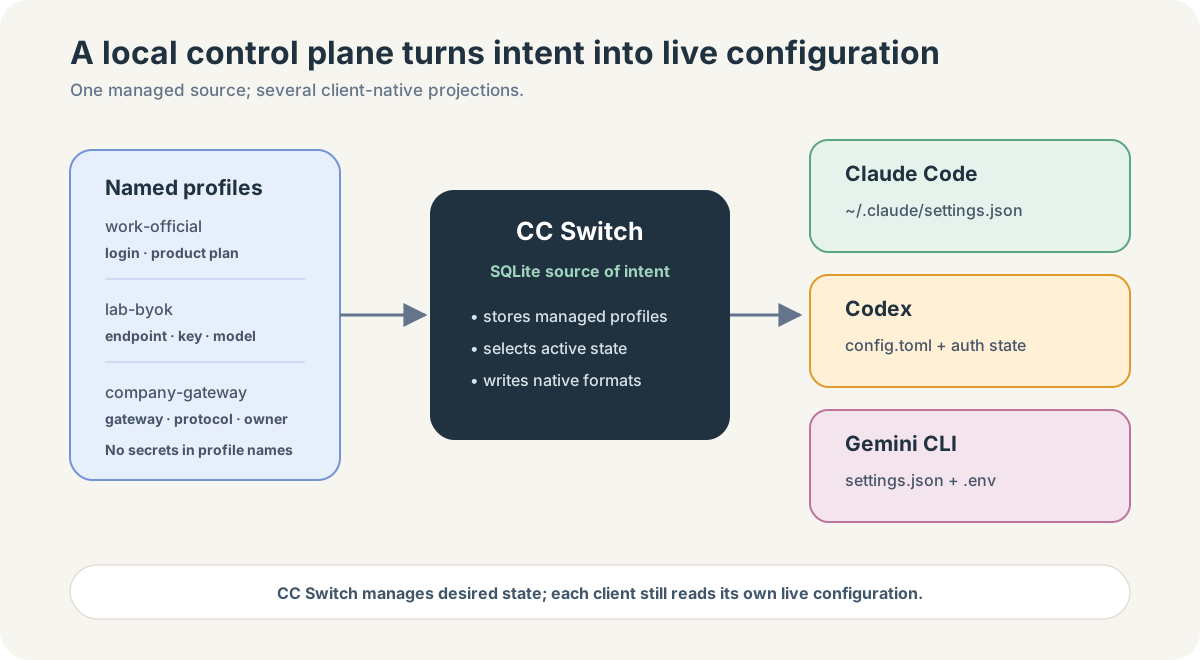
The important mental model is:
Named connection profile
  = endpoint + credential + model/protocol choices + notes

CC Switch
  = stores intent + translates it into supported client formats

Client live configuration
  = the files and variables the AI coding tool actually reads
This is more disciplined than keeping a text file full of keys, but it is not magic:
- CC Switch does not create API access or model entitlement.
- A preset does not certify that a third-party provider is trustworthy.
- One “universal provider” cannot make incompatible APIs semantically identical without routing or conversion.
- A successful write does not prove the client reloaded the file or that the upstream accepted the request.
- Local configuration management does not create organization-wide policy enforcement.
Its value is narrower and more useful: it makes local state visible, repeatable, and reversible.
3. What CC Switch actually manages
As of the documentation reviewed on August 17, 2026, the official project lists Claude Code, Claude Desktop, Codex, Gemini CLI, OpenCode, OpenClaw, and Hermes as supported tools. This list changes with releases, so treat the current project README and the application’s own interface as authoritative rather than memorizing the number.
Provider profiles
A Provider in CC Switch is a saved connection profile for an application. Depending on the client and upstream, it can include:
- an API endpoint;
- an API key, token, or official-login mode;
- a model identifier or role-to-model mapping;
- an API protocol such as Anthropic Messages, OpenAI Responses, or Chat Completions;
- notes, usage-query settings, and health-test behavior.
Presets reduce typing by supplying known field shapes and endpoints. Custom profiles expose the underlying JSON or client-specific fields. Universal Providers can derive app-specific configurations for Claude Code, Codex, and Gemini CLI when one upstream supports the required interfaces. The exact fields and protocol limitations are documented in Add Provider.
Call them profiles, not “providers,” when explaining your own operating model. “Provider” can otherwise mean the model company, an API reseller, a cloud platform, or merely one saved configuration card.
Active-state switching
Enabling a profile changes the relevant live configuration. This replaces a risky editing ritual with a named operation:
“edit two files and hope”
        ↓
“enable work-official for Codex”
The result is still application-specific. Current CC Switch documentation says Claude Code can detect its provider-file changes, while Codex generally needs to be restarted to reload switched configuration. Verification must therefore include the target client, not only the blue “active” label in CC Switch.
MCP, prompts, and Skills
CC Switch can also maintain an inventory of MCP servers, prompt files, and Skills and synchronize them into supported application locations. This reduces duplicate installation, but it should not erase boundaries:
- a tool definition may be syntactically portable while its credentials are not;
CLAUDE.md,AGENTS.md, andGEMINI.mdserve similar jobs but are not identical contracts;- an MCP server suitable for a personal repository may be prohibited in a production workspace;
- a Skill may depend on host-specific tools or instructions.
Use the shared panel as distribution control, not as proof of compatibility. The official MCP management and Skills management guides show which apps and synchronization methods are supported.
Usage views
CC Switch exposes several different things that can all look like “usage”:
- official subscription quota or a provider balance queried from an account endpoint;
- token data imported from supported local CLI session logs;
- request logs captured when traffic passes through the optional local router;
- estimated cost calculated from model mappings and configured prices.
These sources are not interchangeable. A balance is not a token ledger. Session logs may not include every product surface. Proxy logs only cover intercepted traffic. Estimated cost may differ from an invoice because subscriptions, reseller prices, discounts, and model aliases use different billing rules.
The project’s usage-query guide distinguishes automatic subscription queries from manually configured balance scripts. Its usage-statistics guide distinguishes proxy request logs from imported CLI session logs. Treat the dashboard as an operational view; reconcile financial decisions with the billing source that actually charges you.
4. Direct switching and local routing are two different architectures
This is the most important boundary in the article.
In direct switching mode, CC Switch updates live configuration and steps out of the request path. The AI coding client connects to the selected upstream itself.
In local routing mode, CC Switch changes the client’s endpoint to a loopback address and runs a local proxy. Requests now pass through that proxy before reaching the upstream. This enables hot switching, protocol conversion, request logging, health checks, and failover—but it also makes the local service part of the runtime path.
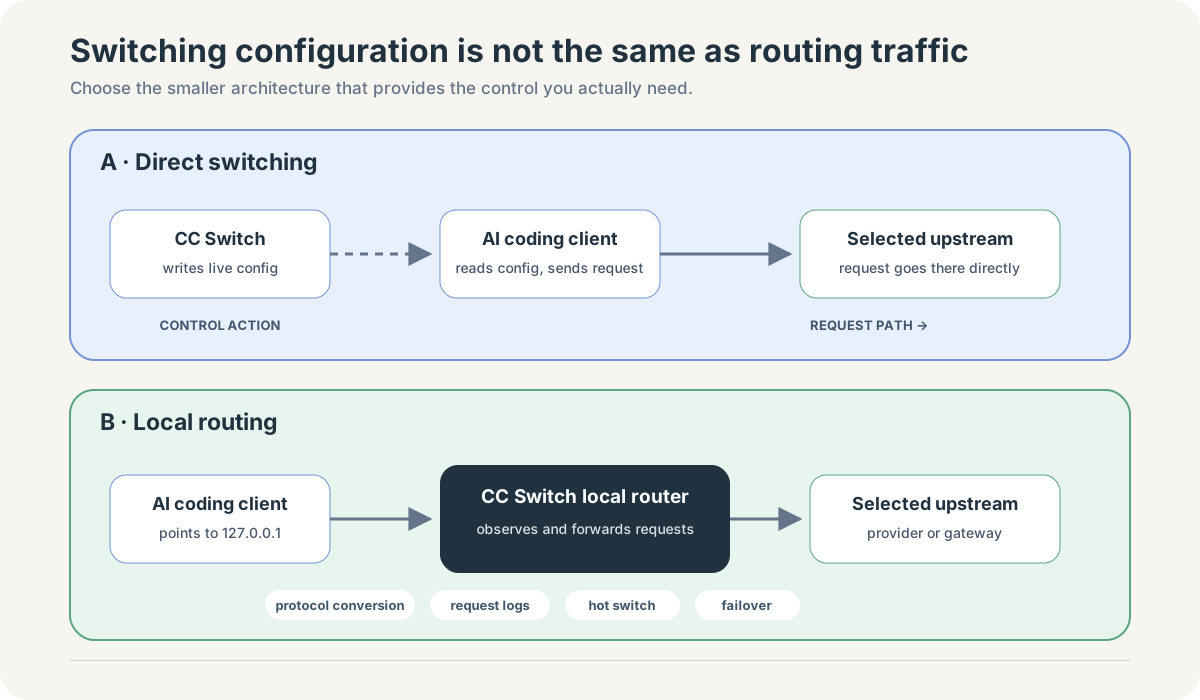
| Question | Direct switching | Local routing |
|---|---|---|
| Where does CC Switch act? | Before the request, by writing configuration | During the request, as a local intermediary |
| Does request content pass through CC Switch? | Normally no | Yes, through the local routing process |
| Must the client reload configuration? | Often yes; behavior depends on the client | Provider changes can be applied by the router without rewriting every client session |
| Can it translate API protocols? | No | For supported combinations, yes |
| Can it observe every routed request? | No | It can log routed requests when logging is enabled |
| Can it fail over between upstreams? | Not at request time | Yes, when configured and supported |
| Failure surface | Wrong or stale live configuration | Configuration plus local-process, port, routing, and upstream failures |
The official App Routing guide documents how supported clients are pointed at the loopback service and how their original configurations are restored when routing is disabled.
Start with direct switching. Add routing only when you can name the capability you need: protocol conversion, instant provider switching, request-level observation, or failover. A more complex path is justified by an explicit control, not by the feeling that a proxy is more advanced.
5. A safe first rollout: two profiles, one client, one small task
Suppose you use Codex with its official login for daily work and want a separate BYOK API project for experiments. Your goal is not to migrate everything. It is to prove that you can switch deliberately and return to the original state.
Step 1: write down the two intended routes
Create a small manifest without secret values:
| Profile | Purpose | Credential owner | Billing source | Data destination | Rollback |
|---|---|---|---|---|---|
codex-official | Normal work | Product account | Product subscription | Official product route | Re-enable this profile |
codex-lab-api | Small model experiments | Personal API project | API account | Chosen API endpoint | Revoke project key and switch back |
If you cannot fill in these five columns, the connection is not ready to become a reusable profile.
Step 2: install only from an official source
Use ccswitch.io, the repository’s GitHub Releases, or a package route explicitly linked by the project. The installation guide warns about unrelated sites using the same name. This matters because the application handles credentials and rewrites live client configuration.
Step 3: preserve the working state first
Before adding anything:
- close or finish important AI coding sessions;
- record how the client is currently authenticated;
- import or retain the working configuration as the default/official profile;
- create a fresh CC Switch database backup;
- separately copy the target client’s live configuration to an appropriately protected location if the state is business-critical.
Do not make “the new profile works” your first test. Make “I can return to the known-good profile” the first test.
Step 4: add the experimental profile
Use a provider preset only if its endpoint, protocol, and authentication fields match your actual API service. Otherwise create a custom profile. Use a project-scoped, revocable key with a low budget—not an organization-wide administrator credential.
Record the exact model ID. “GPT,” “Claude,” or “Gemini” is a product family, not a routable model identifier. If a model-fetch operation fails, verify the provider’s model endpoint and enter the documented ID manually rather than guessing.
Step 5: switch only Codex
Enable codex-lab-api in the Codex view. Do not simultaneously change Claude, Gemini, MCP, Skills, local routing, and cloud sync. A one-variable rollout leaves you an observable cause when something fails.
Restart Codex if the current version requires it. Then verify from both ends:
- Client side: the new session starts, reports the intended model or provider where visible, and completes a harmless task.
- Billing side: the corresponding API project records a small request, while the wrong account does not.
A response that merely “sounds like the expected model” is not evidence. Use configuration state, request metadata, and provider-side usage.
Step 6: switch back and verify again
Re-enable codex-official, restart the client if needed, and repeat a small check. Confirm that official-login behavior is restored and the experimental API project stops receiving calls.
Only after both directions work should you consider adding a second client, shared MCP configuration, usage imports, or local routing.
6. Diagnose the effective path, not the button you clicked
When a switch fails, start from observable evidence:
| Symptom | Likely layer | Smallest useful check | Safe response |
|---|---|---|---|
| CC Switch shows the new profile, but the old account is billed | Precedence or stale client process | Inspect relevant environment variables and start a fresh client session | Remove the unintended override or restore the old profile |
401 or 403 | Credential, header style, project permission | Test the credential against the documented endpoint without exposing it in logs | Rotate or replace the scoped key; verify auth mode |
404 model not found | Model ID or endpoint mismatch | Compare the exact model ID and API base URL with provider documentation | Correct the profile; do not keep adding aliases blindly |
| Request shape or streaming error | Protocol mismatch | Identify whether the client and upstream speak Messages, Responses, or Chat Completions | Use a compatible endpoint or explicitly configured routing conversion |
| MCP entry disappears after switching | Provider fragment overwrote shared config | Compare the live file with the saved shared snippet or backup | Restore the shared portion, then separate provider-specific and common fields |
| Routing mode fails completely | Local data path | Check local service status, loopback endpoint, port conflict, then upstream health | Disable routing and restore direct mode before deeper debugging |
| Dashboard cost differs from the bill | Observation semantics | Identify whether the number came from quota, session logs, proxy logs, or price estimates | Use the charging provider’s invoice as financial truth |
Environment precedence deserves special attention. A shell-level ANTHROPIC_API_KEY, OPENAI_API_KEY, or GEMINI_API_KEY can outlive a UI switch. CC Switch includes conflict detection, but the correct response is not to delete every variable automatically. First identify who created it, which sessions depend on it, and whether a backup contains the secret.
7. The control plane contains secrets, so govern it like one
“Stored locally” describes location, not safety.
CC Switch’s configuration-file guide says its SQLite database contains provider configurations and that exports and backups can include those configurations. Provider profiles can contain API credentials. Therefore, treat the database, SQL exports, automatic backups, environment-variable backups, and any synchronized copy as secret-bearing material.
Use these controls:
- give the local account and backup directory restrictive permissions;
- use full-disk encryption and a locked screen on the workstation;
- create project-scoped, revocable keys with budget limits;
- never commit exported profiles,
.envfiles, live auth files, or database backups; - do not send a database export through chat or issue trackers;
- inspect what a cloud-sync target receives before enabling synchronization;
- rotate credentials after a machine loss, accidental export, or uncertain sharing event;
- keep CC Switch current, because the project’s security policy supports only the latest release line.
Also separate software trust from provider trust. CC Switch is open source, but a built-in third-party provider preset is still a route to an external organization. Evaluate that organization’s identity, terms, retention, model provenance, billing, and incident response independently. A convenient preset is configuration metadata, not a security review.
Finally, local routing means prompt and code content pass through a process on your workstation before going upstream. That can improve control and observability, but it expands the trusted computing base. Decide whether request logging is appropriate for repositories containing customer data or secrets, and set retention accordingly.
8. When CC Switch is—and is not—the right layer
CC Switch fits well when:
- one developer uses several supported AI coding clients;
- BYOK creates multiple legitimate connection profiles;
- switching is frequent enough that manual editing causes mistakes;
- local visibility, backup, and rollback are more important than centralized enforcement;
- the developer can own workstation security and verify the effective route.
It may be unnecessary when one product subscription and one official login already meet your needs. Adding a credential-bearing manager would create more state without reducing meaningful risk.
It is also insufficient when a team needs centrally enforced identity, per-user authorization, organization-wide budgets, audit retention, data-loss controls, contractual routing, or policy that developers cannot bypass. That is the territory of an enterprise model platform or AI Gateway.
The boundary is simple:
CC Switch asks:
“What should this workstation's supported clients use?”

An AI Gateway asks:
“What model traffic may this organization send, under whose identity and policy?”
The two layers can coexist. CC Switch can point local clients at an approved company gateway. In that design, the local control plane improves developer ergonomics, while the gateway owns enforceable routing, authentication, quotas, and audit.
9. A lightweight operating model for advanced users and teams
Do not standardize by sharing one database full of keys. Standardize the profile contract:
profile name
purpose and owner
supported client
endpoint class (official / cloud / gateway)
authentication method (never the secret itself)
model or protocol requirement
billing source
data boundary
verification evidence
rollback profile
review date
For a small pilot, measure a few operational outcomes:
- number of manual config edits per week;
- switches that required recovery;
- requests attributed to the wrong account;
- time needed to restore a known-good route;
- profiles with an identified owner and review date;
- exported or synchronized copies containing credentials.
If CC Switch reduces editing but increases unexplained profiles and long-lived keys, the control plane is not becoming healthier. The goal is not maximum configuration reuse. It is fewer ambiguous states and faster, safer recovery.
10. Verification checklist
You have a usable local control plane when you can answer “yes” to all of these:
- I installed the intended CC Switch project from an official source.
- Every active profile has a purpose, credential owner, billing source, and rollback path.
- I know which live files CC Switch changes for each client I use.
- I checked environment-variable precedence instead of assuming the UI always wins.
- I can switch one client to a test profile and back to a known-good profile.
- I verified the route from both the client and the account that records usage.
- I know whether traffic is direct or passing through local routing.
- I can distinguish quota, balance, session tokens, proxy logs, and estimated cost.
- I protect the database, exports, backups, and synchronized copies as secrets.
- I know which requirements need an AI Gateway rather than a desktop configuration manager.
Conclusion: manage intent before you manage traffic
BYOK gives you control over a model connection. Multiple tools and connections turn that control into a state-management problem.
CC Switch is useful because it gives names and lifecycle to that state: save a connection profile, project it into a supported client, inspect what is active, verify it, and return to a known-good configuration. Its optional router can later enter the data path for protocol conversion, observation, and failover.
Keep those two roles separate. First make local intent explicit. Then, if the organization needs enforceable traffic policy rather than workstation convenience, move the next layer of control into an AI Gateway.
Authoritative references
- CC Switch official website
- CC Switch official repository and current feature overview
- CC Switch User Manual: Add Provider
- CC Switch User Manual: Switch Provider
- CC Switch User Manual: App Routing
- CC Switch User Manual: Usage Statistics
- CC Switch User Manual: Configuration Files
- CC Switch security policy
- Claude Code settings
- Claude Code environment variables
- Codex configuration reference
- Gemini CLI configuration reference