AI Coding Token and Cost Analysis: What exactly is consumed by a task
Start with an ordinary task
You tell an Agent:
GET /reports/:idsometimes returns 500. Find the cause, fix it, and add a regression test.
The final patch may touch only two or three files. Before it edits them, the Agent may also:
- read
AGENTS.mdand the test commands; - search for the route, database calls, and retry logic;
- open related files and an error log;
- run a test, discover that its fixture is wrong, and try again;
- run the checks once more and write a summary for review.
That is why task cost does not track diff size very well. The expensive part is often the path to the answer: how much the Agent had to read, how many tools it called, and how many times it had to recover.
This article follows that debugging task. First we make the Agent loop concrete. Then we separate tokens, cache hits, tools, retries, and review time. Finally, we turn those pieces into a small task ledger a team can actually use.
1. An Agent keeps doing the same four things
Codex, Claude Code, GitHub Copilot coding agent, and similar products look different, but their working loop is familiar: read context, choose the next action, use a tool, and inspect the result. See the official descriptions for Claude Code, GitHub Copilot agents, and Codex.
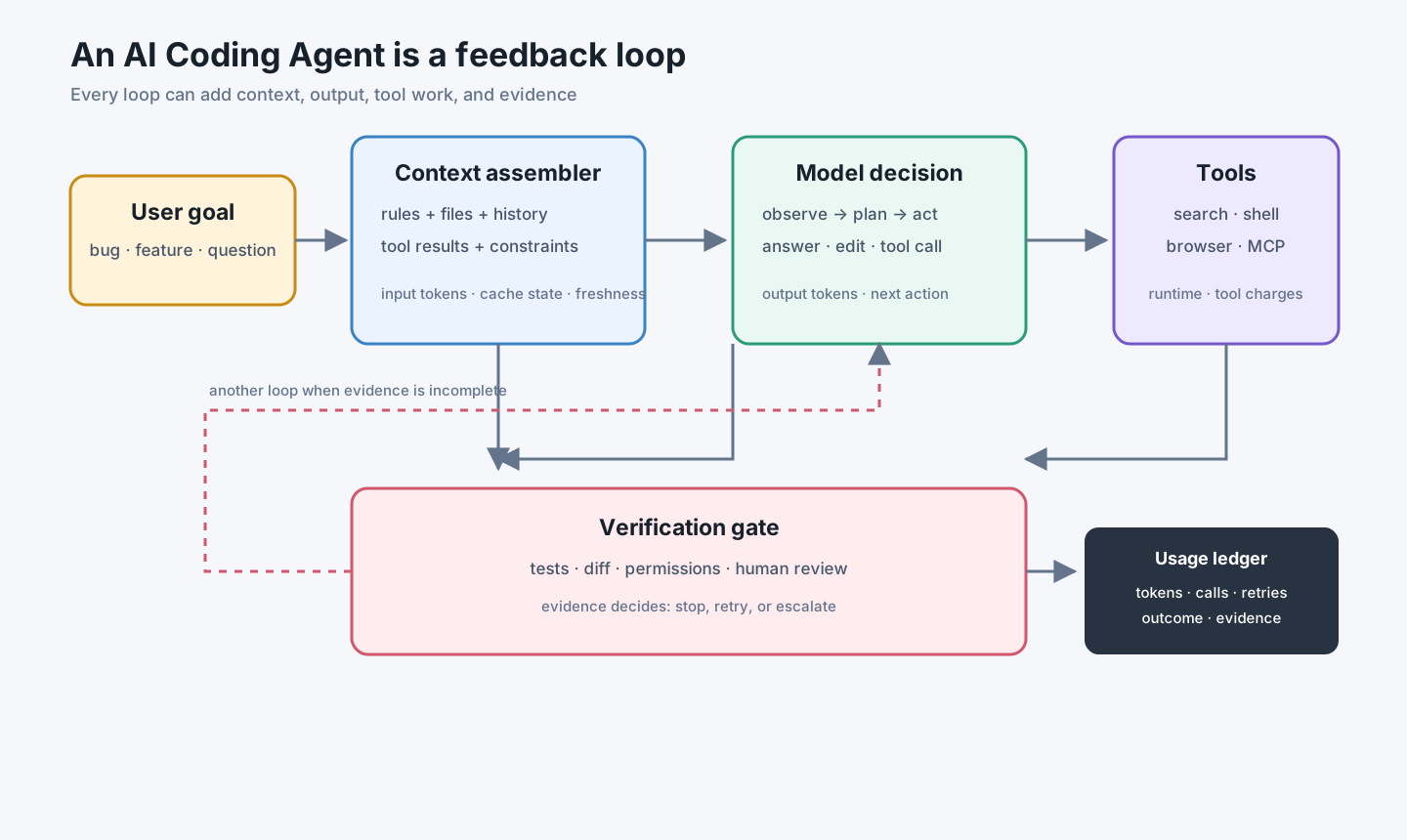
In plain language:
- Look: read the request, rules, code excerpts, and the last tool result.
- Choose the next move: search, open a file, edit, test, or stop.
- Do it: call the shell, search, browser, or another tool.
- Check: inspect the output and decide whether another round is needed.
Every round can add input, output, a tool run, or a retry. The “done” message is only the last line of that loop.
One product name can hide several bills
Some Agents are API-metered. Some include an allowance in a subscription. Some also charge for a cloud container, browser, or search service. So do not compare products only by “price per million tokens.” Ask:
- How many model calls does one task make?
- Do tools run locally or in the cloud?
- Are failed steps retried automatically?
- How much human review does the result need?
A monthly seat total is useful for planning. It is not the cost of fixing one bug.
2. What are you paying for when you pay for tokens?
Think of a model call as handing over a stack of material:
- Input tokens: the prompt, project rules, code, conversation history, and tool results;
- Output tokens: the model’s plan, explanation, edits, and final response;
- Cached input: material that can be reused from an earlier request;
- Tool results: new material returned by the shell, search, browser, or other tools.
OpenAI and Anthropic expose input, output, and cache-related usage as separate billing dimensions, with provider-specific fields and prices. Use the current OpenAI pricing, OpenAI prompt caching, Anthropic pricing, and Anthropic prompt caching pages as the source of truth.
For a first approximation:
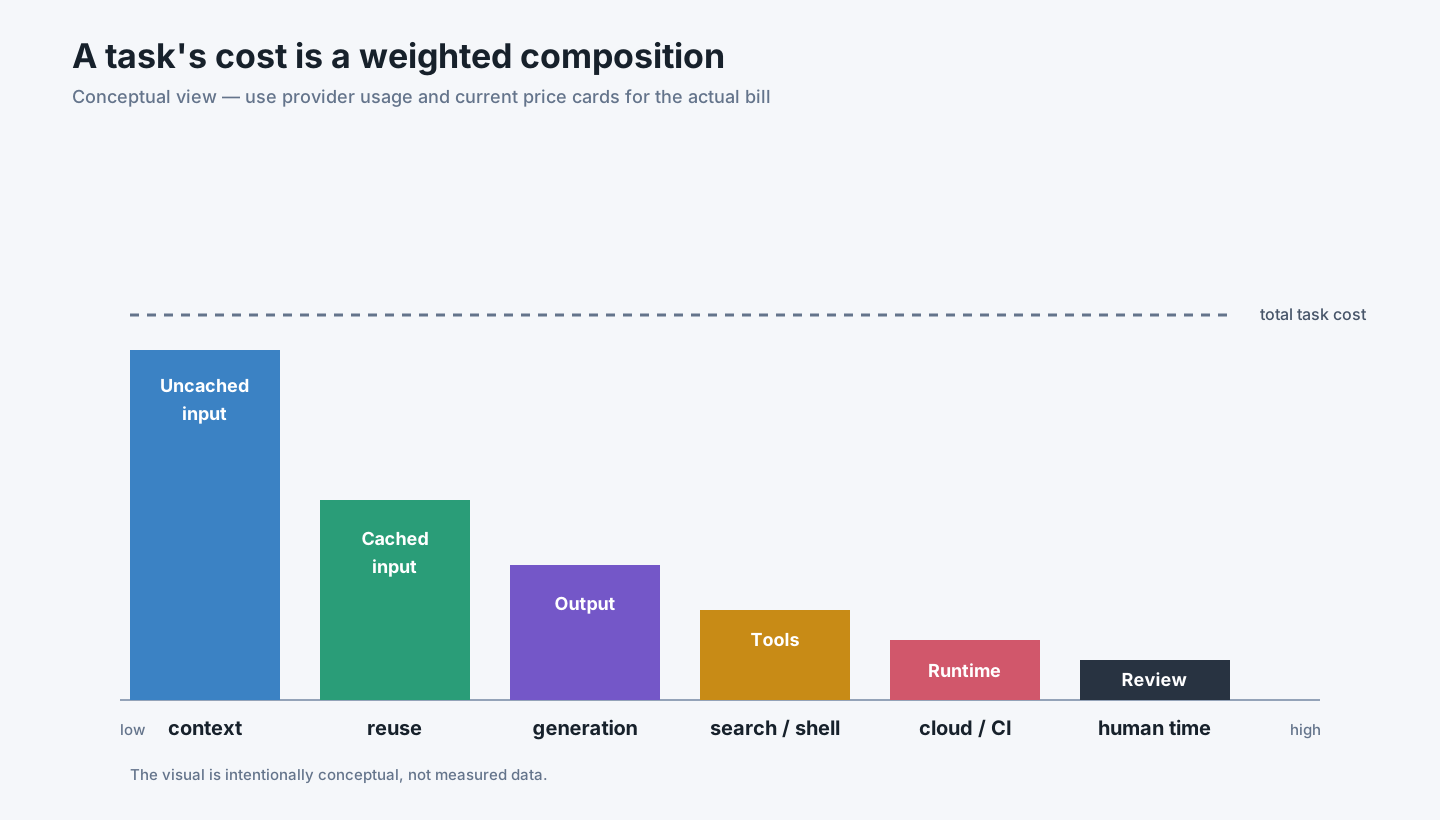
task cost ≈ input + output + tools/runtime + human reviewWhy input grows so quickly
You typed one sentence. The model may receive much more:
- system instructions and project rules;
- previous turns;
- file excerpts found by the Agent;
- test output;
- your latest correction.
After four or five rounds, later requests often carry parts of the earlier history. One extra search can therefore make the next few calls larger too.
Caching is cheaper reuse, not free context
Stable rules and tool definitions may be served from a prompt cache. A cache hit is usually cheaper than ordinary input, but creating a cache, missing it, or never using it again can still have a cost.
Keep stable instructions early and volatile logs later, then measure the real hit rate. Do not put the entire repository in a permanent prefix just to chase cache hits.
3. Spread one debugging task across the table
The numbers below are hypothetical. They demonstrate the method, not a vendor quote.
| Round | What the Agent did | New material | Example usage |
|---|---|---|---|
| 1 | Read rules, route, and tests | task context | 6,000 input; 1,200 output |
| 2 | Searched retry logic | search results | 3,500 input; 700 output |
| 3 | Inspected the database adapter | code and logs | 8,000 input; 900 output |
| 4 | Edited code and test | patch context | 2,000 input; 1,100 output |
| 5 | First test failed | error output | 4,000 input; 600 output |
| 6 | Fixed the fixture and reran | corrected context | 2,000 input; 500 output |
| 7 | Reported the result | final summary | 1,000 input; 700 output |
This is a small code change, but it still contains seven model decisions, several tool calls, and one recovery loop.
If 18,000 tokens came from repeated context and were served from cache, the record should preserve that fact:
{
  "task_id": "BUG-1842",
  "input_tokens": 26500,
  "cached_input_tokens": 18000,
  "output_tokens": 5700,
  "tool_calls": 9,
  "retries": 1,
  "human_review_minutes": 14,
  "outcome": "merged"
}
With a hypothetical price card of $2 / 1M uncached input, $0.20 / 1M cached input, and $8 / 1M output:
(26,500 - 18,000) × $2 / 1M
+ 18,000 × $0.20 / 1M
+ 5,700 × $8 / 1M
= $0.0986
The cents are not the point. Output can be small in volume but expensive; cache hits change the price of repeated context; and one failed test adds both model work and review time.
4. Where the waste usually hides
Reading unrelated code
The task touches one service, but the Agent reads the whole monorepo. More background is not always better; it can bury the useful path.
Noisy tool output
Full build logs, dependency trees, and generated-file lists are expensive and hard to scan. Return the failing section and a reproducible command where possible.
Requirements changing halfway through
If “also enforce permissions” appears after the patch is mostly written, the Agent has to revisit earlier decisions. The problem is not stubbornness; the task boundary changed.
No clear acceptance test
“Fix it” invites guesses. “Fix the 500, add a regression test, run command X, and report the passing checks” gives the loop somewhere to stop.
After a task, ask three simple questions:
- Did this round of context change the next decision?
- Was the failure caused by model capability or unclear input?
- If we ran it again, which context or tool call would we remove first?
Those questions usually reveal more than “tokens per developer.”
5. A chat session is not a task ledger
A session is just a conversation window. It may contain three unrelated questions. One bug may span a local Agent, a cloud Agent, CI, and human review.
Give the work a stable ID such as BUG-1842, then attach:
- model calls;
- tool calls and runtime;
- test results;
- the PR or commit;
- review time;
- the final outcome: merged, reverted, abandoned, or blocked.
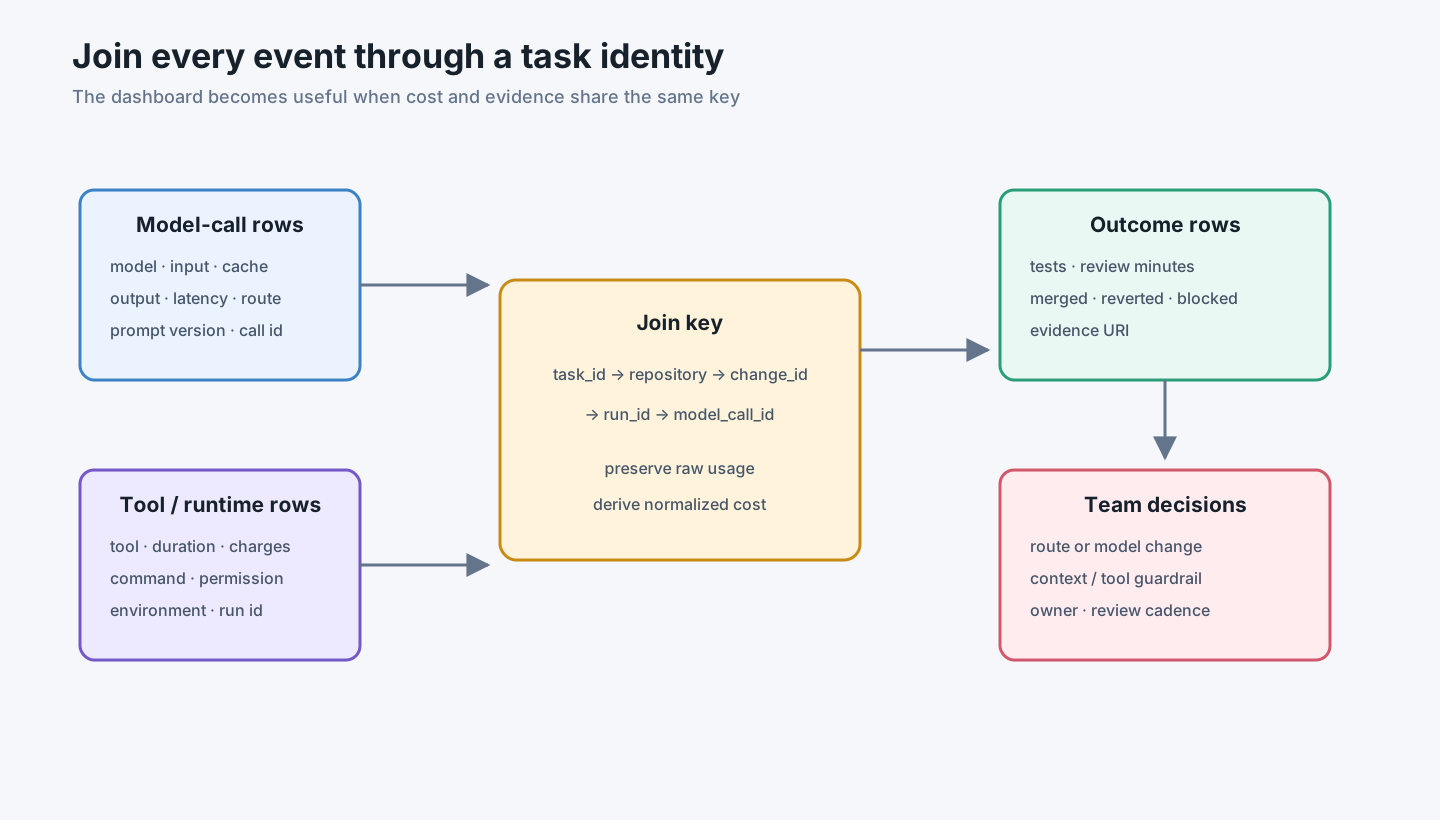
A minimal call record can be small:
task_id
repository
model
input_tokens
cached_input_tokens
output_tokens
tool_calls
retries
runtime_seconds
review_minutes
outcome
evidence_uri
This is not a scorecard for individuals. It helps answer practical questions: Why do this type of task keep retrying? Which tool produces noisy output? Which model route merges more cleanly?
6. The cheapest model is not always the cheapest result
Compare more than the price per million tokens:
- first-review pass rate;
- retries;
- tests and reverts;
- human review time;
- time from start to merge.
A reasonable starting split is:
| Phase | Start with | Upgrade when |
|---|---|---|
| Find files and summarize | smaller model | the path or summary is unreliable |
| Design the change | medium or stronger model | permissions, data, or concurrency are involved |
| Edit code | the model that passes project checks reliably | rework keeps repeating |
| Independent review | another model or a human | the change carries real risk |
This is a starting point, not a vendor rule. Validate it against your own task history rather than a public benchmark alone.
7. Do not “save money” by skipping the safety work
Some shortcuts only move the bill:
- skipping tests moves the cost to production;
- removing permission checks makes dangerous actions faster, not safer;
- sending secrets or raw production logs may save a search call but creates a security incident;
- counting only model tokens hides cloud runtime and review time.
Good optimization is usually less dramatic: narrow irrelevant context, reduce tool noise, state acceptance criteria early, use a cheaper model for simple steps, and keep tests and permission boundaries in place.
8. Start the team dashboard with facts
The first dashboard does not need dozens of charts. It should answer:
- Which models, tools, and runtimes did this task use?
- How many input, cached-input, and output tokens were recorded?
- How many retries happened, and did the tests pass?
- Was the change merged or reverted?
- How much human review did it need?
Then look at the data four ways:
- by outcome: merged, reverted, abandoned, blocked;
- by phase: exploration, implementation, verification;
- by model route: price next to pass rate and review time;
- by waste source: oversized context, repeated tools, retries, idle runtime.
Use medians and P90s as well as averages. A few difficult tasks often consume most of the budget.
Verification checklist
Take one real task and answer:
- Which model calls belonged to it?
- What context did the Agent read, and what was cached?
- Which tools ran, and how many retries occurred?
- What evidence came from tests and human review?
- Was the result merged, reverted, abandoned, or blocked?
- What would you optimize first, and what quality measure would keep you honest?
If the only answer is “we know the monthly subscription total,” you have a budget number, not task-cost visibility.
Conclusion: count what the Agent did
AI Coding cost is not just the amount of text a model generated. It also includes the context it read, the tools it ran, the failed attempts it recovered from, and the time someone spent checking the result.
Attach those events to one task ID and the monthly blur becomes an engineering record you can explain, compare, and improve.
The next article follows naturally: once calls are visible, how do you control model routes, permissions, and quotas with an AI Gateway?